
Alts
The alts package adds +alts, which lists the characters on your account: your alts.
+altslists every character on your account, and whether each is online.+alts <name>lists someone else’s, when they have chosen to let others see them.+alts/public onlets others see yours. Until you do, only you and staff can.+alts/hide <name>keeps one of your characters off the list others see.
| You are | You want to | Read |
|---|---|---|
| A player | see your own alts | Your alts |
| A player | let others see them | Making your list public |
| A player | keep one alt to yourself | Hiding an alt |
| A player | see someone else’s | Someone else’s alts |
| Staff | see any account’s characters | For staff |
| Staff | install it | Running the package |
In the game, +help alts has the same commands in short form, and +help alts staff the staff
part.
Your alts
Section titled “Your alts”+alts lists every character on your account, whether each is online, and whether it is on your
public list:
> +alts═════════════════════════════════╡ Your alts ╞════════════════════════════════Name Online Public listAriel online -Brand online -Cass - -══════════════════════════════════════════════════════════════════════════════Your list is private: +alts/public on makes it public · +alts/hide <name>keeps one off it══════════════════════════════════════════════════════════════════════════════You see all of them, from any of your characters, whatever you have chosen to show others.
+alts <name> with the name of one of your own characters shows this same list.
A character shows as online only when you could already see it connected in WHO, so a
character that is connected but hidden from WHO shows -.
A character that is on no account has no alts, and +alts says so.
Making your list public
Section titled “Making your list public”Your list is private until you make it public. Asked about a character whose list is private,
+alts says only that:
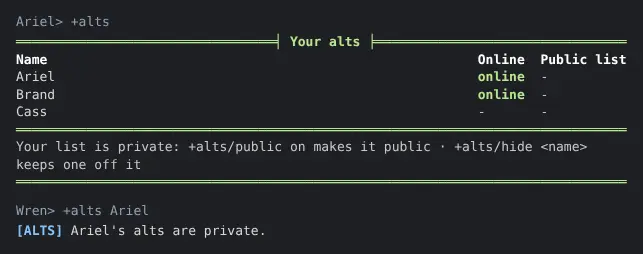
+alts/public on lets anyone list your alts with +alts <name>:
> +alts/public on[ALTS] Done: Your alts are public: anyone can list them with +alts <name>. +alts/hide <name> keeps one off the list.+alts/public off makes the list private again, so only you and staff see it.
+alts/public on its own says which it is now.
The choice is for your whole account, not one character. You can make it from any of your characters, and a character added to your account later is listed too. A new account’s list is private.
Hiding an alt
Section titled “Hiding an alt”+alts/hide <name> keeps one of your characters off your public list. The rest stay on it:
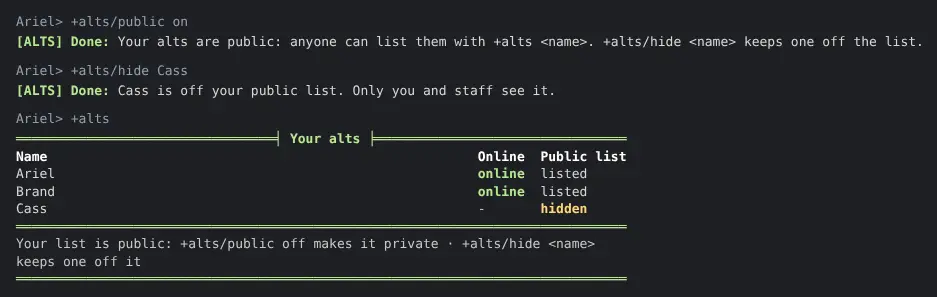
> +alts/hide Cass[ALTS] Done: Cass is off your public list. Only you and staff see it.+alts/unhide <name> puts it back. You can hide only a character on your own account.
A hidden character is never linked to your others: anyone who asks about it is told its alts are private, exactly as if your whole list were.
When a character leaves your account, the account forgets whether it was hidden. If it ever comes back, it is on your public list again until you hide it.
Someone else’s alts
Section titled “Someone else’s alts”+alts <name> lists another player’s alts when their list is public and the character you
named is on it. The character you asked about is not listed again, and a hidden one is left out:
> +alts Ariel═══════════════════════════════╡ Alts of Ariel ╞══════════════════════════════Name OnlineBrand online══════════════════════════════════════════════════════════════════════════════+alts lists your own══════════════════════════════════════════════════════════════════════════════> +alts Cass[ALTS] Cass's alts are private.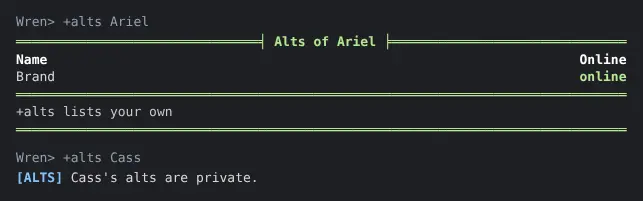
You are given the same sentence, <name>'s alts are private., when:
- that player’s list is private;
- that character is hidden;
- that character is on no account.
So +alts never tells you how many alts someone has, whether they have any, or which of these
is the reason.
A player whose list is public but who hid every other character is said to list no other characters.
For staff
Section titled “For staff”Staff with the players.view permission see every character on an account with
+alts <name>, whatever the account chose. Hidden characters are marked, and the footer names
the account and says whether its list is public:
> +alts Ariel═══════════════════════════════╡ Alts of Ariel ╞══════════════════════════════Name Online Public listAriel online listedBrand online listedCass - hidden══════════════════════════════════════════════════════════════════════════════Account ariel-plays · its list is public · staff see every character══════════════════════════════════════════════════════════════════════════════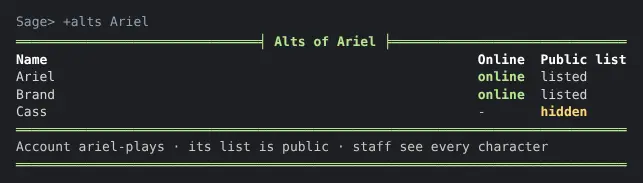
Asked about a character on no account, staff are told so.
Running the package
Section titled “Running the package”Installing
Section titled “Installing”The alts package ships with the server but is not installed on a new game. An administrator installs it from the portal:
- Open Packages in the admin area and choose Browse.
- Install
alts. It needsplus-help, which a new game already has, and an event handler, which is chosen in first-run setup.
It adds the command +alts for everyone. It is a game command, which is matched before
softcode $-commands, so a +alts your game already has in softcode stops running once the
package is in. Nothing a player types after +alts is evaluated.
It makes one object in the master room, Alts, which runs the command. Inside it are the
Alts Store, which keeps each account’s choices, and the object holding its +help topics.
It also adds an attribute to the event handler, so that a character leaving an account is
forgotten as hidden.
See Softcode Packages for how installing, upgrading and rolling back work.
Where the choices are kept
Section titled “Where the choices are kept”Each account’s choices are kept on the Alts Store, by account, never on a character, so a choice made from one character holds for all of them:
| Attribute | What it is |
|---|---|
ACCOUNT`<key>`PUBLIC | 1 when the account’s list is public. Unset is private. |
ACCOUNT`<key>`HIDDEN`<character> | One for each character the account hid. |
<key> is the account’s id, as account() gives it, with / and : written as _.