
Apps That Act for You
An app is a tool that does things in the game for you: a map editor on another website, a character sheet site, a bot, or a package in the portal that runs commands. Instead of giving it your password, you allow it once in the portal. It then acts as the character you chose, with only the permissions you allowed, until you take it back.
This page covers:
- Allowing an app
- What an app can do
- Taking it back
- Registering an app
- Keeping apps away from a command
- Writing an app
- Packages that run commands
Allowing an app
Section titled “Allowing an app”An app sends you to the portal’s Allow an app page. Sign in if you are not already, and play the character you want it to act as. The page names the app, the character, and what the app asks for.
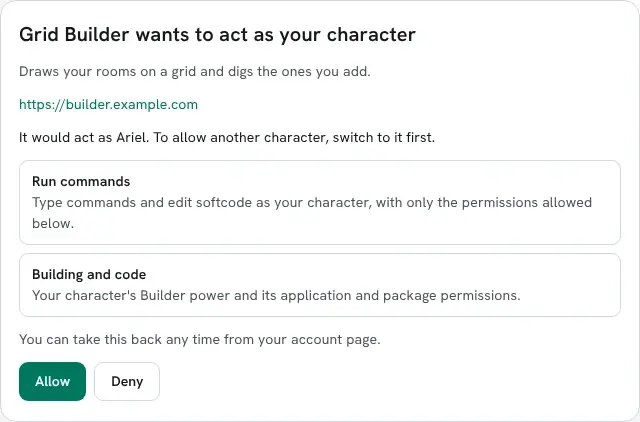
Allow sends you back to the app, which can now act as that character. Deny sends you back with nothing. To let it act as another character, switch to that character in the portal and the page asks again for that one.
You are asked once. When the app asks again later for the same things, the page sends you straight back. It asks again only when the app wants something new.
What an app can do
Section titled “What an app can do”Each line on the page is one scope.
| Scope | What the app may do |
|---|---|
| Run commands | Type commands and edit softcode as your character, with its locks, quota and control, and manage its own queue, recurring jobs and snapshots |
| Wiki and media | Use your wiki and media permissions |
| Building and code | Use your application and package permissions, and the Builder power |
| Portal administration | Use your staff permissions in the portal: configuration, roles, players, jobs, the queue |
| Staff powers in the game | Use your wizard, royalty and other powers, control over others’ objects, and chat and server operation |
A game can add its own permissions in a category, such as Scenes. A category is a scope too, shown as Scenes permissions.
While an app acts, your character holds only the permissions in the scopes you allowed. Ariel is a
builder. Allowed Run commands alone, the app sees no Builder power: think [haspower(me,builder)]
says 0. Allowed Building and code too, it says 1. A wizard who allows the same two scopes is
a builder to the app, not a wizard. Anything the app’s commands queue, such as an @trigger, runs
the same way.
You are only asked about scopes in which your character holds something. A player with no building permissions is not asked about Building and code, and the app does not get it. If you are given building permissions later, the app asks you again before it can use them.
Taking it back
Section titled “Taking it back”Apps you have allowed are listed under Connected apps on your account page, with the character each acts as, its scopes, and when it was last used.

Revoke stops the app at once. Unlinking the character from your account, a ban, or staff removing the app does the same.
Registering an app
Section titled “Registering an app”An app has to be registered before it can ask anyone. You need the config.admin permission. Open
Admin, then Configuration, and under Security choose Apps. Fill in Register an
app and press Save.
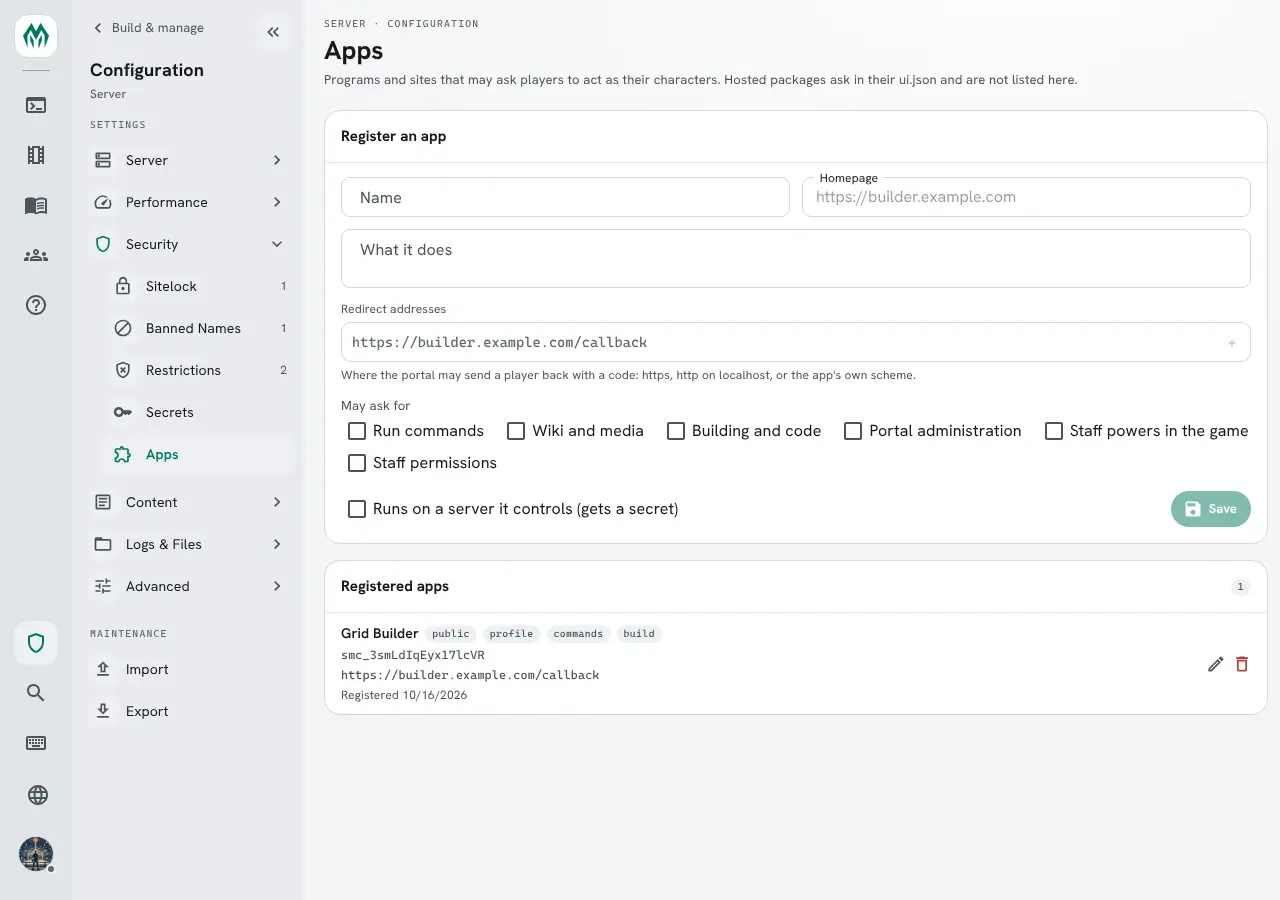
- Name, What it does and Homepage are what players see when the app asks.
- Redirect addresses are where the portal may send a player back to. Use
https, orhttponlocalhostfor an app on the player’s own computer. - May ask for is what the app may ask for. It can ask for less.
- Runs on a server it controls gives the app a secret. The secret is shown once; New secret replaces it. An app that runs in a browser or on a player’s computer cannot keep one, and uses PKCE alone.
Deleting an app takes back every grant players gave it.
Keeping apps away from a command
Section titled “Keeping apps away from a command”An app can run any command your character can. To keep apps away from one, restrict it with
noapp. This needs the config.admin permission, as any change to a command does.
> @command/restrict @dig=noappName : @DIG (Enabled)Flags : Eqsplit, NoAppLock : *UNLOCKED*Switches : TELEPORTLeftside :Rightside : ArgsThe app is refused, and the player typing the same command is not:
app>    @dig AtticPermission denied.
Ariel>  @dig AtticAttic created with room number 19.
Writing an app
Section titled “Writing an app”SharpMUSH is an OAuth 2.0 authorization server for the code flow with PKCE (S256). The game
describes itself at /.well-known/oauth-authorization-server.
This example is Grid Builder, a public app registered with the redirect address
https://builder.example.com/callback and the client id smc_3smLdIqEyx17lcVR.
-
Make a random
code_verifierof 43 to 128 characters, and itscode_challenge: the SHA-256 of the verifier, in base64url without padding. -
Send the player to the portal’s
/oauth/authorizepage:https://game.example.com/oauth/authorize?response_type=code&client_id=smc_3smLdIqEyx17lcVR&redirect_uri=https%3A%2F%2Fbuilder.example.com%2Fcallback&scope=commands+build&state=<state>&code_challenge=<challenge>&code_challenge_method=S256When the player allows it, the portal sends them to
https://builder.example.com/callback?code=<code>&state=<state>. Makestatea new random value for each request and keep it in the app. Refuse the callback ifstateis missing or is not the one you sent. The code works once, within a minute. -
Trade the code for tokens:
curl https://game.example.com/api/oauth/token \-d grant_type=authorization_code -d code=<code> \-d redirect_uri=https://builder.example.com/callback \-d code_verifier=<verifier> -d client_id=smc_3smLdIqEyx17lcVR{"access_token":"smat_…","token_type":"Bearer","expires_in":3600,"refresh_token":"smrt_…","scope":"profile commands build"}scopeis what the player allowed, which can be less than you asked for. An app with a secret also sendsclient_secret, or the id and secret as HTTP Basic. -
Ask who the token acts as:
curl https://game.example.com/api/oauth/me -H "Authorization: Bearer smat_…"{"character":"#17:1792117197795","name":"Ariel","app":"smc_3smLdIqEyx17lcVR","scopes":["profile","commands","build"]} -
Run a command as Ariel:
curl https://game.example.com/api/commands -H "Authorization: Bearer smat_…" \-H "Content-Type: application/json" -d '{"command":"@dig/teleport Loft"}'{"output":["Loft created with room number 18.", "…", "You see nothing special."],"result":null,"truncated":false}
An access token lasts an hour. Before then, trade the refresh token for a new pair at the same
endpoint with grant_type=refresh_token. A refresh token works once and lasts 30 days from its last
use. POST /api/oauth/revoke with token and client_id forgets a token, for an app that signs out.
The token reaches api/commands, api/commands/eval, api/oauth/me, and the portal endpoints whose
permission its scopes cover. It cannot reach the account: its characters, its sign-ins or its
connected apps.
Packages that run commands
Section titled “Packages that run commands”A portal package can run commands as the player too. It names the scopes it needs under scopes
in its ui.json:
"scopes": ["commands", "build"]From its page, it sends a command message through the host and gets a command-result back,
whose result holds output, truncated and error:
port.postMessage({ type: 'command', channel, requestId: 1, command: '@dig/teleport Loft' });The first time, the portal asks the player above the package’s page, with the same lines as the Allow an app page. The package never sees the token, and it is listed under Connected apps like any other app.