
Game Health
Staff want to know whether the game is healthy, and connection time does not tell them: a player idle in a corner for eight hours counts the same as one in a scene all evening. SharpMUSH counts poses instead, and draws from them:
- how many approved characters posed lately, next to the weeks before;
- the regulars who have slowed down or stopped;
- how each month’s new players stayed on;
- which rooms people use, and which nobody does;
- the hours of the week people play.
The numbers are for staff with the players.view permission. They are shown in the portal’s
Activity page, by the health package’s +health command, and to your own code by
activity().
| You are | You want to | Read |
|---|---|---|
| Staff | see the numbers in the portal | The Activity page |
| Staff | see them in the game | +health |
| Staff | find players drifting away | Drifting away |
| Staff | see how new players stay | Cohorts |
| Staff | tidy up the grid | Rooms |
| Staff | pick a time for an event | When people play |
| Staff | see who is carrying the jobs | Staff load |
| An administrator | change the settings, or how long counts are kept | Settings |
| A coder | draw the numbers your own way | For coders |
What is counted
Section titled “What is counted”A pose is a pose, say, semipose or @emit typed by a player, or a pose a player adds to a
scene from the portal. When the scene package records a typed pose, it still counts once.
Only approved characters count toward the player numbers: approval is the approved role, as
isapproved() reads it. The rooms count every pose made in them.
Nothing anyone wrote is kept. For each character and day the game keeps how many times they posed and which hours of the day they posed in; for each room and day, its poses, the scenes started there and who posed there; and the time of each character’s and room’s last pose.
The Activity page
Section titled “The Activity page”Under People in the admin area, Activity shows every report on one page: the summary at the top, then the week as a heatmap, the drifting list, cohorts and rooms. Choose the last 7, 30 or 90 days at the top; hours are shown in your browser’s time zone.
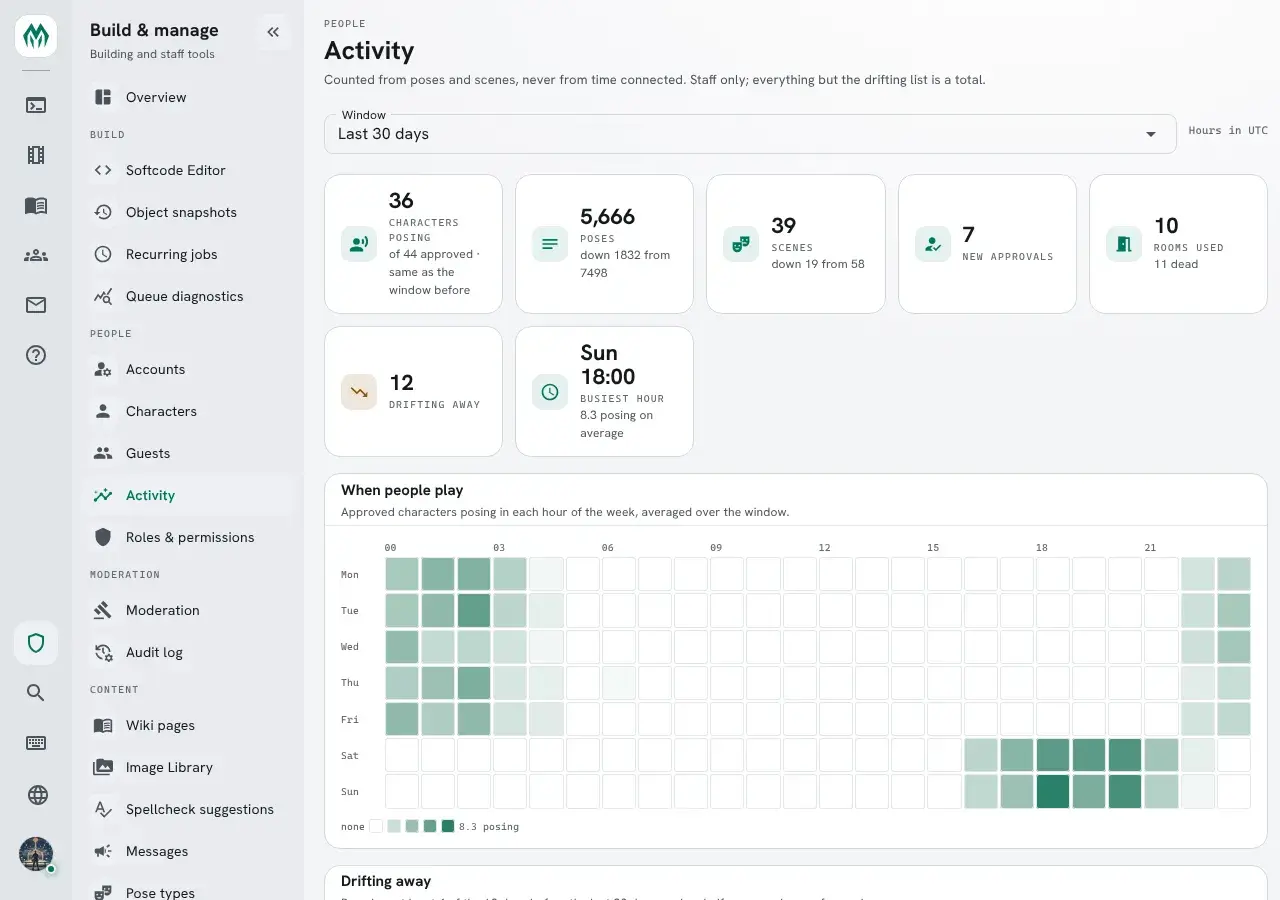
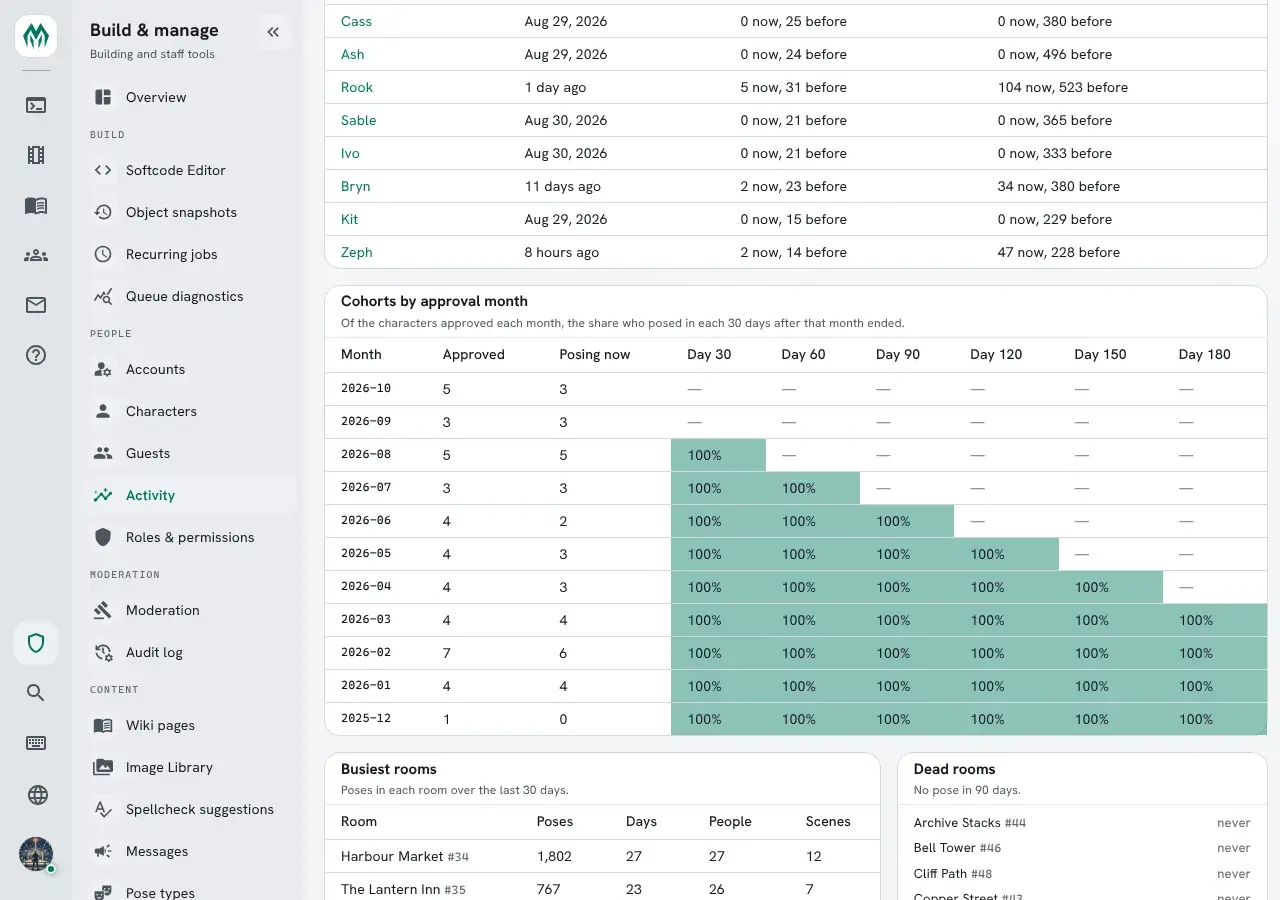
Each name in the drifting list opens that character’s page. Lower down, each cohort’s shares are shaded the same way, next to the busiest and dead rooms:
+health
Section titled “+health”Install the health package from Packages in Build & manage. It adds +health. These examples come from
a game with +config health/limit=5 and the health-jobs package, which adds the Staff load
section and /staff (see Staff load):
> +health╔═════════════════════════════════╡ Health ╞═════════════════════════════════╗║ Approved: 44 ║║ Posed: 36 ║║ Poses: 5666 was 7498 ║║ Scenes: 39 was 58 ║║ New approvals: 7 ║║ Rooms used: 10 ║║ Dead rooms: 11 ║║ Drifting: 12 ║║ Busiest hour: Sun 18:00 · 8.2 posing · UTC ║╠═══════════════════════════════╡ Staff load ╞═══════════════════════════════╣║ Open jobs: 3 ║║ Waiting on staff: 2 ║║ Oldest waiting: 32m job 3 ║║ Unhandled: 1 ║╠════════════════════════════════════════════════════════════════════════════╣║ Last 30 days to 15 Oct · +health /cohorts /drifting /rooms /staff /when ║╚════════════════════════════════════════════════════════════════════════════╝Each count covers the last 30 days. was gives the count for the 30 days before, when it is
different. Busiest hour is the hour of the week with the most characters posing, on average.
Give a number of days after any +health command to count over that many instead:
+health 7, +health/rooms 90.
Scenes appears only when the Scene plugin is running. Without it, scenes are left out rather than shown as 0.
Drifting away
Section titled “Drifting away”+health/drifting lists the regulars who now pose half as often or less:
> +health/drifting╔══════════════════════════════╡ Drifting away ╞═════════════════════════════╗║ Name Last pose Days now Days before ║║ -------------------------------------------------------------------------- ║║ Arden Sat 12 Sep 0/30 31/60 ║║ Quill Thu 08 Oct 2/30 32/60 ║║ Hale Thu 01 Oct 4/30 34/60 ║║ Yara Mon 12 Oct 3/30 32/60 ║║ Cass Sat 29 Aug 0/30 25/60 ║╠════════════════════════════════════════════════════════════════════════════╣║ 12 drifting: posed on 4 or more of the 60 days before, and half as often ║║ or less since. ║║ Last 30 days to 15 Oct · +health /cohorts /drifting /rooms /staff /when ║╚════════════════════════════════════════════════════════════════════════════╝A regular posed on at least 4 of the 60 days before the window. They are drifting when the share of days they posed in the window is half their share in those 60 days, or less. Arden posed on 31 of 60 days, about half of them, then on none of the last 30.
The list puts the biggest drop first. It is a list of people to say hello to, not a judgement: a player on holiday drifts too.
Cohorts
Section titled “Cohorts”+health/cohorts groups approved characters by the month they were approved, and shows how many
of each month kept posing. It shows the last 12 months, the months setting:
> +health/cohorts╔═════════════════════════════════╡ Cohorts ╞════════════════════════════════╗║ Month Approved Active 30d 60d 90d 120d 150d 180d ║║ ------------------------------------------------------------- ║║ 2026-10 5 3 - - - - - - ║║ 2026-09 3 3 - - - - - - ║║ 2026-08 5 5 100% - - - - - ║║ 2026-07 3 3 100% 100% - - - - ║║ 2026-06 4 2 100% 100% 100% - - - ║║ 2026-05 4 3 100% 100% 100% 100% - - ║║ 2026-04 4 3 100% 100% 100% 100% 100% - ║║ 2026-03 4 4 100% 100% 100% 100% 100% 100% ║║ 2026-02 7 6 100% 100% 100% 100% 100% 100% ║║ 2026-01 4 4 100% 100% 100% 100% 100% 100% ║║ 2025-12 1 0 100% 100% 100% 100% 100% 100% ║║ 2025-11 0 0 - - - - - - ║╠════════════════════════════════════════════════════════════════════════════╣║ Active: posed in the last 30 days. 30d to 180d: the share who posed in ║║ each 30 days after their approval month ended. ║║ Last 30 days to 15 Oct · +health /cohorts /drifting /rooms /staff /when ║╚════════════════════════════════════════════════════════════════════════════╝- Active is how many of that month’s characters posed in the window.
- 30d is the share who posed in the first 30 days after the month ended, 60d the next 30 days, and so on. A dash means those days have not all passed yet.
The month comes from the audit log: the first time the character, or its account, was given the
approved role. A character with no approval in the audit log counts by the month it was created,
and the screen says how many did.
+health/rooms lists the busiest rooms, then the dead ones:
> +health/rooms╔══════════════════════════════════╡ Rooms ╞═════════════════════════════════╗╠═════════════════════════════════╡ Busiest ╞════════════════════════════════╣║ Room Poses Days People Scenes Last pose ║║ -------------------------------------------------------------------------- ║║ Harbour Market 1802 27 27 12 Thu 15 Oct ║║ The Lantern Inn 767 23 26 7 Thu 15 Oct ║║ Temple Steps 539 17 18 4 Wed 14 Oct ║║ Old Lighthouse 489 20 19 4 Thu 15 Oct ║║ Glass Gardens 470 15 15 3 Tue 13 Oct ║╠══════════════════════════════════╡ Dead ╞══════════════════════════════════╣║ Room Last pose ║║ -------------------------------------------------------------------------- ║║ Archive Stacks never ║║ Bell Tower never ║║ Cliff Path never ║║ Copper Street never ║║ Duelling Yard never ║╠════════════════════════════════════════════════════════════════════════════╣║ Rooms with a pose: 10. Rooms with none in 90 days: 11. ║║ Last 30 days to 15 Oct · +health /cohorts /drifting /rooms /staff /when ║╚════════════════════════════════════════════════════════════════════════════╝A dead room is older than 90 days and has had no pose in 90 days. That makes it a candidate for tidying, not a fault: a corridor people walk through is dead here too.
When people play
Section titled “When people play”+health/when maps the week, a row per day and a mark per hour:
> +health/when╔════════════════════════════╡ When people play ╞════════════════════════════╗║ 00 03 06 09 12 15 18 21 ║║ Mon + * * + - . . . . . . . . . . . . . . . . . - + ║║ Tue + * # + - . . . . . . . . . . . . . . . . . - + ║║ Wed * + + - - . . . . . . . . . . . . . . . . . - + ║║ Thu + + * - - . - . . . . . . . . . . . . . . . - + ║║ Fri * + * - - . . . . . . . . . . . . . . . . . - + ║║ Sat . . . . . . . . . . . . . . . . + * # # # + - . ║║ Sun . . . . . . . . . . . . . . . . + + # * # + - . ║╠════════════════════════════════════════════════════════════════════════════╣║ . nobody · - under a quarter of the busiest · + under half · * under three ║║ quarters · # the busiest ║║ The busiest hour averages 8.2 players posing. Hours are UTC. ║║ Last 30 days to 15 Oct · +health /cohorts /drifting /rooms /staff /when ║╚════════════════════════════════════════════════════════════════════════════╝In a client with colour, each mark is also tinted with the game’s theme:

Each mark compares an hour with the busiest one, so the map reads the same without colour. Hours
are shown in your own zone when you have set one with +timezone (the time package), and in the
game’s otherwise.
Staff load
Section titled “Staff load”Install health-jobs as well when the game runs the jobs package. It adds a Staff load
section to +health, and +health/staff:
> +health/staff╔═══════════════════════════════╡ Staff load ╞═══════════════════════════════╗║ Staff Open Waiting Oldest waiting ║║ -------------------------------------------------------------------------- ║║ Nobody 1 1 32m job 3 ║║ God 2 1 32m job 1 ║╠════════════════════════════════════════════════════════════════════════════╣║ A job with several handlers counts for each. Waiting: new, or waiting on ║║ staff. ║╚════════════════════════════════════════════════════════════════════════════╝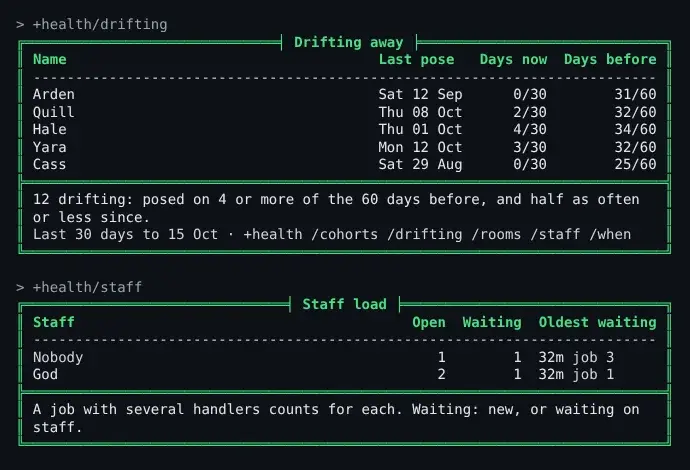
A row for each staffer handling an open job: how many they handle, how many of those wait on staff,
and how long the oldest has waited. Nobody counts the open jobs no one handles. A job assigned
to a role shows as +<role>.
Settings
Section titled “Settings”+config health changes what +health counts over (see Game Settings with +config):
| Setting | Default | What it changes |
|---|---|---|
days | 30 | The days +health counts back when you give none |
baseline | 60 | The days before the window a player’s usual pace is read from |
minimum | 4 | How many of those days make a player a regular |
months | 12 | How many months +health/cohorts shows |
dead-days | 90 | How many days without a pose make a room dead |
limit | 20 | How many rows each list shows |
zone | UTC | The time zone for a reader with none of their own |
> +config health/baseline=90[CONFIG] Done: health/baseline is now 90, was 60.The counts are kept for good. To keep only the last 400 days, set
SHARPMUSH_HISTORY_ACTIVITY_MAX_AGE=400d on the server; @storage/history shows how much they
take. Each character’s and room’s last pose is kept when older days go.
For coders
Section titled “For coders”activity(<report>[, <options>]) returns each report as JSON: summary, drifting, cohorts,
rooms or hours. Like +health, it needs players.view.
> think activity(rooms,{{"limit":1,"days":7}}){"asOf":"2026-10-15","days":7,"deadDays":90,"usedTotal":10,"deadTotal":11,"used":[{"objid":"#34:1774785600000","name":"Harbour Market","poses":537,"days":7,"people":19,"scenes":5,"lastPose":"2026-10-15T02:00:00+00:00"}],"dead":[{"objid":"#44:1774785600000","name":"Archive Stacks","poses":0,"days":0,"people":0,"scenes":0,"lastPose":null}]}Typed at a client, the options object takes a second pair of braces: the outer pair groups.
help activity() lists every option and field.
The health package draws its screens from these reports. Another package adds to it the way
health-jobs does: a FILTER`HEALTH`SCREEN`<name> attribute on the Health object adds lines to
the summary, and an attached INC`VIEW`<name> adds +health/<name>. +help health code
gives the details.