
Scene Availability
Getting players together for a scene is often a scheduling problem. The scene-availability package lets each player write down when they are busy and when they are free to play, the way an office calendar keeps a meeting that repeats, and then answers two questions:
- When are all of us free?
+avail/find Bob Cleolists the times. - Who can make this scene? A scheduled scene’s card shows who of its cast is free at its time.
Times are kept in each player’s own zone, the one the time package sets, and shown to each reader in theirs.
| You are | You want to | Read |
|---|---|---|
| A player | say when you are busy or free | Your times |
| A player | write a pattern that repeats | Writing a time |
| A player | see when someone else is free | Another player’s week |
| A player or a scene runner | find a time a group is all free | Finding a time |
| A scene runner | see who can make a scene | Scene cards |
| Staff | install it and change its settings | Running the package |
| A coder | ask whether someone is free from your own code | For coders |
In the game, +help avail and its subtopics have the same commands in short form.
Your times
Section titled “Your times”+avail/busy <when>=<note> adds a time you are busy, and +avail/free <when>=<note> a time you are
free to play. The note is optional. Ann, in New York, works on weekdays, plays in the evenings and at
weekends, raids every other Tuesday and has a wedding to go to:
> +avail/busy weekdays 9-5=Work[AVAIL] Done: Added 1, busy: Weekdays, 09:00-17:00.> +avail/free sat sun 18:00-23:00[AVAIL] Done: Added 2, free: Weekends, 18:00-23:00.> +avail/free weekdays 7pm-11pm[AVAIL] Done: Added 3, free: Weekdays, 19:00-23:00.> +avail/busy every 2 weeks tue 20:00-22:00=Raid night[AVAIL] Done: Added 4, busy: Every 2 weeks on Tue, 20:00-22:00.> +avail/busy 2026-10-24=Wedding[AVAIL] Done: Added 5, busy: Sat 24 Oct 2026, all day.+avail lists your entries, numbered, and your week ahead:
> +avail=============================< Your availability >============================# Kind When Note1 busy Weekdays, 09:00-17:00 Work2 free Weekends, 18:00-23:00 -3 free Weekdays, 19:00-23:00 -4 busy Every 2 weeks on Tue, 20:00-22:00 Raid night5 busy Sat 24 Oct 2026, all day Wedding==============================< The week ahead >==============================Day Free BusyThu 15 Oct 19:00-23:00 09:00-17:00 WorkFri 16 Oct 19:00-23:00 09:00-17:00 WorkSat 17 Oct 18:00-23:00 -Sun 18 Oct 18:00-23:00 -Mon 19 Oct 19:00-23:00 09:00-17:00 WorkTue 20 Oct 19:00-23:00 09:00-17:00 WorkWed 21 Oct 19:00-23:00 09:00-17:00 Work==============================================================================Times in America/New_York * +avail/busy and +avail/free add one *+avail/remove <n> takes one away * +avail/find <names> finds a time==============================================================================A client that reads colour shows busy in yellow and free in green:
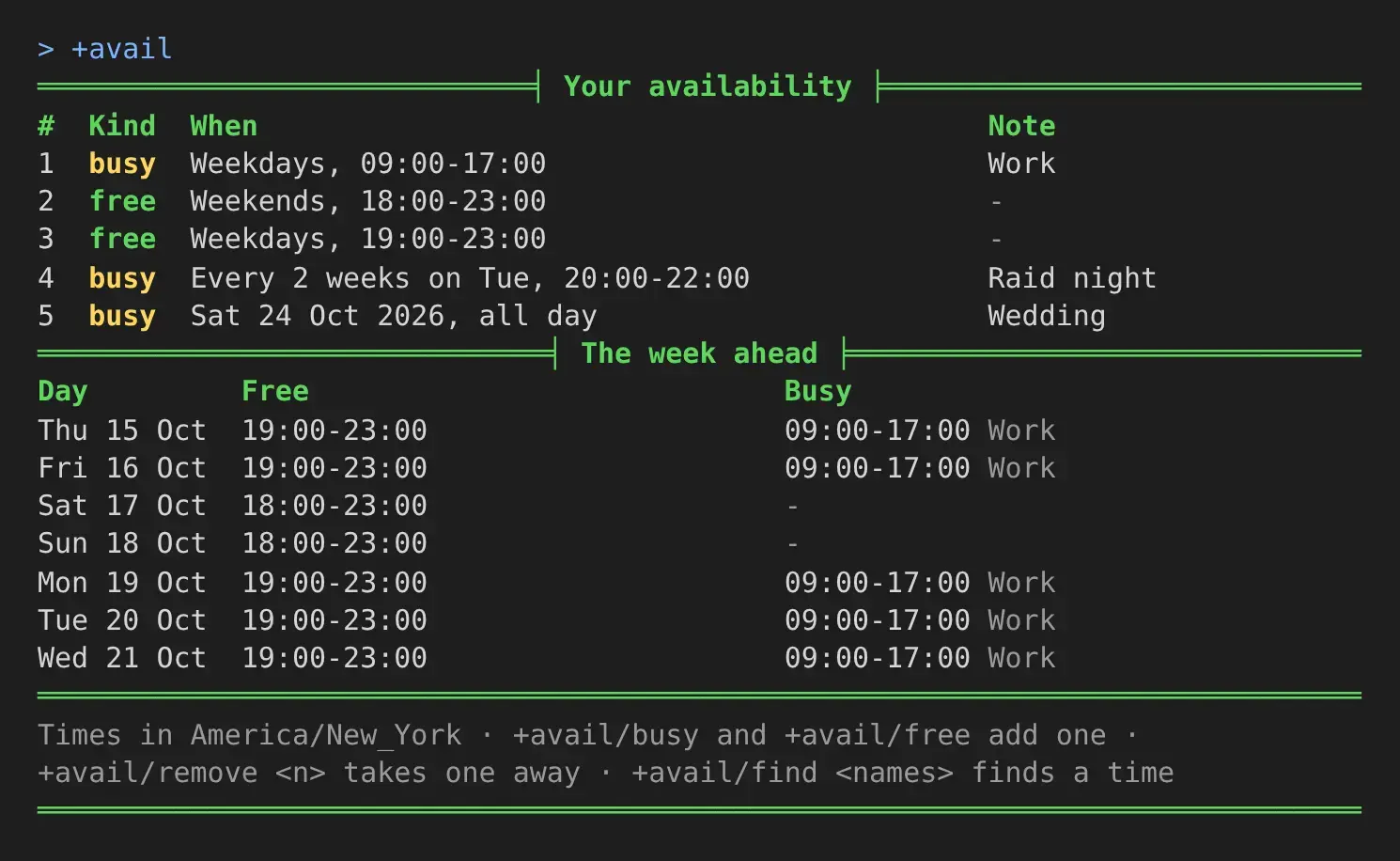
The raid does not show on Tuesday 20 October. A repeat every two weeks counts its weeks from the week
it starts in, which is this week unless you give a date with from, so its first Tuesday is the 27th.
Free and busy
Section titled “Free and busy”Until you add a free time, you count as free whenever you are not busy. Once you add one, only the times your free entries cover count, less the times you are busy. Ann is free on weekday evenings and at weekend evenings, and not at 10 in the morning on a Saturday, though nothing says she is busy then.
Free time is counted in steps of 30 minutes. A step is free when a free entry covers all of it and no busy entry touches it.
Changing your entries
Section titled “Changing your entries”+avail/remove <n> takes an entry away. +avail/clear takes them all.
+avail/skip <n>=<date> leaves one date out of a repeating entry, a week you are away, and
+avail/unskip <n>=<date> puts it back:
> +avail/skip 2=2026-10-27[AVAIL] Done: Entry 2 leaves out Tue 27 Oct 2026.> +avail/unskip 2=2026-10-27[AVAIL] Done: Entry 2 takes in Tue 27 Oct 2026 again.> +avail/remove 9[AVAIL] Warning: You have no entry 9. +avail lists yours.A character keeps 30 entries at most, and a note is up to 60 characters. Your notes are yours: no one else sees them.
Writing a time
Section titled “Writing a time”The <when> after +avail/busy and +avail/free is words in any order. Capitals and commas do
not matter.
| Words | Means |
|---|---|
mon, tuesday, thursdays, mon wed fri | those days, every week |
weekdays, weekends, mon-thu | a run of days, every week |
daily, every 3 days | every day, or every few |
every 2 weeks tue, every other week thu, fortnightly fri | every other week, counted from the week of the first date |
2nd tue, last fri, 2nd and 4th thu | those weekdays in those weeks of each month |
15th, 1st 15th, monthly | those days of each month; monthly is the first date’s day |
2026-10-20, today, tomorrow | one date, written year first |
2026-12-20 to 2026-12-28 | each of those days |
from 2026-11-02, until 2026-12-14 | the first and last day of a repeat |
19:00-22:00, 7pm-10pm, 9-5 | the time of day; 9-5 is read as 9:00 to 17:00 |
23:00-02:00 | a time that ends before it starts runs past midnight |
With no time, the entry is all day. Cleo’s entries show more of these, from a player whose zone is not set, so the game’s (UTC here):
> +avail/free last fri 19:00-23:00[AVAIL] Done: Added 1, free: The last Fri of each month, 19:00-23:00.> +avail/busy 2nd tue 4th tue 18:00-21:00=Choir[AVAIL] Done: Added 2, busy: The 2nd and 4th Tue of each month, 18:00-21:00.> +avail/busy 15th=Payday shift[AVAIL] Done: Added 3, busy: The 15th of each month, all day.> +avail/busy 2026-12-20 to 2026-12-28=Holiday[AVAIL] Done: Added 4, busy: Sun 20 Dec 2026 to Mon 28 Dec 2026.> +avail/free sat until 2026-11-30[AVAIL] Done: Added 5, free: Every Sat, all day, until Mon 30 Nov 2026.Words it cannot read are named back to you:
> +avail/busy someday[AVAIL] Warning: 'someday' is not a day, a date or a time I can read. +help avail when lists what a time can say.> +avail/busy tue 9-5 every 99 weeks[AVAIL] Warning: Every 99 is not a repeat I can keep. Give 1 to 52.A yearly repeat, or two times of day in one entry, cannot be written. Add a second entry for those.
Your zone
Section titled “Your zone”An entry keeps the time as you typed it, in your zone, with the zone beside it. A weekly 19:00 stays
19:00 for you when summer time starts or ends, and moves for players in zones that change on another
day. Set your zone with +timezone, from the time package. An entry
you added before you set it keeps the zone it was written in.
A zone you hide with +timezone/hide still places your entries. Other players see your times only in
their own zone.
Another player’s week
Section titled “Another player’s week”+avail <name> shows another player’s week ahead, in your zone, without their notes. Bob, in London,
looks at Ann’s:
> +avail Ann=============================< Availability: Ann >============================Day Free BusyThu 15 Oct - 14:00-22:00Fri 16 Oct 00:00-04:00 14:00-22:00Sat 17 Oct 00:00-04:00, 23:00-24:00 -Sun 18 Oct 00:00-04:00, 23:00-24:00 -Mon 19 Oct 00:00-04:00 14:00-22:00Tue 20 Oct 00:00-04:00 14:00-22:00Wed 21 Oct 00:00-04:00 14:00-22:00==============================================================================Times in Europe/London * +avail/find Ann finds a time you are both free==============================================================================Ann’s weekday evening, 19:00 to 23:00 in New York, is midnight to 4 in the morning for Bob. Her entries start on Thursday 15 October, the day she added them, so the Wednesday evening before them does not count.
Finding a time
Section titled “Finding a time”+avail/find <names>=<length> lists the times in the coming week when you and every player named
are all free, for at least that length. Names are split by spaces or commas. The length is 2h,
90m, 1h30m or a number of hours, and two hours when left out.
Bob has added +avail/free daily 23:00-03:00 and +avail/busy wed 23:00-01:00=Five-a-side, in
London. Ann asks for a time with Bob and Cleo, who had not set any times yet:
> +avail/find Bob Cleo================================< Free times >================================Day From Until Free forThu 15 Oct 19:00 22:00 3hFri 16 Oct 19:00 22:00 3hSat 17 Oct 18:00 22:00 4hSun 18 Oct 18:00 22:00 4hMon 19 Oct 19:00 22:00 3hTue 20 Oct 19:00 22:00 3hWed 21 Oct 20:00 22:00 2h==============================================================================For Ann, Bob, and Cleo * at least 2h * times in America/New_YorkCleo set no times, so count as free throughout.Book the first: +scene/schedule <title>=1792105200==============================================================================
On Wednesday Bob’s football runs to 20:00 in New York, so that evening starts later. A player who has set no times counts as free throughout, and is named under the list.
The last line books the first time as a scene. +scene/schedule reads the time in seconds:
> +scene/schedule Lighthouse keeper=1792105200[SCENE] Done: Scheduled scene 3 "Lighthouse keeper" for Thu Oct 15 23:00:00 2026.+avail/find Bob=3h asks for three hours, and drops Wednesday.
+avail/scene <id>=<length> does the same for a scene’s cast, its owner and everyone who joined it,
to move a scene to a time they can all make:
> +avail/scene 1==========================< Free times for scene 1 >==========================Day From Until Free forThu 15 Oct 19:00 22:00 3h...Scene cards
Section titled “Scene cards”A scene scheduled for a time still to come shows, under its cast, who is free at its time, who is busy, and who has set no times. Ann scheduled scene 2 for Wednesday at 19:00 in New York, which is midnight in London, and Bob plays football until one:
> +scene 2...==============================< Players >=====================================Status Name PosesOwner Ann 0Participant Bob 0Participant Cleo 0============================< Free at its time >==============================Free: AnnBusy: BobNot set: Cleo==============================================================================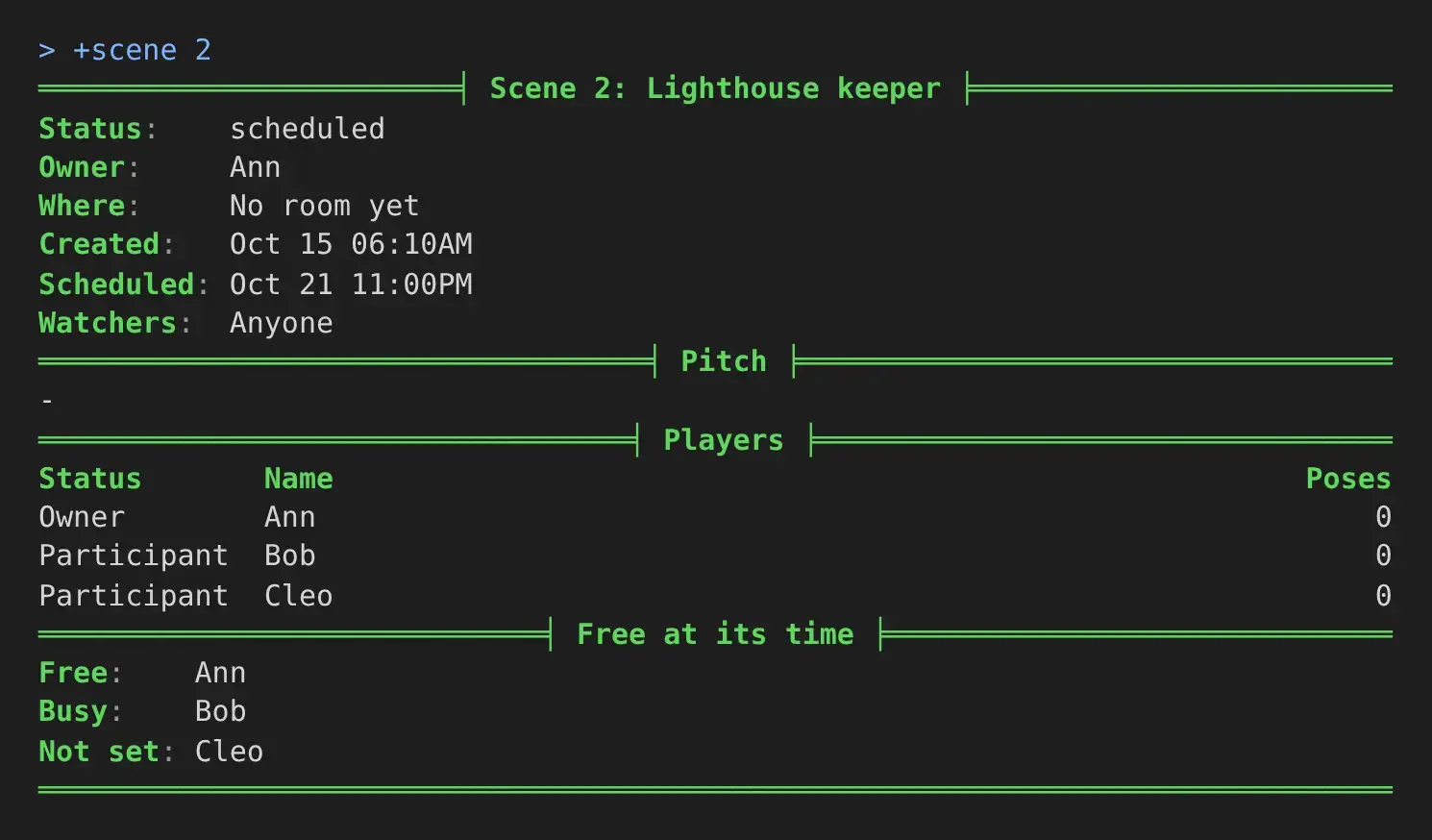
A scene is taken to last two hours. Busy means not free for all of them: busy at some point, or outside every free time the player gave.
Running the package
Section titled “Running the package”Installing
Section titled “Installing”The package ships with the server but is not installed on a new game. It needs the scene, time, plus-help and plus-config packages, and the Scene plugin that scene runs on. An administrator installs it from the portal:
- Open Packages in the admin area and choose Browse.
- Install
scene-availability. Iftimeis not in yet, install it first.
It adds +avail for everyone, as a game command, so a softcode +avail your game already has stops
running once the package is in. Typed notes are kept as typed and never evaluated.
It makes two objects in the master room: Availability, which runs the command and holds the
settings, and Availability Calendar, inside it, which keeps every player’s entries. It also
attaches the Free at its time section to the Scene Logger’s card. @find Availability gives the
Availability object’s number. It is #27 in the examples below; the number on your game will differ.
Settings
Section titled “Settings”+config avail lists the settings, and +config avail/<setting>=<value> changes one. Changing them
takes the config.admin permission. Lengths take 2h, 90m or a number of seconds.
Game Settings with +config covers the command.
| Setting | What it is | Default |
|---|---|---|
slot | Minutes in one step free time is counted in: 15, 20, 30 or 60. | 30 |
find-days | How many days ahead +avail/find looks, 1 to 28. | 7 |
find-length | The length +avail/find looks for when none is given. | two hours |
find-results | How many times it lists at most. | 10 |
find-players | How many players it takes at once, the one asking included. | 12 |
scene-length | How long a scene is taken to last on its card. | two hours |
entries | How many entries one character may keep. | 30 |
note-length | How long a note may be. | 60 |
For example, to look two weeks ahead:
> +config avail/find-days=14[CONFIG] Done: avail/find-days is now 14, was 7.A longer look ahead, a shorter step or more players makes +avail/find slower: it lays every
player’s steps over each other, one character per step.
For coders
Section titled “For coders”Two functions on the Availability object answer for your own code. Both take their moments as seconds since 1970, so code that calls them names its own time.
FUN`FREE`AT(<player>, <start>, <end>) is 1 when the player is free for the whole span, 0 when
not, and empty when they have set no times:
> think [u(#27/FUN`FREE`AT,*Ann,1792623600,1792630800)] [u(#27/FUN`FREE`AT,*Cleo,1792623600,1792630800)]1 0FUN`FIND`RUNS(<players>, <from>, <steps>, <least steps>) lists the runs, from <from> for
<steps> steps, in which every player (by object id) is free for at least <least steps> steps, each
as <start>:<end>:
> think u(#27/FUN`FIND`RUNS,[objid(*Ann)] [objid(*Bob)],1792540800,48,4)1792540800:1792548000With 30-minute steps, that is the 24 hours from midnight UTC on 21 October, at least two hours long: Tuesday 20:00 to 22:00 in New York.
The Availability object is WIZARD, and the functions read the Availability Calendar, so call them from an object your game trusts, as the Scene Logger does for its card.