
Finger Profiles
The finger package gives every character two short profiles:
+fingershows the in-character one: name, age, what they do, a quote.+oocfingershows the player’s out-of-character one: pronouns, time zone, when they play, what scenes they like.
The fields are a list the game keeps, one attribute per field, so adding or removing one is a single line.
| You are | You want to | Read |
|---|---|---|
| A player | look someone up | Reading a profile |
| A player | fill in your own | Filling in your profile |
| A player | keep a field to yourself | Hiding a field |
| Staff | set a player’s field | Staff |
| Staff | change the fields | Choosing the fields |
In the game, +help finger has the same commands in short form.
Reading a profile
Section titled “Reading a profile”+finger <name> shows a character’s IC profile, and +oocfinger <name> the player’s OOC one.
On their own, both show yours.
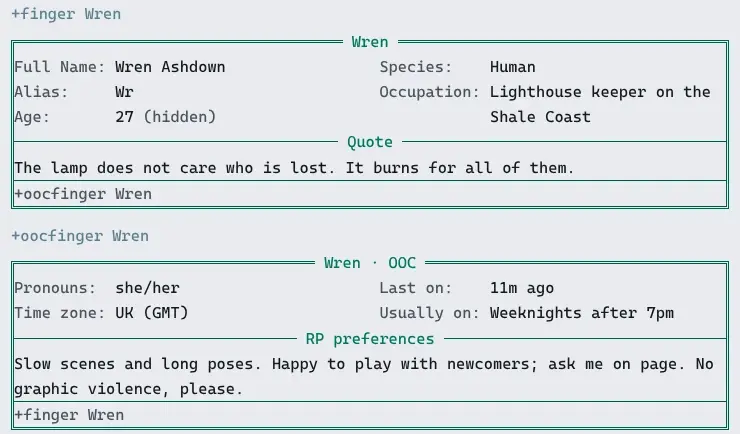
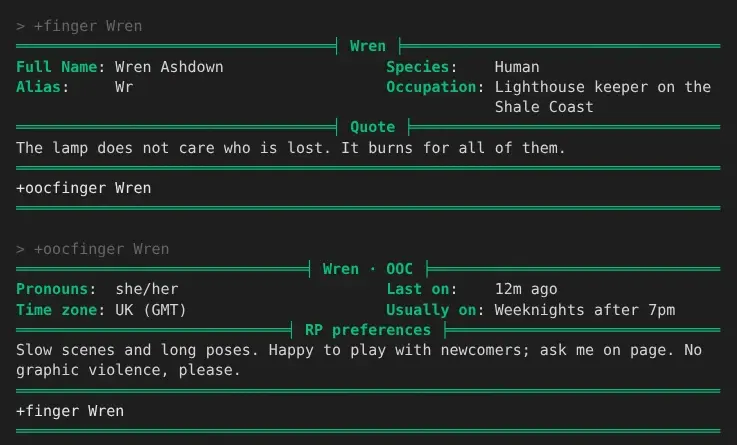
> +finger Wren===================================< Wren >===================================Full Name: Wren Ashdown Species: HumanAlias: Wr Occupation: Lighthouse keeper on the Shale Coast===================================< Quote >==================================The lamp does not care who is lost. It burns for all of them.==============================================================================+oocfinger Wren==============================================================================> +oocfinger Wren================================< Wren · OOC >================================Pronouns: she/her Last on: 6s agoTime zone: UK (GMT) Usually on: Weeknights after 7pm==============================< RP preferences >==============================Slow scenes and long poses. Happy to play with newcomers; ask me on page. Nographic violence, please.==============================================================================+finger Wren==============================================================================Short fields sit in two columns, and stack on a narrow screen. Longer text, such as the quote, gets a line of its own with its label in it. The line at the bottom is the command for the other profile.
A field the player has not filled in is left out, and so is one they hid: Wren’s age is missing above because she hid it. See Hiding a field.
Some fields are worked out by the game rather than typed:
- Alias is the character’s alias.
- Last on says
on nowand how idle they are, when you could see them inWHO, or how long ago they left.
A web client and the portal show the same profile as a card:
A terminal shows it in the reader’s own colours:
Filling in your profile
Section titled “Filling in your profile”Your own profile shows every field, with - where you have set nothing, so you can see what is
left to fill in:
> +finger===================================< Tomas >==================================Full Name: - Species: -Alias: - Occupation: -Age: -===================================< Quote >==================================-==============================================================================+oocfinger Tomas · +finger/set <field>=<text> · +finger/fields==============================================================================+finger/set <field>=<text> sets a field. Name it by its label or its key; case and spaces do not
matter:
> +finger/set full name=Wren Ashdown[FINGER] Done: Your Full Name: Wren Ashdown> +finger/set age=27[FINGER] Done: Your Age: 27+finger/set <field>= with nothing after the = clears it:
> +finger/set age=[FINGER] Done: Your Age is cleared.+oocfinger/set is the same command, so either works for any field.
What you type is kept as you typed it, less the spaces around the =. Brackets and percent signs
are plain text, so +finger/set quote=[Laughs] 100% stores just that.
A field the game works out cannot be set:
> +finger/set alias=Wr[FINGER] Warning: Alias is worked out by the game: nobody sets it.Every field
Section titled “Every field”+finger/fields lists the fields, which command shows each one, and what you have in it:
> +finger/fields===============================< Finger fields >==============================Field Key Shown by YoursFull Name fullname +finger setAlias alias +finger worked outAge age +finger set · hiddenSpecies species +finger setOccupation occupation +finger setQuote quote +finger setPronouns pronouns +oocfinger setTime zone timezone +oocfinger setLast on laston +oocfinger worked outUsually on playtimes +oocfinger setRP preferences rpprefs +oocfinger set==============================================================================+finger/set <field>=<text> sets one · +finger/set <field>= clears it ·+finger/hide <field> keeps it to you and staff==============================================================================Hiding a field
Section titled “Hiding a field”+finger/hide <field> keeps a field you have set to you and staff. Everyone else’s +finger leaves
it out, and yours marks it:
> +finger/hide age[FINGER] Done: Only you and staff see your Age now.> +finger===================================< Wren >===================================Full Name: Wren Ashdown Species: HumanAlias: Wr Occupation: Lighthouse keeper on theAge: 27 (hidden) Shale Coast===================================< Quote >==================================The lamp does not care who is lost. It burns for all of them.==============================================================================+oocfinger Wren · +finger/set <field>=<text> · +finger/fields==============================================================================+finger/unhide <field> shows it to everyone again:
> +finger/unhide age[FINGER] Done: Everyone sees your Age again.A hidden field stays hidden when you change it, and a field you clear and set again starts out shown.
Each field is an attribute on your character, PROFILE`<KEY>, and hiding it clears the
attribute’s visual flag. @set me/PROFILE`AGE=!visual does the same as +finger/hide age.
Staff with the softcode.finger.edit permission look after profiles. The package gives it to
nobody but the administrator, so a game hands it out. To every wizard, through their role:
> @role/allow wizard=softcode.finger.editRole Wizard: allows softcode.finger.edit.Or to one player:
> @permission/allow Tomas=softcode.finger.editTomas: allows softcode.finger.edit.They can:
- set or clear anyone’s field with
+finger/set <player>/<field>=<text>. The player is told who changed it. - see every field of anyone’s profile, set or not, with the hidden ones marked.
- set the fields only staff set. See Settings.
> +finger/set Wren/occupation=Lighthouse keeper on the Shale Coast[FINGER] Done: Wren's Occupation: Lighthouse keeper on the Shale CoastWren hears, if she is connected:
[FINGER] God changed your Occupation.Anyone else who tries is refused with Only staff change someone else's fields.
Running the package
Section titled “Running the package”Installing
Section titled “Installing”The finger package ships with the server but is not installed on a new game. An administrator installs it from the portal:
- Open Packages in the admin area and choose Browse.
- Install
finger. It needsplus-helpandplus-config, which a new game already has.
It adds the commands +finger and +oocfinger for everyone. They are game commands, which are
matched before softcode $-commands, so a +finger your game already has in softcode stops
running once the package is in.
See Softcode Packages for how installing, upgrading and rolling back work.
Choosing the fields
Section titled “Choosing the fields”The fields are attributes on the Finger object in the master room. Find its number with
@find:
> @find FingerFinger(#15TW)Finger Help(#16T)*** 2 objects found ***The numbers on your game will differ. Each field is one attribute named
FIELD`<view>`<order>`<KEY>, with its label as the value:
<view>isICfor+fingerorOOCfor+oocfinger.<order>sorts the fields. The shipped ones count in tens, so a new field fits between two.<KEY>names the player’s attribute,PROFILE`<KEY>, and is what+finger/settakes.
The package ships these:
| Attribute | Label |
|---|---|
FIELD`IC`010`FULLNAME | Full Name |
FIELD`IC`020`ALIAS | Alias (worked out) |
FIELD`IC`030`AGE | Age |
FIELD`IC`040`SPECIES | Species |
FIELD`IC`050`OCCUPATION | Occupation |
FIELD`IC`060`QUOTE | Quote |
FIELD`OOC`010`PRONOUNS | Pronouns |
FIELD`OOC`020`TIMEZONE | Time zone |
FIELD`OOC`030`LASTON | Last on (worked out) |
FIELD`OOC`040`PLAYTIMES | Usually on |
FIELD`OOC`050`RPPREFS | RP preferences |
To add a Height field after Age, set one attribute:
> &FIELD`IC`035`HEIGHT #15=HeightFinger/FIELD`IC`035`HEIGHT - Set.Players can fill it in at once, and it shows in +finger:
> +finger===================================< Wren >===================================Full Name: Wren Ashdown Height: Tall for a CoasterAlias: Wr Species: HumanAge: 27 (hidden) Occupation: Lighthouse keeper on the Shale Coast===================================< Quote >==================================The lamp does not care who is lost. It burns for all of them.==============================================================================+oocfinger Wren · +finger/set <field>=<text> · +finger/fields==============================================================================To take a field away, clear its attribute: &FIELD`IC`040`SPECIES #15. What players typed into
it stays on them, so putting the field back brings their values back too. To rename one, set
its label again.
Fields the game works out
Section titled “Fields the game works out”A field with a SHOW`<KEY> attribute beside it is worked out instead of typed. The attribute
is evaluated with %<target> the player whose profile it is and %<viewer> the player reading
it. An empty result leaves the field out for everyone but the player and staff.
For example, the month a character was made:
> &FIELD`OOC`015`SINCE #15=Playing sinceFinger/FIELD`OOC`015`SINCE - Set.> &SHOW`SINCE #15=timefmt($B $Y,csecs(%<target>))Finger/SHOW`SINCE - Set.> +oocfinger Wren================================< Wren · OOC >================================Pronouns: she/her Last on: 17s agoPlaying since: October 2026 Usually on: Weeknights after 7pmTime zone: UK (GMT)==============================< RP preferences >==============================Slow scenes and long poses. Happy to play with newcomers; ask me on page. Nographic violence, please.==============================================================================+finger Wren==============================================================================The shipped SHOW`ALIAS is alias(%<target>). Change it the same way.
Another package can add fields the same way: it puts its own FIELD and SHOW attributes
on the Finger object, and they go away when that package is uninstalled.
Settings
Section titled “Settings”+config finger lists the settings and +config finger/<setting>=<value> changes one, with the
config.admin permission. See Game Settings with +config.
| Setting | What it is | Default |
|---|---|---|
sections | Keys shown under the rest, each below a line with its label, for text longer than a line. | QUOTE RPPREFS |
locked | Keys only staff set. | none |
columns | How many columns the other fields are dealt into, 1 to 4. | 2 |
length | The longest value, in characters. | 1000 |
sections and locked take only keys the game has fields for. For example, to let only staff
set Occupation:
> +config/add finger/locked=occupation[CONFIG] Done: finger/locked is now occupation, was none.A player who tries is told so:
> +finger/set occupation=Smuggler[FINGER] Error: Only staff set Occupation.The portal’s profile page
Section titled “The portal’s profile page”A player’s values are their PROFILE`<KEY> attributes. The profile-handler package, which
serves the portal’s profile page, reads the same attributes for any field a game adds to its
schema, so that page and +finger show the same text.
Drawing your own screen
Section titled “Drawing your own screen”+finger builds its screen with lfields(),
which takes the labels and the values as two lists, so the number of fields can come from the
attributes. The same works in your own code:
> think lfields({{"width":40}},Full Name|Origin,Mannaz Byron|Super Robot Wars AG,|)Full Name: Mannaz ByronOrigin: Super Robot Wars AG