
Discord for Players
On a game linked to Discord, each linked Discord channel is a feed in the game. This page covers what a player does: link their Discord account once, then choose which character speaks for them in each channel. Setting up the bot and linking channels are covered in Discord.
Linking members
Section titled “Linking members”Each member links their Discord account to their game account once. In the game’s Discord
server they type /link. The bot answers with a link that only they can see, which works
once, for ten minutes. They open it while signed in to the game’s website and confirm:
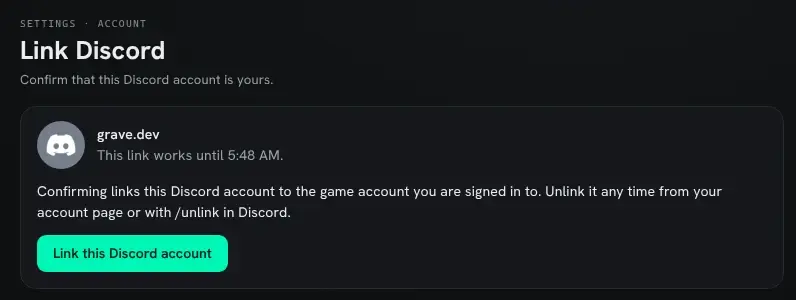
The link starts with the game’s web address, the mud_url setting. Until mud_url is set,
/link tells the member to ask staff instead.
Once it is linked, the Discord section of the account page shows the Discord account, with an Unlink button:

- A game account links to one Discord account, and a Discord account to one game account.
- Only an active account can link. A disabled or banned one cannot.
- A Discord account unlinked from one game account waits a week before it can link a different one, so a Discord role tied to a game role cannot be handed around. It can link the same account again at once.
- While a game account’s ban stands, the Discord account that was linked to it cannot link a different game account.
/unlinkin Discord, or Unlink on the account page, drops the link.
Speaking from Discord
Section titled “Speaking from Discord”A linked member chooses which of their characters speaks for them in each linked channel.
In the game, as that character, they type @discord/speak and the channel’s id:
> @discord/speak 1234567890123456789From then on, each message they post in the channel comes into the game as a line on its feed, spoken by that character. The member’s own message is deleted and the game’s version posted in its place, so the channel shows what actually arrived in the game.

- One character per channel. Choosing another replaces the first.
@discord/speak/off <id>, as the character, stops it. Unlinking the Discord account drops every choice. - It is not private. Anyone who reads both the game and the Discord channel can tell which Discord member plays the character. The command says so when it is used.
- The character must be allowed to send on the feed, by the feed’s send lock (
help @feed). A character that is gagged, or no longer on the account, or an account that is disabled or banned, speaks nothing. The bot sends the member a direct message saying why, and their message stays in Discord. - A member with no character chosen in the channel gets one direct message saying how to choose one. Their messages stay in Discord and do not reach the game.
- A member who is not linked cannot post there at all, because of the Linked role. If a channel lets them anyway, the bot deletes the message and sends them one direct message saying how to link.
How a message reads in the game:
| In Discord | In the game |
|---|---|
**bold**, *italic*, __underline__, ~~strike~~ | the game’s own bold, italic, underline and strikethrough |
:waves. or ;'s here. at the start | a pose or a semipose |
| a mention of a member | @ and the name of the character they speak as in that channel, or their Discord name |
| a mention of a channel or role | #channel or @role |
| a custom emoji | :name: |
a masked link [text](https://...) | a link |
| a file | a link to it, named for the file |
| a reply | (replying to Name) before the text |
code, spoilers, game code such as [pemit(me,hi)] | the text as typed; nothing is ever run |