
Scene Pose Types
Every line written into a scene has a type. A pose, a say or an emit is in character (ic). A
remark made out of character is ooc. A line that is the world speaking rather than a character,
such as the weather turning or a crowd reacting, is narration. A game can add more: the
radio-scene package adds radio for calls heard over a radio frequency.
The type decides how the line looks, and it is what a player hides when they would rather not read a kind of line. This page covers:
- what players can do with types;
- how a type looks in a MU* client and in the portal, and how to change that;
- adding a type of your own.
Types come with the scene package, which a new game installs during setup.
For players
Section titled “For players”Nothing changes about how you pose. pose, say, semipose and @emit in a scene’s room are
recorded as in character. Two commands record the other shipped types:
+scene/ooc <id>=<text>speaks out of character into the scene, and so does theooccommand when you are standing in it;+scene/narrate <id>=<text>adds narration.
+scene/types shows every type, a sample of how it looks to you, and whether you hide it.
+scene/type <type> shows one in full.
Hiding a type
Section titled “Hiding a type”Some players would rather read a scene without the out-of-character chatter, or without the radio
traffic. +scene/hide <type> leaves that type out of your +scene/recall and +scene/log, and a
note under the recall says how many lines it left out:
> +scene/hide ooc[SCENE] Done: Out of character lines are hidden from your recall and log. +scene/show ooc shows them again.> +scene/recall 5=10═╡ Wren · pose 32 ╞═══════════════════════════════════════════════╡ Scene 5 ╞═Wren pulls her hood up and squints at the breakwater. "That's no fishing boat."═╡ Tomas · pose 33 ╞══════════════════════════════════════════════╡ Scene 5 ╞═Tomas sets down the crate and follows her gaze, one hand on the rail.<RADIO · 5> [Harbour Watch] Tomas: Tower, we have an unlit vessel off the north mole.═╡ Wren · pose 37 ╞═══════════════════════════════════════════════╡ Scene 5 ╞═Out past the mole, the fog bell begins to ring.═╡ Wren · pose 38 ╞═══════════════════════════════════════════════╡ Scene 5 ╞═Wren is already moving, boots loud on the wet boards.[SCENE] 2 lines of ooc hidden. +scene/show <type> shows them.> +scene/show ooc[SCENE] Done: Out of character lines show in your recall and log.+scene/hide on its own lists what you hide. The choice is kept on your character, so the portal
reads the same one: the Show menu above a scene’s story lists the types with a tick beside each,
and unticking one there is the same as +scene/hide. In the portal, hidden lines fold into a row
such as “1 Out of character line hidden”, which opens them for that page.
Hiding only affects reading the log. Lines said in the room while you are there still reach you.
How a type looks
Section titled “How a type looks”A type looks different in a MU* client and in the portal, because the two can do different things. Both follow the reader’s theme.
In a MU* client
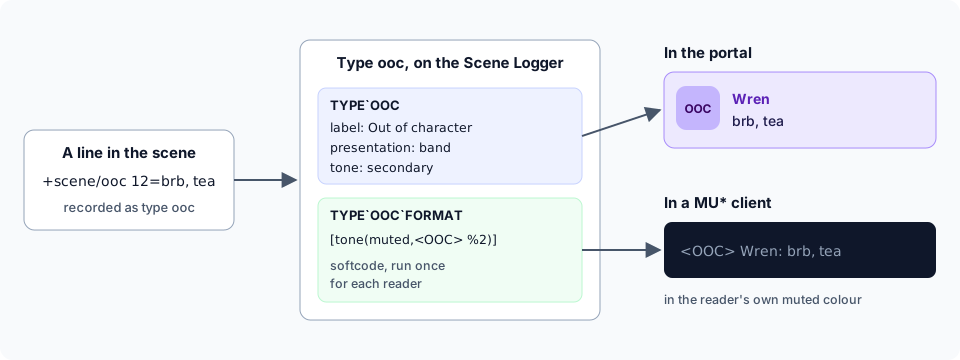
Section titled “In a MU* client”A pose, and narration, comes under a rule naming who wrote it and the pose’s number on the left and the scene on the right. Out-of-character lines and radio calls have no rule. Each is one line, tagged with its type and the scene, so a quick aside does not get a rule of its own:
<OOC · 5> Tomas: Brb, door.═╡ Tomas · pose 40 ╞══════════════════════════════════════════════╡ Scene 5 ╞═Tomas lifts the handset again, thumb on the key.On a narrow screen the scene is dropped from the rule first, so the name and pose number stay.
Which types get a rule follows their portal layout, described below: a prose or aside type has
one, and a band, message or notice type does not.
The line itself is drawn by a short piece of softcode on the Scene Logger, the type’s format. The game runs it once for each reader, so each can see the line differently. The shipped formats are:
| Type | Format | What a reader sees |
|---|---|---|
ic | %2 | the line as written |
ooc | [tone(muted,<OOC[if(strlen(%3),%b[chr(183)] %3)]> %2)] | <OOC · 5> and the line, in the reader’s muted colour |
narration | [tone(secondary,%2)] | the line, in the reader’s secondary colour |
radio | [tone(info,<RADIO[if(strlen(%3),%b[chr(183)] %3)]> %2)] | <RADIO · 5> and the call, in the reader’s info colour |
chr(183) is the middle dot. The if() leaves the scene out where there is none, such as the
sample +scene/types shows.
tone() colours by a theme colour’s name rather than by a colour, so each player sees it in the
theme they chose with @theme. A player whose theme makes muted paler sees every out-of-character
line paler. See Layout Themes for themes.
The format is used for lines said live in the room, for +scene/recall and for +scene/log. A
player who has set their own FORMAT`POSE, FORMAT`SAY and so on keeps it: the lines they say
live in the room are drawn by it instead of the type’s format. The scene still records the line as
written, so recall and the portal draw it by its type.
In the portal
Section titled “In the portal”The portal does not run softcode to draw a line. A type picks one of five layouts, its presentation, and a colour, its tone:
| Presentation | Looks like | Shipped for |
|---|---|---|
prose | the character’s portrait, their name, then the pose | ic |
band | a tinted strip with the name inline | ooc |
message | a bubble with a header and an icon, such as “Wren on Ship”; your own on the right | radio |
aside | no portrait; centred and in italics | narration |
notice | one dim line | dice rolls, joins, system results |
The tone is one of the same theme colours tone() takes: foreground, primary, secondary,
tertiary, muted, success, warning, error or info. Each reader’s portal theme supplies
the colour, light or dark, at a contrast the theme has already checked.
Changing a type
Section titled “Changing a type”Staff who hold the layout.admin permission, the one that manages portal themes, change types with
commands or in the portal under Build & manage, Content, Pose types, which shows a sample of each type as
you change it.
> +scene/type/set ooc/tone=tertiary[SCENE] Done: Pose type ooc: tone set.> +scene/type/set ooc/presentation=sideways[SCENE] Warning: presentation must be one of prose, band, message, aside, noticeA type has six fields:
| Field | What it is |
|---|---|
label | its name for people, in menus and listings |
presentation | its layout in the portal, from the table above |
tone | its colour, a theme colour’s name |
icon | for a message: radio, phone, chat, dice, book, scroll, megaphone, eye, mask, music, star or bolt |
hidden | yes makes it start hidden for players who have not chosen |
order | its place in lists, lowest first |
A value that does not fit is refused, and the type keeps what it had.
The format a MU* client sees is softcode that runs as the Scene Logger, which is a wizard object, so only a wizard changes it:
> &TYPE`OOC`FORMAT <Scene Logger>=[tone(muted,<OOC %3> %2)]Scene Logger/TYPE`OOC`FORMAT - Set.> +scene/recall 5=1<OOC 5> Tomas: Brb, door.It is given the pose’s number as %0, the reader as %1, the line as %2 and the scene’s number
as %3. Whatever it returns is what that reader sees; nothing at all hides the line from them, rule
and all.
Adding a type
Section titled “Adding a type”-
Add it, with a name for people. A type is 1 to 32 letters, digits,
-and_:> +scene/type/add dice=Dice rolls[SCENE] Done: Added pose type dice. +scene/type/set dice/<field>=<value> changes how it looks. -
Shape how it looks in the portal:
> +scene/type/set dice/presentation=notice[SCENE] Done: Pose type dice: presentation set.> +scene/type/set dice/icon=dice[SCENE] Done: Pose type dice: icon set. -
Have a wizard give it a format for MU* clients, or leave it without one. A
noticetype with no format is one line, tagged with its type and the scene:<DICE · 5> Tomas rolls Perception: 4, 6, 2 = 12 (success) -
Record lines as that type. The command that records a pose names its type, so this is the code behind your dice roller, not something players type:
@scene/addpose <scene>=<author>,<shown as>,<room>,dice,emit,,<the roll>
+scene/type/remove dice removes a type. Lines already recorded as it are then drawn as in
character, in the portal and in recall, and a player who had hidden it sees them again.
A package can bring a type of its own, the way radio-scene brings radio: it attaches the two
attributes to the Scene Logger, and uninstalling the package takes the type away again.
When a type does not show up
Section titled “When a type does not show up”A type is two attributes on the Scene Logger: TYPE`<TYPE>, holding the fields as JSON, and
TYPE`<TYPE>`FORMAT. If one is edited by hand and no longer makes sense, the game leaves that
type out rather than guessing, and its lines are drawn as in character. A wizard’s @scene/types
lists the types the game read and, separately, every TYPE attribute it left out and why:
> @scene/types╭───────────────────────────────┤ Pose types ├───────────────────────────────╮│ Key Label Presentation Tone Icon Hidden Order ││ ────────────────────────────────────────────────────────────────────────── ││ ic In character prose no 10 ││ ooc Out of character band secondary no 20 ││ narration Narration aside secondary no 30 ││ radio Radio message info radio no 40 ││ dice Dice rolls notice warning dice no 50 │╰────────────────────────────────────────────────────────────────────────────╯╭────────────────────────────────┤ Not read ├────────────────────────────────╮│ Attribute Why it was left out ││ ────────────────────────────────────────────────────────────────────────── ││ TYPE`BELLS icon must be one of radio, phone, chat, dice, book, scroll, ││ megaphone, eye, mask, music, star, bolt │╰────────────────────────────────────────────────────────────────────────────╯