
Getting Started Checklist
The onboarding package gives each new character a short checklist of things to do first:
learn the basics, read the game’s help, write a description, get approved. It shows when they log
in and any time they type +welcome. The game chooses the steps.
- A step the game can check ticks itself off: setting a description, joining a channel, getting approved.
- Any other step the player ticks off with
+welcome/done <number>. +welcome <number>tells you more about a step.+welcome/hidestops the list showing at login.+welcomestill shows it.
| You are | You want to | Read |
|---|---|---|
| A player | see what to do next | The checklist |
| A player | tick a step off, or stop the list showing | Ticking steps off |
| A player | read more about a step | More about a step |
| Staff | change the steps or when it shows | For staff |
| A package author | add a step from a package | Adding a step from a package |
| Staff | install it | Running the package |
In the game, +help welcome has the commands in short form, +help welcome staff the settings,
and +help welcome steps how a step is put together.
The checklist
Section titled “The checklist”A new game installs the package on its first start, so a new character sees the list the first time they log in, below the room:
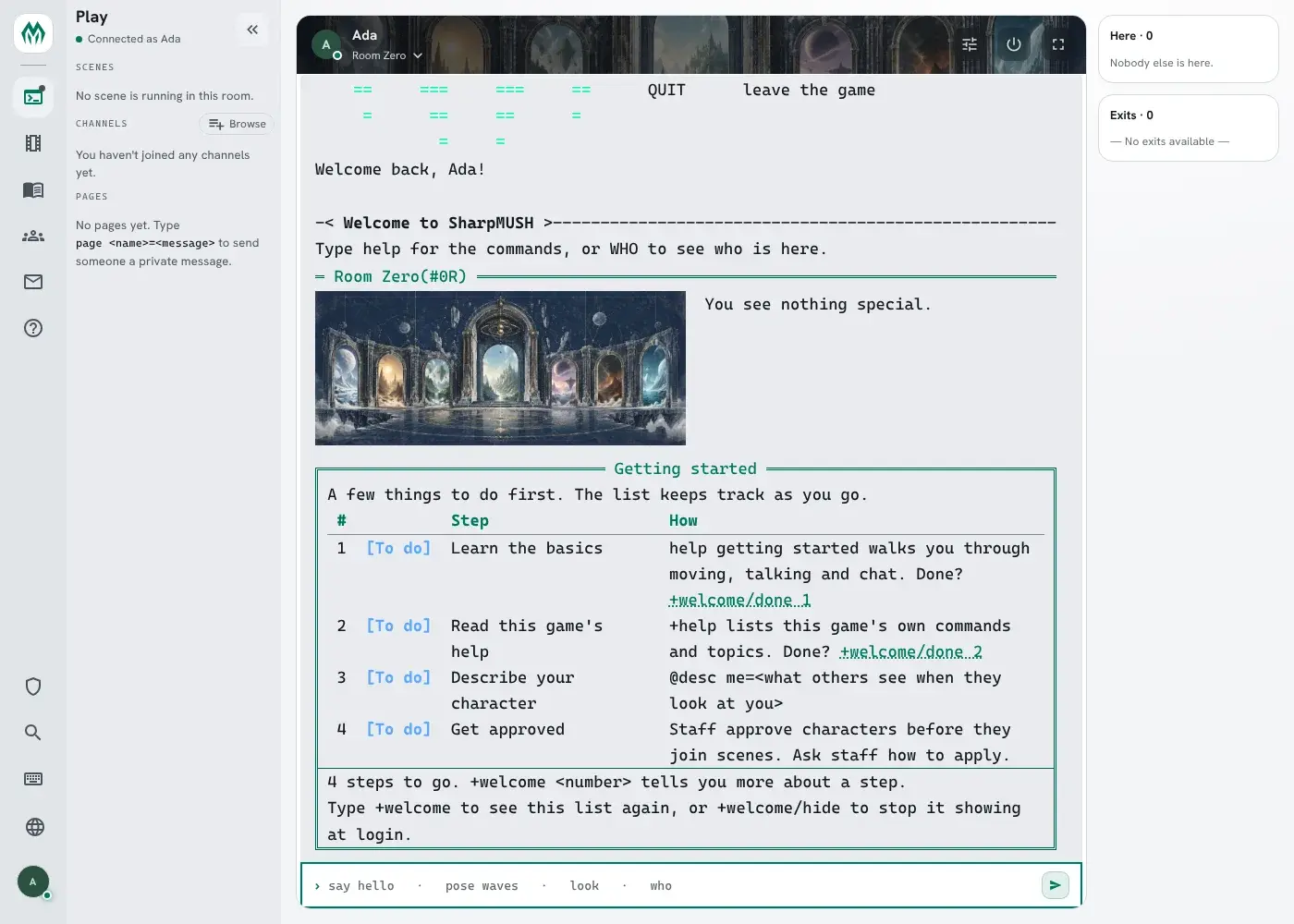
At login the list ends with a line saying how to see it again: Type +welcome to see this list again, or +welcome/hide to stop it showing at login.
+welcome shows it again at any time:
> +welcome╔═════════════════════════════╡ Getting started ╞════════════════════════════╗║ A few things to do first. The list keeps track as you go. ║║ # Step How ║║ -------------------------------------------------------------------------- ║║ 1 [Done] Learn the basics ║║ 2 [To do] Read this game's help +help lists this game's own commands ║║ and topics. Done? +welcome/done 2 ║║ 3 [To do] Describe your character @desc me=<what others see when they ║║ look at you> ║║ 4 [To do] Get approved Staff approve characters before they ║║ join scenes. Ask staff how to apply. ║╠════════════════════════════════════════════════════════════════════════════╣║ 3 steps to go. +welcome <number> tells you more about a step. ║║ +welcome/hide stops it showing at login. ║╚════════════════════════════════════════════════════════════════════════════╝Each step has a number. A step’s line says how to do it while it is open, and nothing once it is
done. On a client that shows links, +welcome/done <number> is a link.
Not every character sees every step. A guest has no description or approval step, and the channel step shows only when there is a channel to join. The numbers follow your own list.
More about a step
Section titled “More about a step”+welcome <number> shows one step: whether it is done, how to do it, and more about it when the
game has written more.
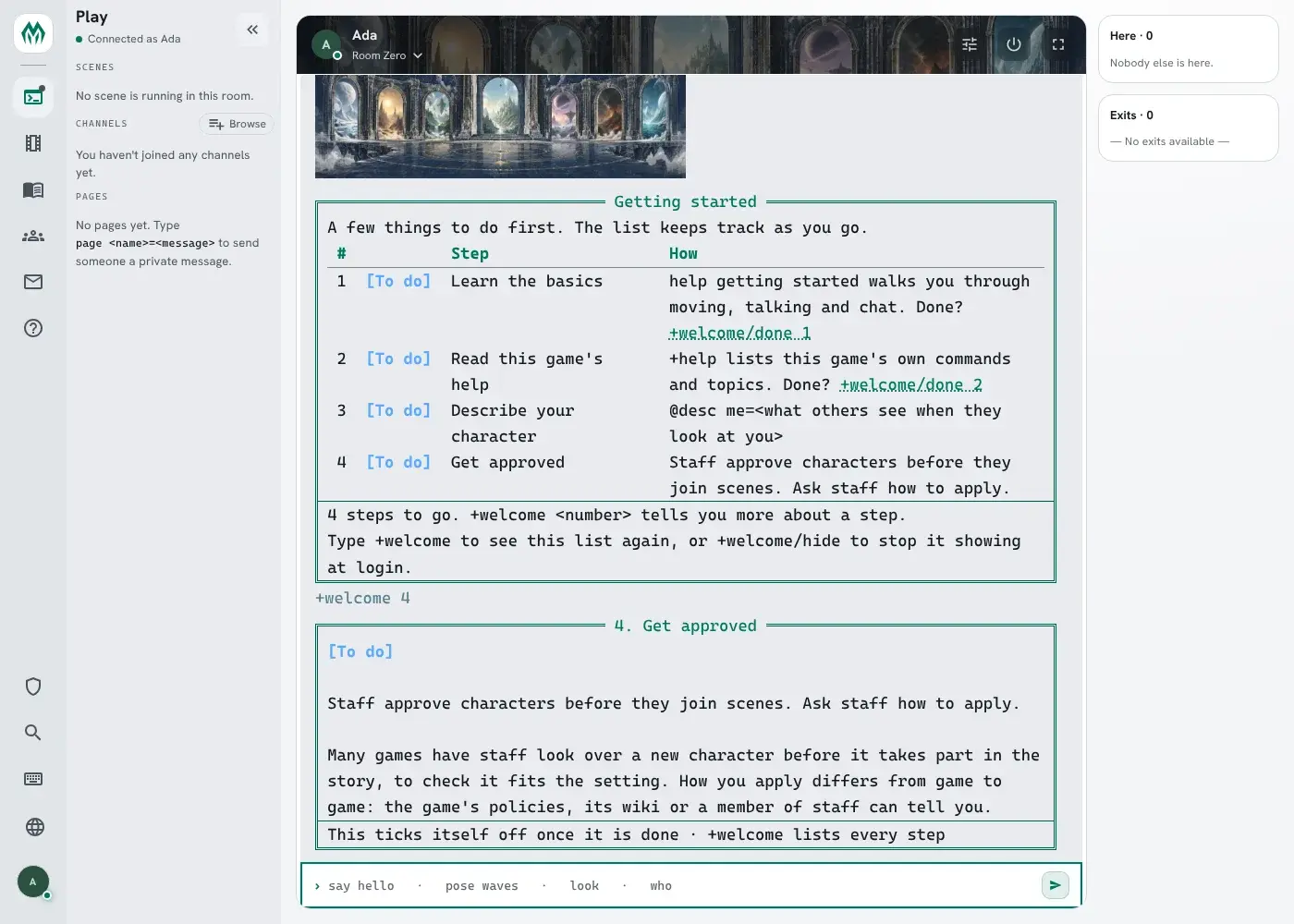
The step’s name works as well as its number: +welcome approval shows the same.
Ticking steps off
Section titled “Ticking steps off”The game ticks off a step it can check as soon as it is done. Write a description and the
Describe your character step shows [Done] the next time you look; you can’t tick it off
yourself:
> +welcome/done describe[WELCOME] Warning: Describe your character ticks itself off once it is done.> @desc me=A cartographer with ink on her cuffs.Bea/DESCRIBE - Set.A step the game cannot check, such as reading the help, you tick off when you have done it, by its number on the list:
> +welcome/done 1[WELCOME] Done: Learn the basics. 3 steps to go.> +welcome/undo 1[WELCOME] Done: Learn the basics is open again.The step’s name works too: +welcome/done basics.
While a step is open, the list shows at every login. Two commands change that for you:
+welcome/hidestops it showing at login.+welcomestill shows it, with a note at the bottom:Hidden at login: +welcome/show brings it back.+welcome/showbrings it back.
Once every step is done, the list stops showing at login on its own.
For staff
Section titled “For staff”With onboarding-config, the list’s settings are in +config onboarding:
| Setting | Default | What it changes |
|---|---|---|
login | open | When the list shows at login: open at every login while a step is open, first at the first login only, off never. |
title | Getting started | The list’s title. |
intro | A few things to do first. The list keeps track as you go. | The line above the steps. Empty shows none. |
steps | five steps | The steps, as a table. |
> +config onboarding/login=first[CONFIG] Done: onboarding/login is now first, was open.The steps
Section titled “The steps”The steps are a table. Each has a name, a label, a hint saying in a line how to do it, a
detail with more about it (up to 1,000 characters, shown by +welcome <number>), and an order
(lowest first). A name starts with a letter, so a number always means a place on the list. A new
game has these:
| Step | Order | Ticks itself off when |
|---|---|---|
basics | 10 | never: the player ticks it off |
plushelp | 20 | never: the player ticks it off (added by onboarding-help) |
describe | 30 | the character has a description (not shown to guests) |
channel | 40 | the character is on a channel (shown only when there is a channel to join) |
approval | 60 | staff approve the character (not shown to guests) |
+config/add adds a step. A step you add has no check, so players tick it off themselves:
> +config/add onboarding/steps/rules=Read the house rules[CONFIG] Done: Added onboarding/steps/rules. +config onboarding/steps/rules shows it.> +config onboarding/steps/rules/hint=The Policies page on the wiki.[CONFIG] Done: onboarding/steps/rules/hint is now The Policies page on the wiki., was none.> +config onboarding/steps/rules/order=5[CONFIG] Done: onboarding/steps/rules/order is now 5, was 50.> +config onboarding/steps/rules/detail=Six short rules. The one that matters most: ask before you hurt another character.[CONFIG] Done: onboarding/steps/rules/detail is now Six short rules. The one that matters most: ask before you hurt another character., was none.With order 5 it comes first. +welcome 1 shows the detail, and a player ticks it off with
+welcome/done 1:
> +welcome/done 1[WELCOME] Done: Read the house rules. 4 steps to go.+config/remove onboarding/steps/approval takes a step away, for a game that approves no one.
+config onboarding/steps/describe/label=Write your description renames one.
Adding a step from a package
Section titled “Adding a step from a package”A package adds a step by putting an entry in the steps table, the Onboarding Steps object, and
any code the step needs on the Onboarding object, keyed by the same name. Each piece of code is
given the player as %0:
| Attribute, on the Onboarding object | What it does |
|---|---|
CHECK`<STEP> | True once the step is done. Without one, the player ticks the step off. |
SHOW`<STEP> | False leaves the step off that player’s list. |
NOTE`<STEP> | A line shown in place of the hint, such as where an application stands. |
This is how onboarding-help adds its step. It depends on onboarding and plus-help, and attaches one entry to the store:
- ref: plushelp_step target: "{{onboarding/store}}" attributes: STEP`PLUSHELP: Read this game's help STEP`PLUSHELP`HINT: +help lists this game's own commands and topics. STEP`PLUSHELP`DETAIL: >- help covers the commands every SharpMUSH game has. +help covers this game's own: ... STEP`PLUSHELP`ORDER: "20"A step that can check itself adds a CHECK. A package that adds a +tutorial might tick its
step off once the player finishes it:
- ref: tutorial_check target: "{{onboarding/guide}}" attributes: CHECK`TUTORIAL: value: hasattr(%0,TUTORIAL`FINISHED) flags: [funsyntax]onboarding-chargen uses NOTE for the approval step. While the character is not approved,
the line under Get approved says where their character application
stands: +app starts your application., Your application is a draft. +app/submit sends it to staff., Staff have your application. +app shows where it stands., and so on.
What a player has done is kept on the player: ONBOARDING`DONE`<STEP> for each step they
ticked off, and ONBOARDING`HIDE while they have the list hidden.
Running the package
Section titled “Running the package”A new game installs onboarding, onboarding-help and onboarding-config on its first start; the setup wizard lists them in its Essentials group. onboarding-chargen is offered, not installed, like chargen itself: it is in the setup wizard’s Characters group, with chargen.
| Package | Adds |
|---|---|
onboarding | +welcome, the list at login, and the steps |
onboarding-help | +help welcome, and the Read this game’s help step |
onboarding-config | +config onboarding, and +help welcome staff |
onboarding-chargen | Where the player’s application stands, under Get approved |
The package needs the event handler, for the list at login. It comes with a new game.