
Jobs That Run Themselves
The jobs package keeps the queue of requests players send to staff: applications, room fixes, bugs, plot ideas. Each job sits in a bucket, such as Applications or Building, and each bucket decides how its jobs are handled. Filing and working jobs are in Jobs. This guide covers the parts that save staff from typing the same thing twice:
| A bucket can | So that | Read |
|---|---|---|
| Answer every new job at once | the player knows it arrived and how long to wait | First replies |
| Measure how soon it answers | that wait comes from real jobs, not a guess | How soon a bucket answers |
| Give each job a checklist | staff and the player see what is left | Checklists |
| Let staff leave a one-line update | the player knows where a job stands without a reply | Status updates |
| Approve some jobs at once | routine requests do not wait on staff | Approving at once |
Everything here is a bucket setting, changed with +bucket/set <bucket>/<setting>=<value> by a
Job Admin or by someone who works that bucket, or on the bucket’s page under Bucket
settings in the portal. In the game, +help buckets, +help jobs checklist and
+help jobs audit have the same in short form.
First replies
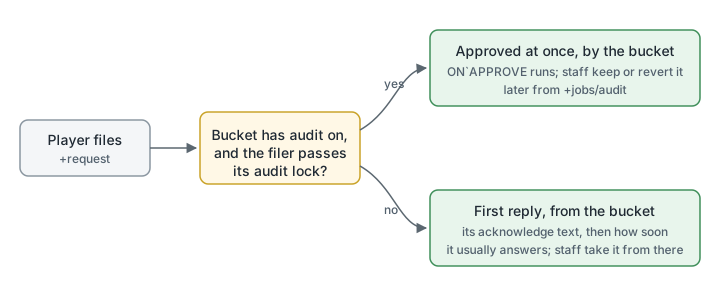
Section titled “First replies”A new job gets a reply from its bucket straight away. It is the bucket’s acknowledge text,
followed by how soon the bucket usually answers:
> +request Room description=My room in the harbour still has the default description.[JOBS] Done: Filed job 9 in Requests: Room description. Staff usually answer in about 4 hours. +job 9 shows it.> +job 9══════════════════════════╡ Job 9: Room description ╞═════════════════════════Bucket:       RequestsStatus:       NewPriority:     NormalFiled:        Oct 15 07:00 by WrenFirst answer: About 4 hoursHandlers:     Nobody═════════════════════════╡ Wren · Oct 15 07:00 · #1 ╞═════════════════════════My room in the harbour still has the default description.═══════════════════════╡ Requests · Oct 15 07:00 · #2 ╞═══════════════════════Thanks. Staff have your request and will answer here.
Staff usually answer in about 4 hours.══════════════════════════════════════════════════════════════════════════════+job/reply 9=<text> answers══════════════════════════════════════════════════════════════════════════════
The reply is written by the bucket, so it does not count as staff answering: the job stays New, and the filer does not see it as unread. Each bucket has its own text. Change it, or leave it empty to send none:
> +bucket/set Requests/acknowledge=Thanks. Staff have your request and will answer here.[JOBS] Requests acknowledge is Thanks. Staff have your request and will answer here.> +bucket/set Feedback/acknowledge=[JOBS] Feedback acknowledge is nothing.A job staff file themselves, and a question staff send a player with +job/query, get no
first reply.
How soon a bucket answers
Section titled “How soon a bucket answers”Every bucket keeps two measurements:
- First answer: how long its jobs waited for staff’s first reply.
- Closed in: how long they took to close.
Each is the middle value of the bucket’s last 25 jobs, so one job that sat over a holiday does
not skew it. Jobs staff filed, +job/query jobs and jobs approved at once are left out, since
nobody waited on them. Until a bucket has three jobs measured, players are told its
turnaround setting instead: “Staff aim to answer within 3 days.”
+buckets shows the first-answer time beside every bucket, and players see the same when they
choose a bucket in the portal’s New request form:
> +buckets════════════════════════════════╡ Job buckets ╞═══════════════════════════════Bucket Open First answer What it is forApplications* 2 within 3 days Character applications.Bugs* 0 within 7 days Problems with code or the server.Building* 0 at once Rooms, objects, descriptions and typos.Feedback* 0 within 7 days Suggestions and complaints. Staff do not see who sent them.Plots* 0 within 7 days Plot and scene proposals.Requests* 5 about 4 hours Anything you need from staff.Staff* 0 within 7 days Work among staff. Players do not see it.══════════════════════════════════════════════════════════════════════════════* you work it · +request [<bucket>/]<title>=<text>══════════════════════════════════════════════════════════════════════════════+bucket <name> shows both measurements and how many jobs they come from:
> +bucket Requests═════════════════════════════╡ Bucket: Requests ╞═════════════════════════════About: Anything you need from staff.Turnaround: 3 daysFirst answer: About 4 hours (the last 7 jobs)Closed in: About 2 days (the last 5 jobs)...To measure over more or fewer jobs, change the wait-sample setting with
+config:
> +config jobs/wait-sample=50Checklists
Section titled “Checklists”A bucket can give every new job the same list of steps. Separate the steps with |. A step
that starts with scene: asks for the log of a scene:
> +bucket/set Applications/checklist=Sheet checked|Background read|scene:A log of a scene you played[JOBS] Applications checklist is Sheet checked, Background read, and A log of a scene you played (a scene log).Each job copies the checklist when it is filed, so changing the bucket’s list later leaves the jobs already filed alone. In the portal, the checklist is a list on the bucket’s page: type a step and press Enter to add it, or click its × to remove it. A step may contain a comma.
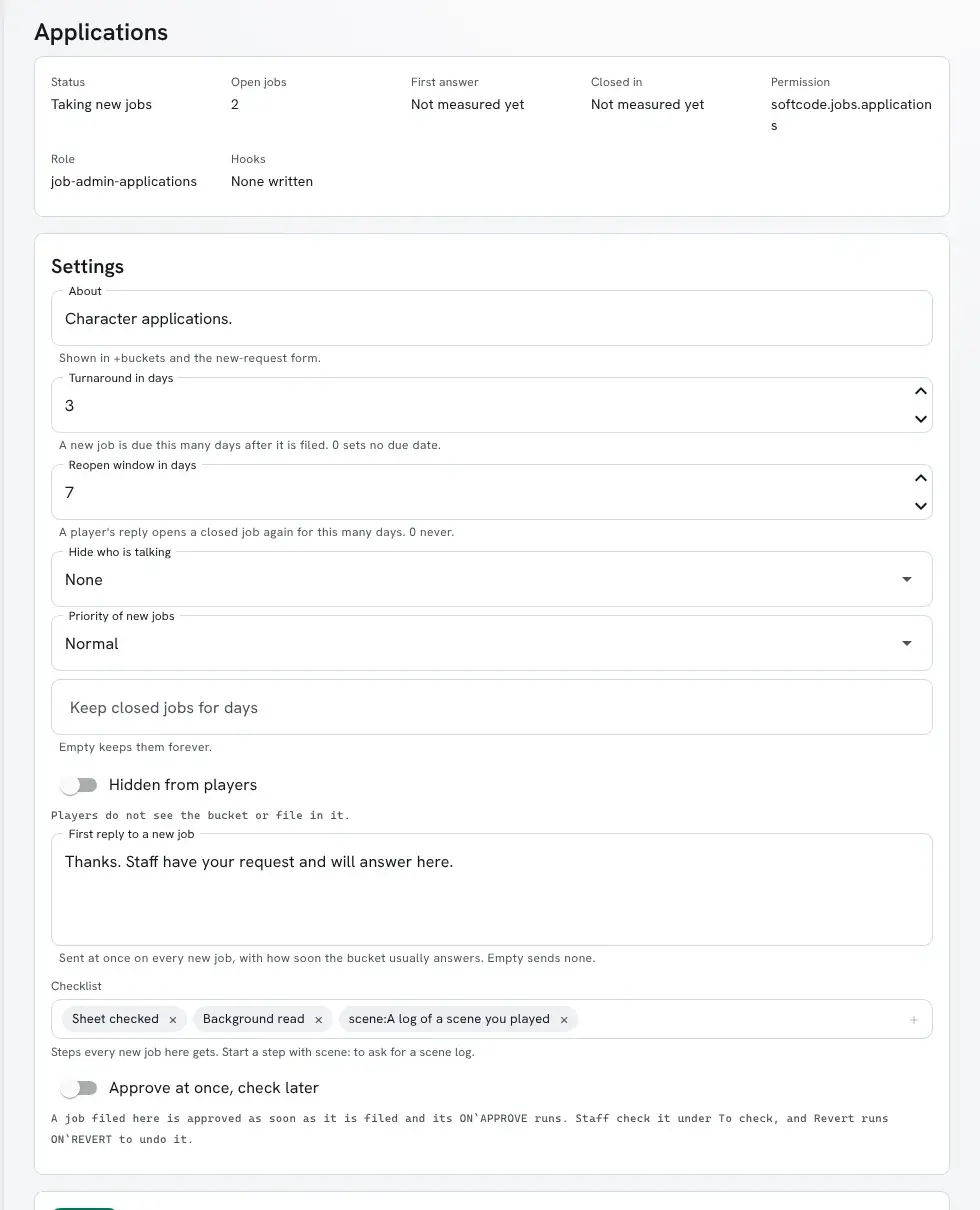
Staff tick a step with +job/check <#>=<step> and untick it with +job/uncheck:
> +job/check 8=1[JOBS] Done: Step 1 of job 8 is done: Sheet checkedAttaching a scene log
Section titled “Attaching a scene log”The player, anyone they added as a helper, or staff attach a scene with
+job/scene <#>=<scene>. It goes on the job as a message with a link to the log, and ticks
the first scene step that is still open. A player can attach only scenes they were in.
> +job/scene 8=2[JOBS] Done: The log of scene 2 is on job 8 now. Step 3 is done.> +job 8════════════════════════════════╡ Job 8: Wren ╞═══════════════════════════════Bucket:       ApplicationsStatus:       With staffUpdate:       Sheet checked. Reading your background next. · Oct 15Checklist:    2 of 3 donePriority:     NormalFiled:        Oct 15 07:00 by WrenFirst answer: Within 3 daysHandlers:     Nobody═════════════════════════════════╡ Checklist ╞════════════════════════════════1. [x] Sheet checked · Marisol, Oct 152. [ ] Background read3. [x] A log of a scene you played · Wren, Oct 15 · scene 2═════════════════════════╡ Wren · Oct 15 07:00 · #1 ╞═════════════════════════I'd like to play Wren, a ferry pilot.═════════════════════╡ Applications · Oct 15 07:00 · #2 ╞═════════════════════Thanks. Staff have your request and will answer here.
Staff aim to answer within 3 days.═════════════════════════╡ Wren · Oct 15 07:11 · #3 ╞═════════════════════════Attached the log of scene 2: The night ferry.══════════════════════════════════════════════════════════════════════════════+job/reply 8=<text> answers══════════════════════════════════════════════════════════════════════════════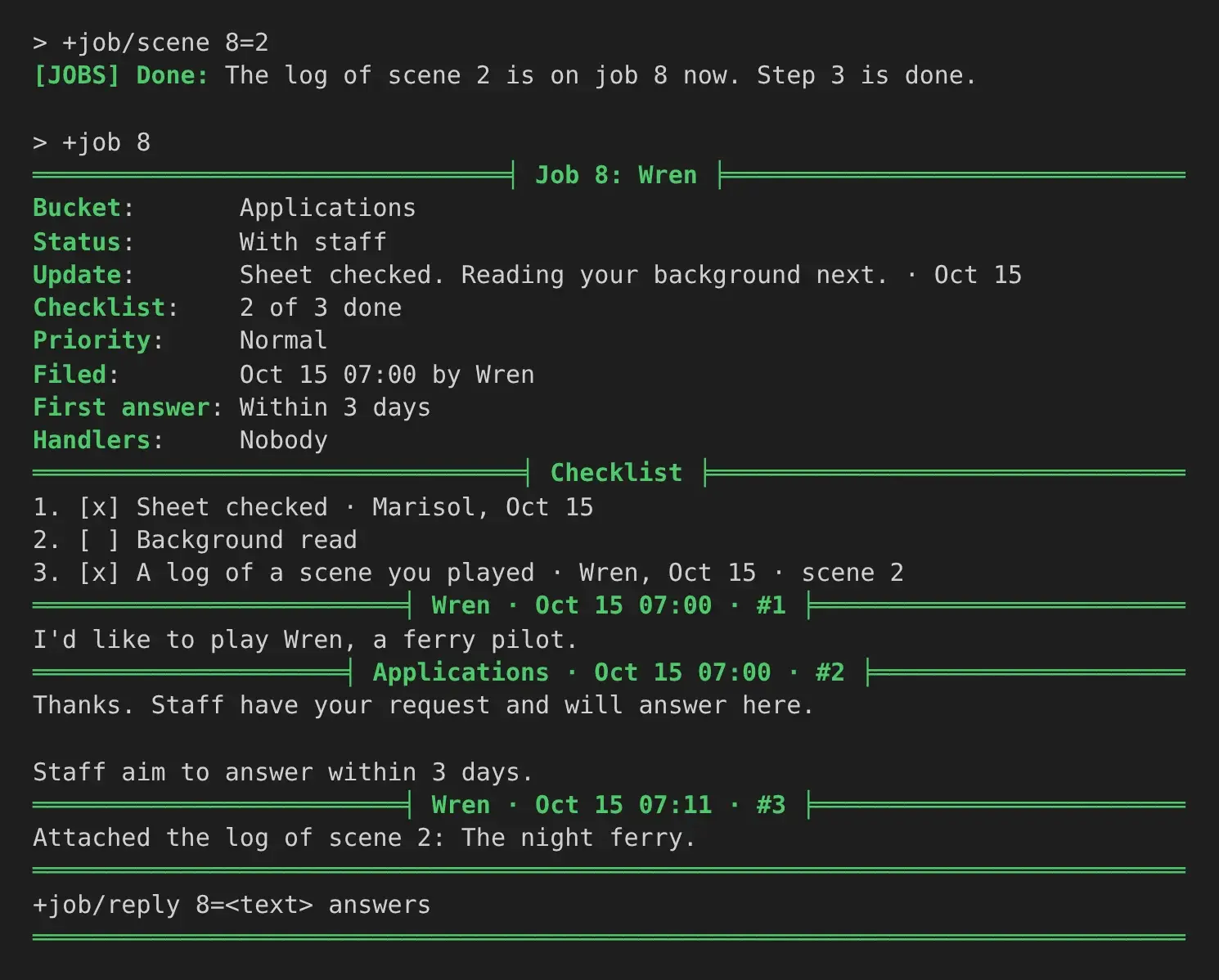
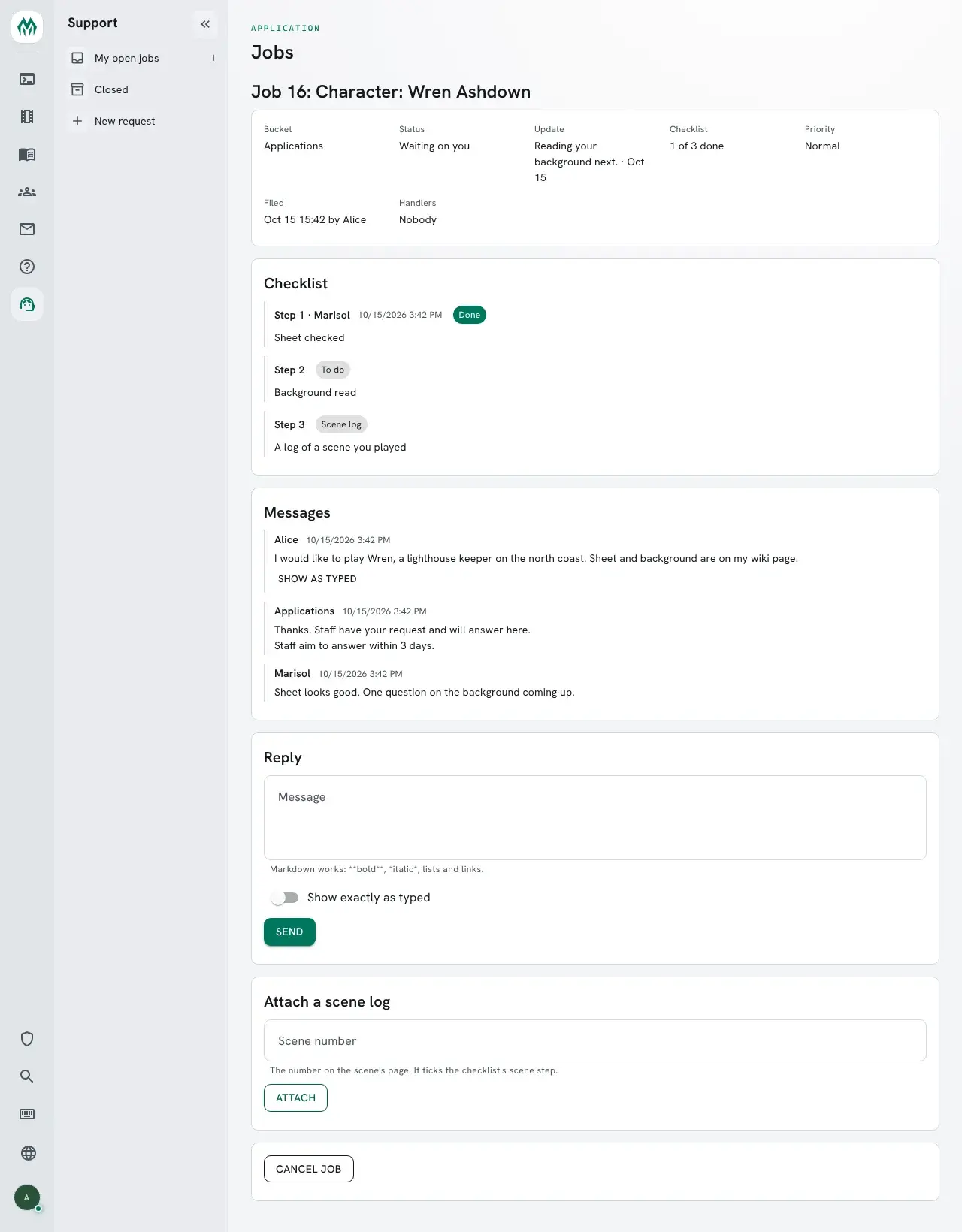
In the portal, the job page lists the steps with Mark done and Mark not done for staff, and an Attach a scene log box for the player and staff.
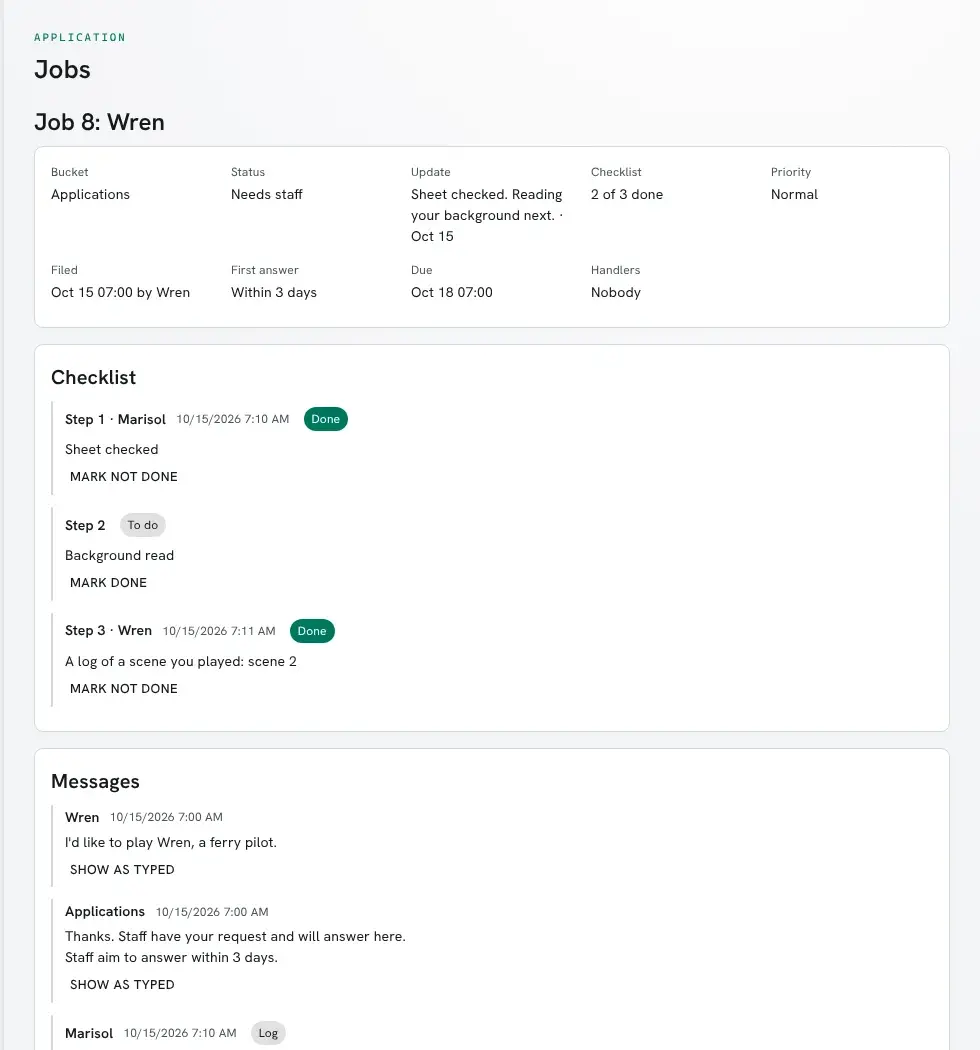
The player sees the same page without the staff buttons: the steps, the Update line, the bucket’s first reply with how soon it usually answers, and the scene log box.
Status updates
Section titled “Status updates”+job/status <#>=<text> sets one line the player reads at the top of the job, under
Update. It tells them where things stand without a reply that passes the turn back to them:
> +job/status 8=Sheet checked. Reading your background next.[JOBS] Done: The player reads on job 8: Sheet checked. Reading your background next.+job/status 8= with nothing after it clears the line. In the portal it is the Update for the
player box on the job page.
Approving at once
Section titled “Approving at once”Some requests are almost always granted: a builder bit, a room, a name change. A bucket with
audit on approves a job as soon as it is filed, and staff look it over afterwards.
> +bucket/set Building/audit=yes[JOBS] Building audit is yes.The approval is a normal one, made by the bucket: the job closes as approved and the bucket’s
ON`APPROVE hook runs, the same as when staff approve. The player is told straight away:
> +request Building/Builder bit=I'd like to build a ferry dock off the harbour.[JOBS] Done: Filed job 11 in Building: Builder bit. It is approved at once, and staff look it over later. +job 11 shows it.To approve at once only for some players, set the bucket’s audit lock. Anyone it refuses waits for staff as usual. With no audit lock, everyone’s job is approved at once.
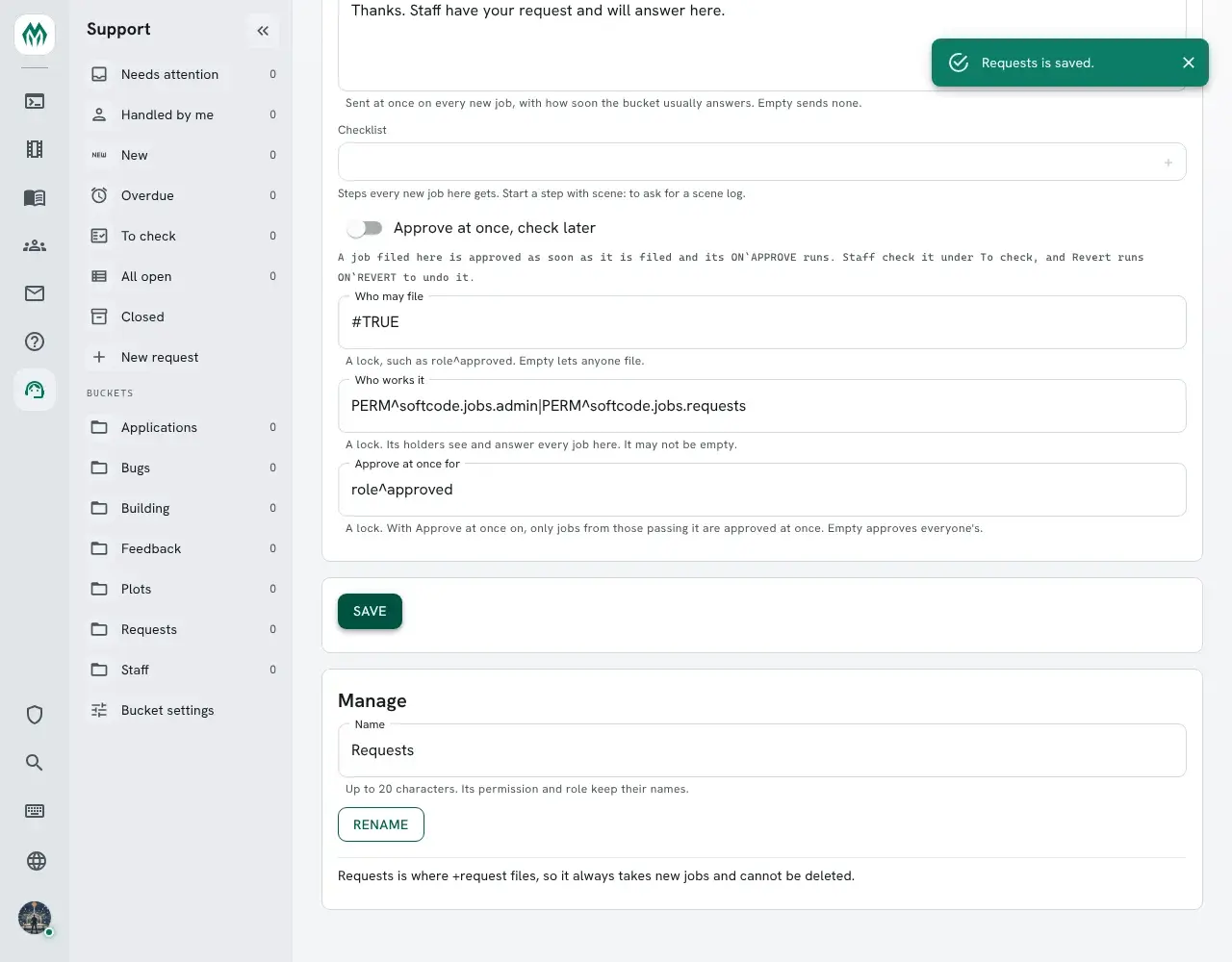
> +bucket/lock Building/audit=perm^softcode.jobs.admin|role^approved[JOBS] Building audit lock: PERM^softcode.jobs.admin|ROLE^approvedA Job Admin can set all three of a bucket’s locks on its settings page in the portal too: Who may file, Who works it and Approve at once for. A key that is not a lock is refused, and so is an empty Who works it.
Checking approvals
Section titled “Checking approvals”+jobs/audit lists the approvals nobody has checked. They also show in +jobs, as
Approved, to check, and under To check in the portal.
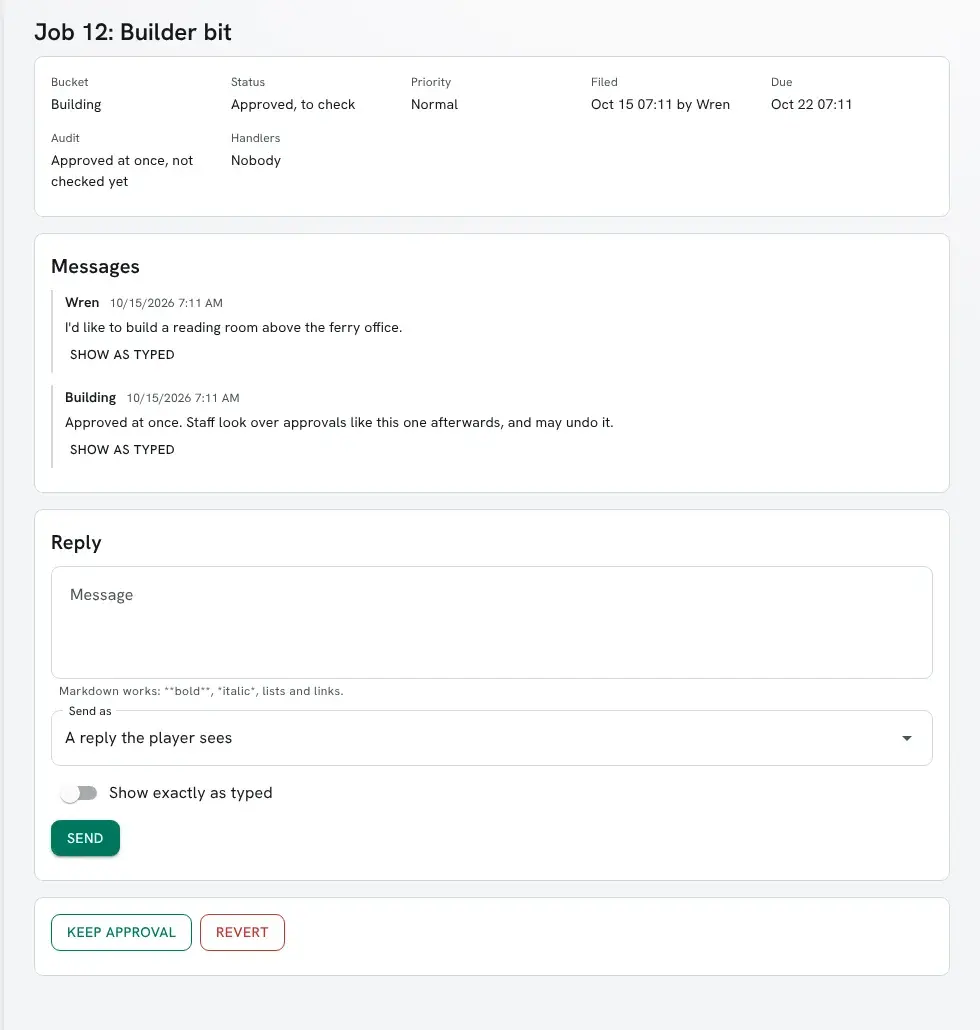
+job/audit <#>keeps the approval.+job/revert <#>=<why>undoes it. The reason goes on the job for the player, the job shows Reverted, and the bucket’sON`REVERThook runs.
> +jobs/audit════════════════════════════╡ Approvals to check ╞════════════════════════════ # Bucket Title Status Updated*11 Building Builder bit Approved, to check Oct 15══════════════════════════════════════════════════════════════════════════════+job/audit <#> keeps one · +job/revert <#>=<why> undoes it══════════════════════════════════════════════════════════════════════════════> +job/revert 11=The harbour belongs to the Docks plot this month. Ask again in November.[JOBS] Done: Job 11 is reverted. Building runs its ON`REVERT to undo the approval.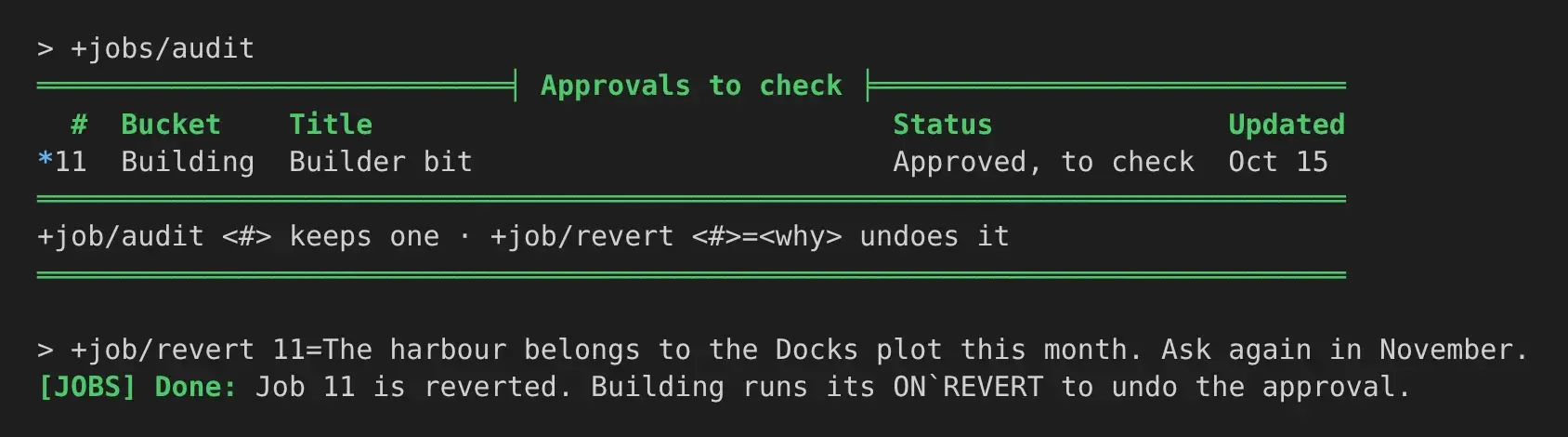
Writing the hooks
Section titled “Writing the hooks”Only the bucket knows what its approval did, so each bucket undoes its own in
ON`REVERT. Here Building gives the filer the builder role when it approves, and takes it
back when staff revert:
> &ON`APPROVE Building=@role/assign %<filer>=builder> &ON`REVERT Building=@role/unassign %<filer>=builderThe hooks run as the bucket, so the bucket must be allowed to assign the role. That takes
roles.admin on a role ranked above builder, since nobody can manage a role at or above their
own highest one. Give the bucket a role of its own for this, rather than a staff role:
> @role/create grants-builder=Jobs/Grants Builder> @role/priority grants-builder=16> @role/allow grants-builder=roles.admin> @role/assign Building=grants-builderbuilder is at priority 15, so 16 is enough. Change the bucket name and the role to suit.
With these in place, filing the request above gave Wren the builder role, and reverting it
took the role away again.
A bucket with audit on and no ON`REVERT can still be reverted: the job shows
Reverted and the player is told why, but nothing else is undone.
Hooks for this
Section titled “Hooks for this”Two bucket hooks belong to these features, alongside the ones +help jobs hooks lists:
| Hook | Runs after | Named arguments |
|---|---|---|
ON`CHECK | a checklist step is ticked or unticked, by staff or by attaching a scene log | job, actor, step, done (1 or 0) |
ON`REVERT | staff revert a job the bucket approved at once | job, actor, filer, entry (the reason) |
job(<#>, <field>) reads the new parts of a job from softcode: update (the status line),
steps and done (how many checklist steps it has and how many are done), scenes (the
scenes attached), audit (pending, passed or reverted) and answered (when staff first
replied, in seconds). This hook tells a job’s handlers once every step is done:
&ON`CHECK Applications=@if cand(%<done>,eq(job(%<job>,done),job(%<job>,steps)))=@dolist [job(%<job>,handlers)]=@pemit ##=Every step of job %<job> is done.