
Game Settings with +config
Many softcode systems have a few choices a game makes once: how long a player is idle before
+who dims their name, the game’s time zone, how long a status line may be. The plus-config
package gives all of them one command, +config. Each system keeps its settings on its own
object, says what each one accepts, and registers with +config. Staff list the settings, read
what each does, and change them; +config refuses a value the setting does not accept.
| You are | You want to | Read |
|---|---|---|
| Staff | see and change a system’s settings | Reading settings and Changing a setting |
| Staff | know what some bundled packages let you set | Some bundled packages’ settings |
| A coder | give your own code settings | Giving your code settings |
| A package author | ship settings with a package | In a package |
plus-config ships with the server and is installed on a new game.
Reading settings
Section titled “Reading settings”Anyone may read the settings. +config alone lists every system that has some:
> +config╔════════════════════════════════╡ Settings ╞════════════════════════════════╗║ System Settings About ║║ -------------------------------------------------------------------------- ║║ finger 4 Finger profiles. What +finger and +oocfinger show, ║║ and who sets which field. ║║ scene 3 Scenes. What a new scene starts as, which details ║║ players may set, and how much +scene/recall shows. ║║ status 5 Status. How long a status line, note and place may ║║ be, and what +status/list says under the list. ║║ time 14 Time and the IC clock. The game's time zone, how ║║ times are written, and the IC clock. ║║ who-where 3 Who and Where. What +who and +where show. ║╠════════════════════════════════════════════════════════════════════════════╣║ +config <system> lists one system's settings. ║╚════════════════════════════════════════════════════════════════════════════╝A system shows up once its package is installed. The About column gives its display name, then what
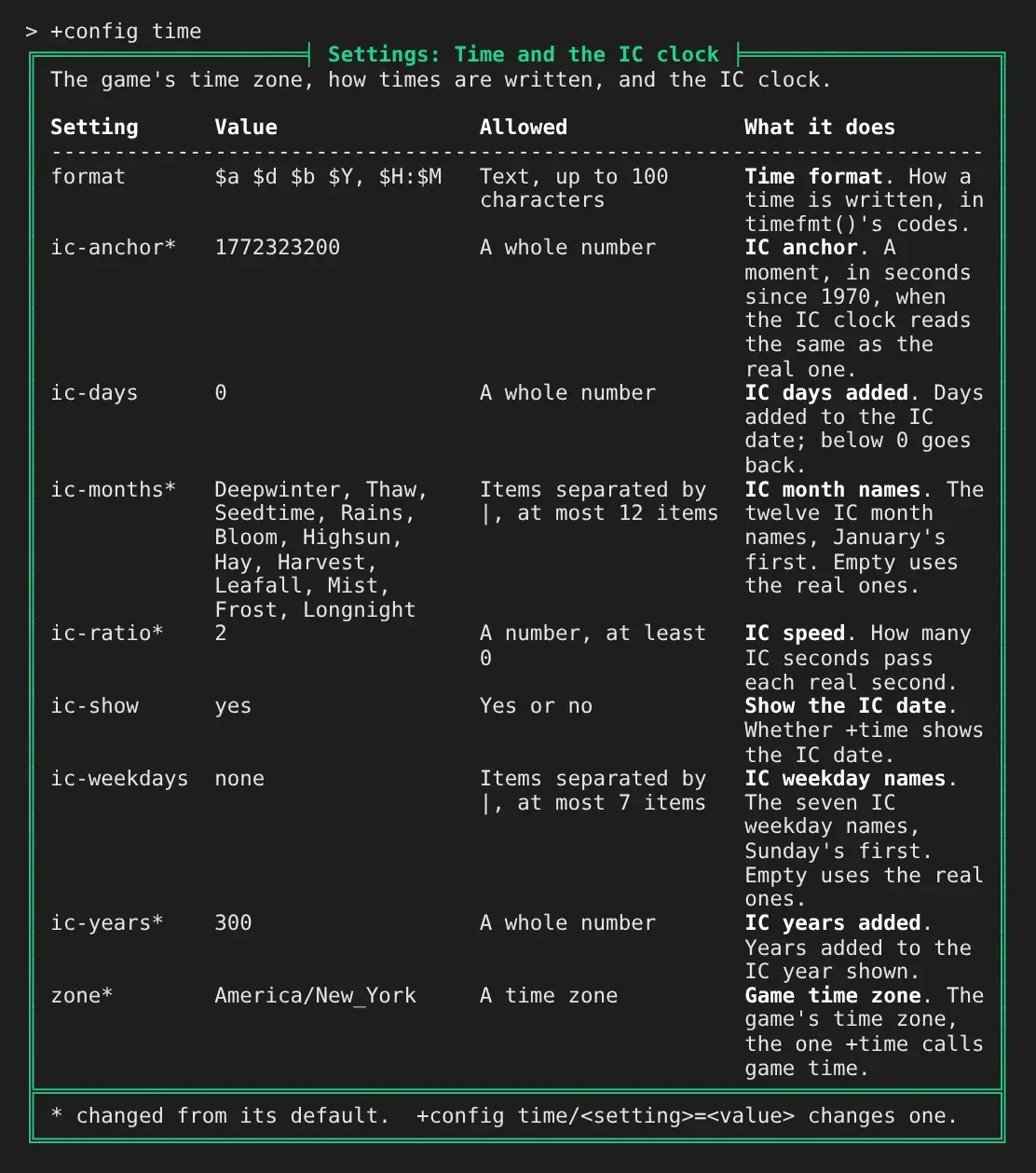
it covers. +config <system> lists its settings with the value each has, what it accepts, and its
display name and what it changes. A * after a name marks a value changed
from its default:
+config <system>/<setting> shows one setting with its display name, its default, an example when
the system gives one, and who may change it:
> +config time/ic-months╔═════════════════════════════╡ time/ic-months ╞═════════════════════════════╗║ Name: IC month names ║║ Value: Deepwinter, Thaw, Seedtime, Rains, Bloom, Highsun, Hay, ║║ Harvest, Leafall, Mist, Frost, Longnight ║║ Default: none ║║ Allowed: Items separated by |, at most 12 items ║║ What it does: The twelve IC month names, January's first. Empty uses the ║║ real ones. ║║ Changed by: The config.admin permission ║╠════════════════════════════════════════════════════════════════════════════╣║ +config time/ic-months=<value> sets it, /add and /remove change items, ║║ /reset goes back to the default. ║╚════════════════════════════════════════════════════════════════════════════╝System and setting names match in any case.
Changing a setting
Section titled “Changing a setting”+config <system>/<setting>=<value> changes a setting. It needs the config.admin permission,
the same one @config needs. +config says what the value was and what it is now:
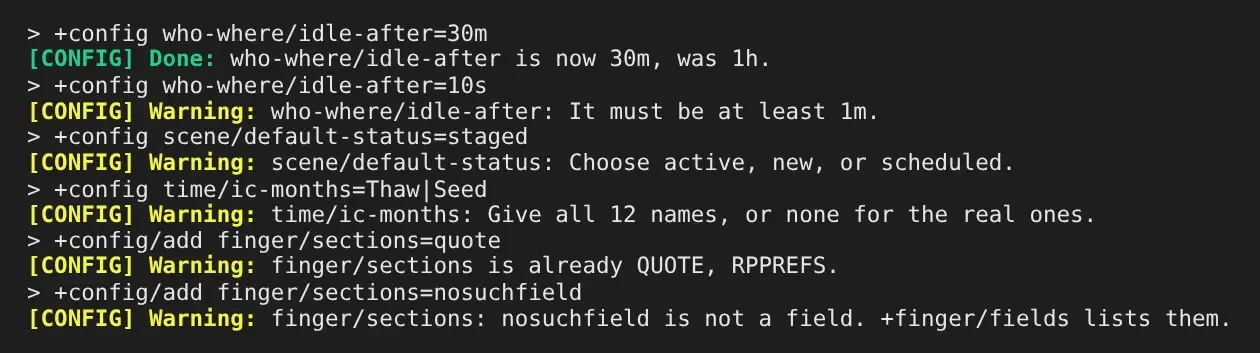
> +config who-where/idle-after=30m[CONFIG] Done: who-where/idle-after is now 30m, was 1h.A value the setting does not accept is refused, with the reason:
What you type is stored as text and never run as code, so [ and % in a value are kept as
they are.
A list setting takes /add and /remove to change a few items, and keeps each item once:
> +config/add finger/locked=occupation[CONFIG] Done: finger/locked is now occupation, was none./reset puts a setting back to its default:
> +config/reset who-where/idle-after[CONFIG] Done: who-where/idle-after is now 1h, was 30m.Someone without the permission can read a setting but not change it:
> +config weather/season=winter[CONFIG] Error: Changing weather/season needs the config.admin permission.Some bundled packages’ settings
Section titled “Some bundled packages’ settings”These are some of the systems the bundled packages register; +config lists every system a game has
installed.
| System | Setting | What it changes | Default |
|---|---|---|---|
who-where | idle-after | How long a player is idle before +who draws their name muted. At least 1m. | 1h |
who-order | The order bare +who lists players in: name or idle. | name | |
where-view | What bare +where shows: grouped under a line per location, or one player per line by room or by name. | grouped | |
finger | sections | Fields shown under the rest, each below a line with its label. | QUOTE RPPREFS |
locked | Fields only staff set. | none | |
columns | How many columns the other fields are dealt into, 1 to 4. | 2 | |
length | The longest value, in characters. | 1000 | |
status | line-length, note-length, place-length | The longest status line, note and place. | 100, 400, 60 |
list-footer | A line shown under +status/list. | none | |
statuses | The statuses a player may choose, a table: what each means, its tag, how long it lasts, and whether logging off ends it. | lfrp, rp_ok | |
time | zone | The game’s time zone. | UTC |
format | How a time is written, in timefmt()’s codes. | $a $d $b $Y, $H:$M | |
ic-anchor, ic-ratio, ic-days, ic-years | Where the IC clock starts, how fast it runs, and days and years added. | 1767225600, 1, 0, 0 | |
ic-months, ic-weekdays | The IC month and weekday names, split by |; all of them or none. | the real ones | |
ic-show | Whether +time shows the IC date. | yes | |
detect, detect-ip | For a player who set no zone: set fills it in from what their client reports (detect) or from where they connect (detect-ip), offer tells them at login, off does nothing. | set, off | |
ip-service, ip-field | The https address that answers with an address’s zone, and where the zone is in its JSON reply. Used only when detect-ip is not off. | https://ipinfo.io/<ip>/json, timezone | |
match-zones | The zones +timezone/match offers, in order. | a list of common zones | |
scene | default-status | What +scene/create makes: active logs at once, new or scheduled waits for +scene/start. | active |
open-details | Whether an owner may set scene details the game does not list. | yes | |
recall-rounds | How many rounds of poses a bare +scene/recall shows, 1 to 20. | 2 | |
safety | topics | The topics +safety/topics suggests, split by |. | 14 common ones |
warning-detail | The scene detail that holds content warnings. | warning | |
topic-length, note-length | The longest line or veil, and the longest note on a pause or skip. | 40, 200 | |
signal-wait | How long a player waits between one pause or skip and the next. | 1m | |
jobs | wait-sample | How many of a bucket’s latest jobs its first-answer and closing times are measured over, 3 to 200. Installed with the jobs package. | 25 |
Giving your code settings
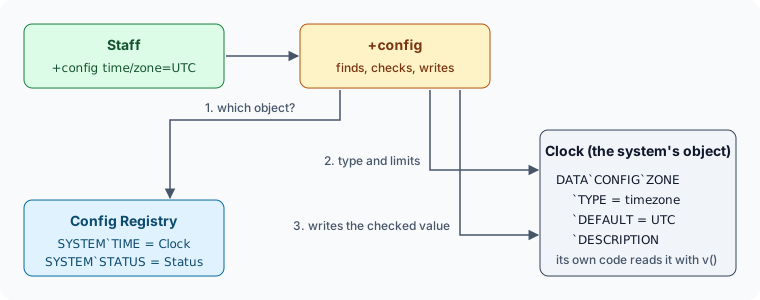
Section titled “Giving your code settings”A system keeps its settings on its own object, under DATA`CONFIG, and registers that object.
+config finds the object through the registry, reads what each setting accepts from the object,
and writes a value back to it only once the value passes:
For example, a weather report that changes every half hour, picks from a list of skies and
follows a season. Each setting is one attribute holding the value, with leaves under it.
DATA`CONFIG holds what the system covers and DATA`CONFIG`LABEL its display name:
> @create WeatherCreated: Object #28.> &DATA`CONFIG Weather=How the weather report behaves.Weather/DATA`CONFIG - Set.> &DATA`CONFIG`LABEL Weather=Weather reportWeather/DATA`CONFIG`LABEL - Set.> &DATA`CONFIG`SEASON Weather=springWeather/DATA`CONFIG`SEASON - Set.> &DATA`CONFIG`SEASON`TYPE Weather=choiceWeather/DATA`CONFIG`SEASON`TYPE - Set.> &DATA`CONFIG`SEASON`CHOICES Weather=spring summer autumn winterWeather/DATA`CONFIG`SEASON`CHOICES - Set.> &DATA`CONFIG`SEASON`DEFAULT Weather=springWeather/DATA`CONFIG`SEASON`DEFAULT - Set.> &DATA`CONFIG`SEASON`LABEL Weather=SeasonWeather/DATA`CONFIG`SEASON`LABEL - Set.> &DATA`CONFIG`SEASON`DESCRIPTION Weather=The season the weather follows.Weather/DATA`CONFIG`SEASON`DESCRIPTION - Set.> &DATA`CONFIG`EVERY Weather=1800Weather/DATA`CONFIG`EVERY - Set.> &DATA`CONFIG`EVERY`TYPE Weather=durationWeather/DATA`CONFIG`EVERY`TYPE - Set.> &DATA`CONFIG`EVERY`DEFAULT Weather=1800Weather/DATA`CONFIG`EVERY`DEFAULT - Set.> &DATA`CONFIG`EVERY`MIN Weather=300Weather/DATA`CONFIG`EVERY`MIN - Set.> &DATA`CONFIG`EVERY`LABEL Weather=Change everyWeather/DATA`CONFIG`EVERY`LABEL - Set.> &DATA`CONFIG`EVERY`EXAMPLE Weather=45mWeather/DATA`CONFIG`EVERY`EXAMPLE - Set.> &DATA`CONFIG`EVERY`DESCRIPTION Weather=How often the weather changes.Weather/DATA`CONFIG`EVERY`DESCRIPTION - Set.> &DATA`CONFIG`SKIES Weather=clear|light rainWeather/DATA`CONFIG`SKIES - Set.> &DATA`CONFIG`SKIES`TYPE Weather=listWeather/DATA`CONFIG`SKIES`TYPE - Set.> &DATA`CONFIG`SKIES`DELIMITER Weather=|Weather/DATA`CONFIG`SKIES`DELIMITER - Set.> &DATA`CONFIG`SKIES`DEFAULT Weather=clear|light rainWeather/DATA`CONFIG`SKIES`DEFAULT - Set.> &DATA`CONFIG`SKIES`MIN Weather=1Weather/DATA`CONFIG`SKIES`MIN - Set.> &DATA`CONFIG`SKIES`LABEL Weather=SkiesWeather/DATA`CONFIG`SKIES`LABEL - Set.> &DATA`CONFIG`SKIES`DESCRIPTION Weather=The skies the report picks from.Weather/DATA`CONFIG`SKIES`DESCRIPTION - Set.> +config/register weather=Weather[CONFIG] Done: weather is Weather's settings. +config weather lists them.> +config weather╔════════════════════════╡ Settings: Weather report ╞════════════════════════╗║ How the weather report behaves. ║║ ║║ Setting Value Allowed What it does ║║ -------------------------------------------------------------------------- ║║ every 30m A length of time, at Change every. How ║║ least 5m often the weather ║║ changes. ║║ season spring Spring, summer, Season. The season the ║║ autumn, or winter weather follows. ║║ skies clear, light rain Items separated by |, Skies. The skies the ║║ at least 1 item report picks from. ║╠════════════════════════════════════════════════════════════════════════════╣║ +config weather/<setting>=<value> changes one. ║╚════════════════════════════════════════════════════════════════════════════╝An EXAMPLE leaf, written as staff would type the value, is shown as a whole +config line:
> +config weather/every╔══════════════════════════════╡ weather/every ╞═════════════════════════════╗║ Name: Change every ║║ Value: 30m ║║ Default: 30m ║║ Allowed: A length of time, at least 5m ║║ Example: +config weather/every=45m ║║ What it does: How often the weather changes. ║║ Changed by: The config.admin permission ║╠════════════════════════════════════════════════════════════════════════════╣║ +config weather/every=<value> sets it, /reset goes back to the default. ║╚════════════════════════════════════════════════════════════════════════════╝+config/register needs config.admin. +config/unregister weather drops the registration and
leaves the settings on the object.
The value is stored in the form your code can use at once: a duration in seconds, a yes or no as
1 or 0, a list joined by its delimiter. The code reads it where it lives, with v() on the
object or get() from elsewhere, and needs nothing from plus-config to do so:
> +config weather/every=10m[CONFIG] Done: weather/every is now 10m, was 30m.> +config/add weather/skies=fog|Clear[CONFIG] Done: weather/skies is now clear, light rain, fog, was clear, light rain.> think get(Weather/DATA`CONFIG`EVERY) [get(Weather/DATA`CONFIG`SKIES)]600 clear|light rain|fogClear was already in the list as clear, so /add kept the one there.
| Type | Accepts | Stored as |
|---|---|---|
text | anything | as typed |
integer | a whole number | the number |
number | any number | the number |
boolean | yes, no, on, off, true, false, 1, 0 | 1 or 0 |
duration | 4h, 30m, 1d 12h, or seconds | seconds |
choice | one word of CHOICES, in any case | as CHOICES writes it |
list | items split on DELIMITER, a space when it has none | the same, each once, in the order given |
pattern | a regular expression | as typed |
object | a name or dbref the person setting it can find | objid |
timezone | a zone such as Europe/London | as typed |
table | named entries, each with the fields it declares | on another object; see Tables |
Leaves
Section titled “Leaves”| Leaf | What it says |
|---|---|
TYPE | Required. One of the types above. |
DEFAULT | What /reset writes, in stored form. |
DESCRIPTION | One line: what the setting changes. |
LABEL | Its display name, such as Change every, shown before the description and at the top of its screen. |
EXAMPLE | A value written as staff would type it, shown as a whole +config line. |
MIN, MAX | Bounds: a number’s value, a duration in seconds, a text’s length, a list’s number of items. |
CHOICES | The words a choice takes, or the items a list may hold. |
PATTERN | A regular expression a text, or each item of a list, must match. |
DELIMITER | What splits a list’s items, such as | for items with spaces in them. |
OBJECTTYPE | For object: any of ROOM PLAYER THING EXIT. |
CHECK | The name of an attribute on the same object. It gets the value as stored in %0 and the setting in %1 (for a table’s field, also the entry in %2 and the field in %3), and returns nothing when the value is fine, or the reason it is not. |
PERMISSION | The permission that changes this setting, in place of config.admin. |
DATA`CONFIG`LABEL, beside the settings, is the system’s display name, so no setting may be called
label.
A CHECK covers anything a type cannot say. The time package’s month names are a list of at most
twelve, and its CHECK refuses any number but twelve or none:
> +config time/ic-months=Thaw|Seed[CONFIG] Warning: time/ic-months: Give all 12 names, or none for the real ones.Tables
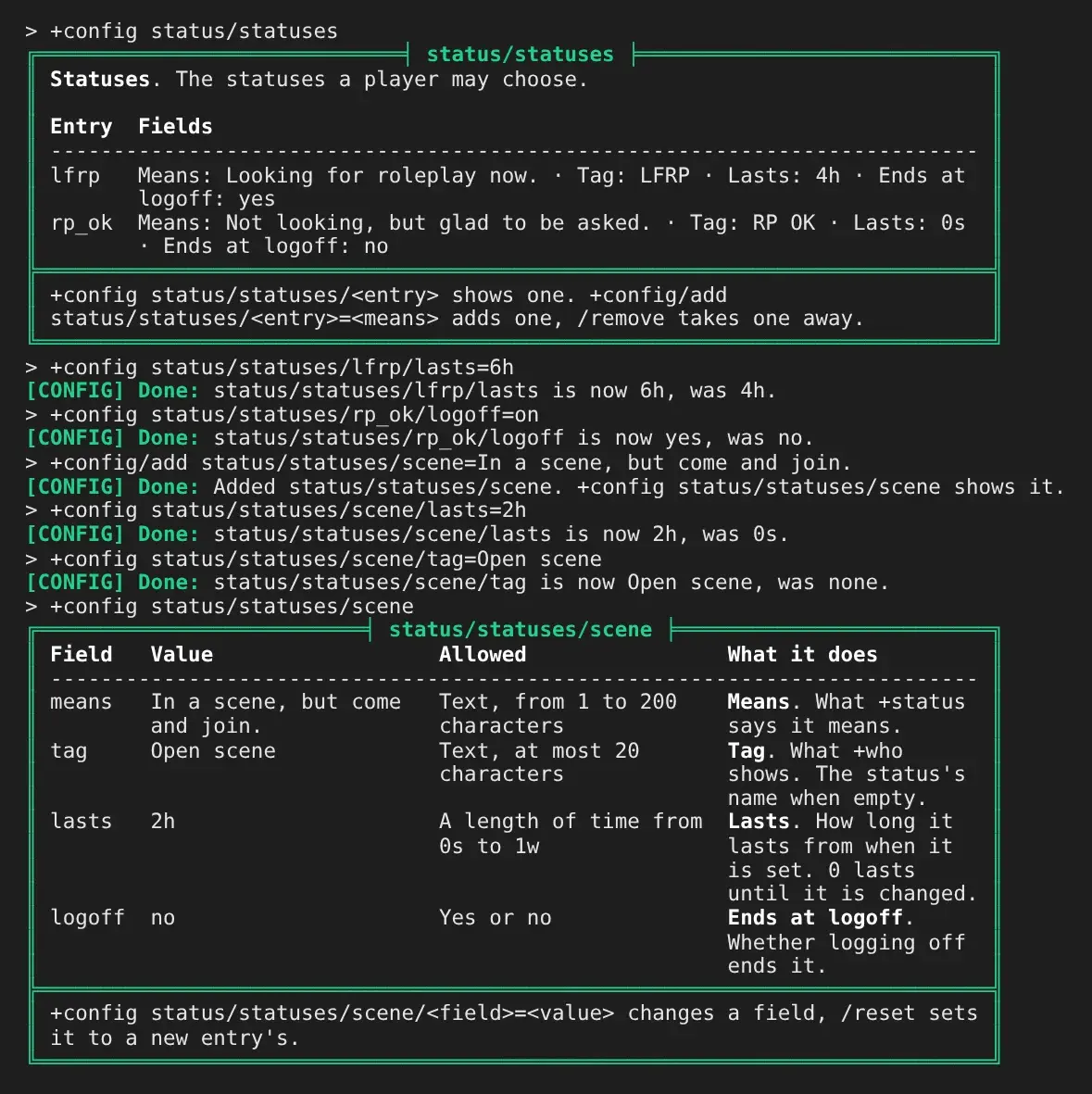
Section titled “Tables”A table is a set of named entries that each have the same fields. The statuses a player may
choose are one: each has what it means, a tag, how long it lasts and whether logging off ends it.
+config changes one field of one entry at a time, and /add and /remove add and take away
entries:
| Type | To |
|---|---|
+config <system>/<table> | list the entries, each with its fields on one line |
+config <system>/<table>/<entry> | show one entry: each field, its value, what it takes |
+config <system>/<table>/<entry>/<field>=<value> | change one field |
+config/add <system>/<table>/<entry>=<value> | add an entry; the value is its main field |
+config/remove <system>/<table>/<entry> | take an entry away |
+config/reset <system>/<table>/<entry>/<field> | put a field back to what a new entry gets |
The entries are not kept in the setting. They stay on the object the system’s code already reads
them from, its STORE, under the attribute branch PATH: <PATH>`<ENTRY> holds the entry’s main
field, its ENTRY, and each other field is an attribute beneath it, <PATH>`<ENTRY>`<FIELD>.
Each field is declared like a setting, under FIELD`<field>, with its own TYPE, DEFAULT,
LABEL, DESCRIPTION, bounds and CHECK. For example, a map’s regions, each with a name and a
danger level from 1 to 5, kept on a Region Store:
> @create RegionsCreated: Object #30.> @create Region StoreCreated: Object #31.> @set Region Store=NO_COMMANDRegion Store - NO_COMMAND (already) set.> &DATA`CONFIG`REGIONS`TYPE Regions=table> &DATA`CONFIG`REGIONS`LABEL Regions=Regions> &DATA`CONFIG`REGIONS`DESCRIPTION Regions=The regions of the map.> &DATA`CONFIG`REGIONS`STORE Regions=[num(Region Store)]> &DATA`CONFIG`REGIONS`PATH Regions=REGION> &DATA`CONFIG`REGIONS`ENTRY Regions=name> &DATA`CONFIG`REGIONS`FIELDS Regions=name danger> &DATA`CONFIG`REGIONS`FIELD`NAME`TYPE Regions=text> &DATA`CONFIG`REGIONS`FIELD`DANGER`TYPE Regions=integer> &DATA`CONFIG`REGIONS`FIELD`DANGER`DEFAULT Regions=1> &DATA`CONFIG`REGIONS`FIELD`DANGER`MAX Regions=5> +config/register regions=Regions[CONFIG] Done: regions is Regions's settings. +config regions lists them.> +config/add regions/regions/coast=The Salt Coast[CONFIG] Done: Added regions/regions/coast. +config regions/regions/coast shows it.> +config regions/regions/coast/danger=3[CONFIG] Done: regions/regions/coast/danger is now 3, was 1.> +config regions/regions/coast/danger=9[CONFIG] Warning: regions/regions/coast/danger: It must be at most 5.> think lattr(Region Store/**)REGION REGION`COAST REGION`COAST`DANGERThe Set. reply to each & line is left out above. REGIONCOASTholdsThe Salt CoastandREGIONCOASTDANGERholds3, where the Regions code reads them with get()`.
| Leaf | What it says |
|---|---|
STORE | The object the entries are on; the system’s own object when it has none. |
PATH | Required. The attribute branch the entries are under, such as STATUS. |
ENTRY | The field kept in the entry’s own attribute, which /add <entry>=<value> sets. Without it, the entry’s attribute holds its name and /add takes no value. |
FIELDS | The fields, in the order they are shown. |
FIELD`<field>`<leaf> | One field, with any leaf a setting takes. |
KEYPATTERN | A regular expression a new entry’s name must match, besides being letters, digits, - and _. |
FIXED | 1 when staff may change the fields but not add or take away entries. |
+config writes to a store only when it has the same owner as the system’s object, and only when
nothing written there can run as a command: the store needs the NO_COMMAND flag, or its PATH
attribute the no_command attribute flag. A new entry gets each field’s DEFAULT.
Reacting to a change
Section titled “Reacting to a change”After a value changes, +config triggers the object’s ACONFIG attribute, if it has one, with
%<setting>, %<value> (stored form), %<previous> and %<by> (who changed it, as an objid).
%<action> is set; a table’s change also gives %<entry> and %<field>, and %<action> is
add or remove when an entry comes or goes. A removal is where a system tidies up after the
entry: status clears the status from everyone who had it.
> &ACONFIG Weather=@pemit %<by>=The weather now follows %<value>, not %<previous>.Weather/ACONFIG - Set.> +config weather/season=autumn[CONFIG] Done: weather/season is now autumn, was spring.The weather now follows autumn, not spring.In a package
Section titled “In a package”A package declares the same attributes on its own object and registers by attaching one leaf to
the Config Registry, the way it registers its help with +help. It depends on plus-config.
A package that should also run without +config keeps the attributes and leaves the registration
to a bridge package, as scene does with scene-config:
depends:  - package: plus-config    version: ">=1.0"    source:      repo: https://github.com/SharpMUSH/SharpMUSH      path: examples/packages/plus-config/      branch: main
objects:  - ref: weather    type: thing    name: Weather    attributes:      DATA`CONFIG:        value: |-          How the weather report behaves.        flags: [no_command]      DATA`CONFIG`EVERY: |-        1800      DATA`CONFIG`EVERY`TYPE: |-        duration      DATA`CONFIG`EVERY`DEFAULT: |-        1800      DATA`CONFIG`EVERY`MIN: |-        300      DATA`CONFIG`LABEL: |-        Weather report      DATA`CONFIG`EVERY`DESCRIPTION: |-        How often the weather changes.      DATA`CONFIG`EVERY`LABEL: |-        Change every      DATA`CONFIG`EVERY`EXAMPLE: |-        45m
  - ref: config_registration    target: "{{plus-config/registry}}"    attributes:      SYSTEM`WEATHER: |-        {{weather}}
no_command on DATA`CONFIG reaches every leaf below it. Installing writes the registration,
and uninstalling removes it with the package’s object and its values. A package’s registration
cannot be dropped with +config/unregister.
Write the value and its DEFAULT with the same text. When the package is upgraded, a value staff
changed is kept, and one nobody changed follows a new default. When an upgrade changes the default
of a value staff also changed, the review screen asks which to keep. See
Versioning Packages.