

Structure
box() and rule() create titled boundaries. flex() and item() place related sections
together and stack them when space is tight.
SharpMUSH softcode can describe a display once and let each reader receive the form that works for them. A terminal gets carefully aligned text and box-drawing characters. The web portal gets responsive page structure and real images. A screen reader gets the same information in reading order, without decorative borders getting in the way.
That makes layouts useful for more than decoration: they give a game a recognisable visual language while keeping the content adaptable.
Structure
box() and rule() create titled boundaries. flex() and item() place related sections
together and stack them when space is tight.
Information
fields(), tree(), bullets(), grid(), datatable(), and datacolumns() express the
meaning of a display instead of baking it into spaces.
Status
gauge(), badge(), and gradient() add visible state while retaining text and numeric meaning.
Images
image() sends a picture with a description. figure() pairs that picture with terminal art,
surrounding content, and an accessible description.
Layouts can nest. A fields() or flex() on a line of its own inside box() becomes structured
content inside that box; a rule() becomes a real divider. Use an empty width or auto to draw for
each reader’s reported width rather than assuming an 80-column terminal.
think box(fields({{"cols":2}},Name,Mannaz Byron,Species,Human,Calling,Dark Warrior,Status,Ready),Character,60,{{"theme":"fantasy","border":"rounded"}})A Unicode terminal receives a rounded, themed character card. A client without Unicode receives an
ASCII border. In the portal, the fields become responsive page structure. For a screen reader, the
border disappears and the content is read as Name: Mannaz Byron, Species: Human, and so on.
datatable(), flex(), tree() and node() take one argument per row, item or child. When the
code only learns how many there are as it runs, use the list form: ldatatable(), lflex(),
ltree() or lnode() take them as one list and a delimiter, so a single iter() builds the whole
display.
think ldatatable({{"width":40,"nowrap":"2"}},Name|>Level|Class,iter(Mannaz:12:Dark Warrior^Raya:9:Bard^Wren:4:Sky Pirate,edit(##,:,|),^,^),^)Name Level Class---------------------------Mannaz 12 Dark WarriorRaya 9 BardWren 4 Sky PirateIn the web portal the table, the row from lflex() and the tree from ltree() are page structure:
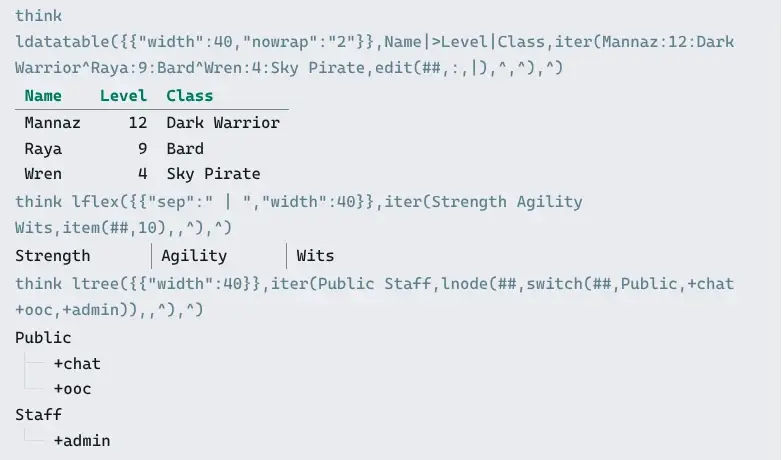
The cells of each row are still split by |; the rows are split by ^, the last argument. Pick a
row delimiter that never appears in the content. A list of layouts, such as nodes for ltree(),
needs one that never appears in their drawn text either: borders and tree guides contain | and
spaces. A marked delimiter, as in the next example, can’t collide with either.
Any delimiter you pick by hand can turn up in what a player types. A motto of Dark|Light splits
into two cells. Mark the delimiter instead: %*<|> is a | that list and layout functions split
on only where it is marked, so a | a player typed stays inside its cell.
&MOTTO`MANNAZ me=Dark|Light&MOTTO`RAYA me=Bard^Poetthink ldatatable({{"width":30,"delim":"%*<|>"}},Name%*<|>Motto,iter(lattr(me/MOTTO`*),[after(##,`)]%*<|>[unmark(v(##))],%b,%*<^>),%*<^>)Name Motto------------------MANNAZ Dark|LightRAYA Bard^Poet%*<|> separates the cells and %*<^> the rows. Write the cell delimiter into the options as it
is; json() builds plain text and would drop the mark. A player can type %*<|> too, so put text
a player typed through unmark() before it goes into a list. It keeps the colour and takes the mark
off. secure() and escape() take it off as well.
datacolumns() takes the table a column at a time: each argument is a heading and then its cells.
A list of names from iter() or lvplayers() becomes a column once its heading is put in front.
When a cell can hold a space, as an exit name can, split the cells by %r and set delim to
%r. Any list inside the options, such as grow, is split the same way.
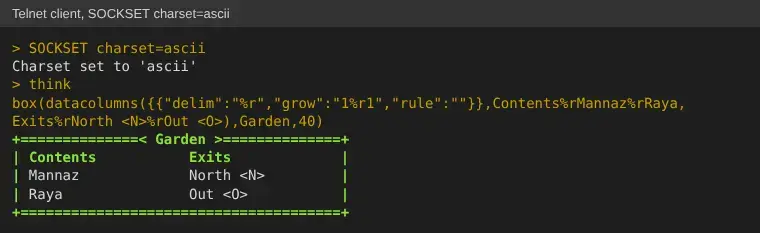
think box(datacolumns({{"delim":"%r","grow":"1%r1","rule":""}},Contents%rMannaz%rRaya,Exits%rNorth <N>%rOut <O>),Garden,40)+==============< Garden >==============+| Contents Exits || Mannaz North <N> || Raya Out <O> |+======================================+Each column grows to share the width, and "rule":"" leaves out the line under the headings. A
telnet client without UTF-8 gets the ASCII box above; the web portal draws a table in a frame:
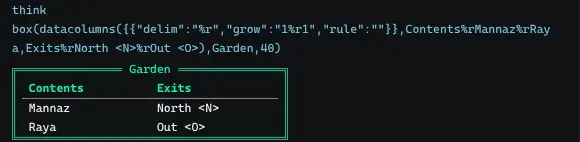
In a room’s @conformat, build the columns from the room itself, with %r between the cells:
@conformat here=box(datacolumns({{"delim":"%r","grow":"1%r1","rule":""}},Contents%r[iter(lvplayers(%!),name(##),%b,%r)],Exits%r[iter(lexits(%!),name(##),%b,%r)]),name(%!))A layout option it cannot read is named in the error. With delim set to %r but grow still
written as "1|2", the result is #-1 LAYOUT OPTION GROW: INVALID ARGUMENT.
Every layout is drawn in a layout theme: the game’s layout_theme, a player’s own @theme, or one a
layout names with its "theme" option. A theme controls borders, titles, headings, field labels,
bullets, tree guides, gauges, and the quieter separators between them. Nothing essential should
depend on colour alone: the text, values, and structure remain present. A player’s @theme changes
layouts sent to MU* clients; it does not override the portal’s own theme.
Layout Themes covers choosing, adding and inheriting themes.
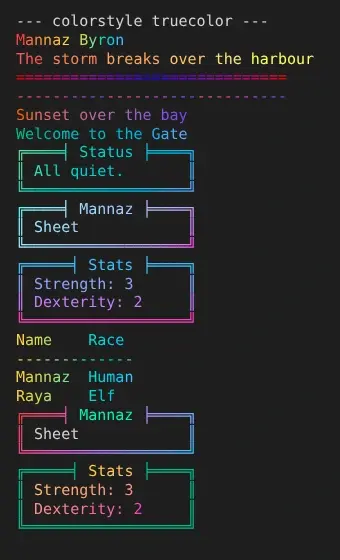
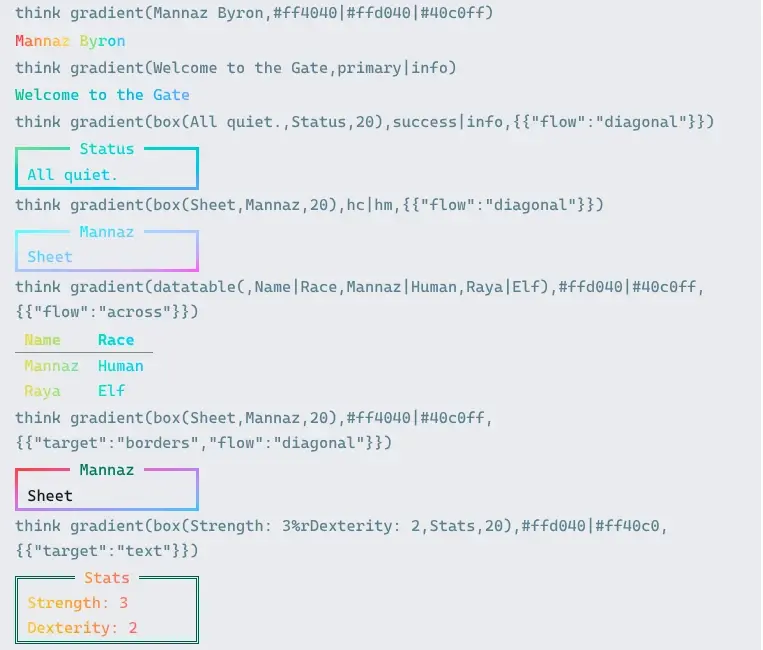
gradient() blends colours one into the next across text or a whole layout. Given a layout, it
shades the box, its title and its text together, over the colours the theme would give them:
think gradient(box(Sheet,Mannaz,20),hc|hm,{{"flow":"diagonal"}})The colours can be ansi() codes, #rrggbb values, or theme colours named as tone() names them,
such as primary|info. A theme colour follows the game’s layout_theme, so the gradient stays in
the theme’s palette when the theme changes. The "target" option shades only the box drawing
("borders") or only the text ("text"), and the other part keeps its theme colour:
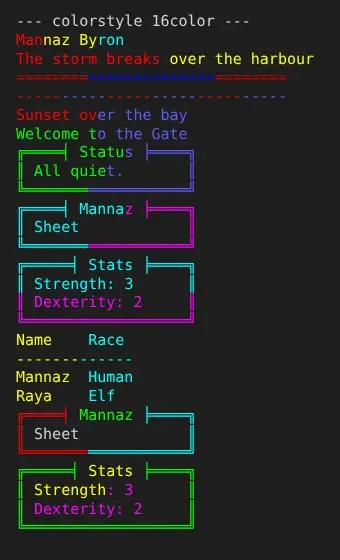
think gradient(box(Sheet,Mannaz,20),#ff4040|#40c0ff,{{"target":"borders","flow":"diagonal"}})think gradient(box(Strength: 3%rDexterity: 2,Stats,20),#ffd040|#ff40c0,{{"target":"text"}})A blend needs a client with 256 colours or more. A client with only the sixteen standard colours
gets bands of the colours you named instead, each character in the nearest one. terminfo() shows
which a connection gets, and SOCKSET colorstyle=truecolor asks for more when a client reports
less than it can show.
help gradient() in the game lists every option, with an example of each.
image() is appropriate for a standalone picture. figure() is the richer layout primitive: it
can show a real image in capable clients, text art in a terminal, descriptive text when neither is
available, and content flowing beside it.
think box(figure(https://images.example.org/mannaz.png,Mannaz Byron wearing dark armour,/|_/|%r=^.^=%r%b> <,left,fields(,Species,Human,Calling,Dark Warrior)),Mannaz Byron,44)The description is not optional polish. It gives a screen reader the image’s meaning and remains the fallback when a client can show neither the picture nor terminal art. Terminal art is a presentation fallback, not alternative text; keep the description useful even when the art is removed.
Markdown images follow the same model:
Capable clients receive the picture. Text readers receive the description. An image alone in its paragraph is treated as a figure; an image inside a sentence stays inline.
fields(), flex(), tree(), tables, or another layout primitive.box() and rule() to establish the game’s repeated visual language.