
Secrets
A secret is a password, token or key the server uses for itself: the SQL password, a bot’s
token, a webhook’s signing key. SharpMUSH keeps each one under a name, such as sql.password, and
never shows a value again once it is set.
- The world stores a secret only encrypted. The key that decrypts it is in the server’s key ring, which is kept beside the world, not in it. A copy of the world on its own opens no secret.
@secretand the portal’s Secrets page set and clear secrets. Neither can show a value.- Softcode cannot read a secret. No function returns one.
- An operator can give a secret from outside the game instead, as an environment variable or a file.
This page covers:
- Setting a secret in the game
- Setting a secret in the portal
- Giving a secret from outside the game
- Secrets for web requests
- Importing from PennMUSH
- Backups and the key ring
- Secrets in plugins
Setting a secret in the game
Section titled “Setting a secret in the game”You need the config.admin permission.
> @secret sql.password=hunter2sql.password is set. Its value is never shown again.The command is not evaluated: what you type after = is stored as it is, brackets, % and further
= signs included.
@secret on its own lists the secrets the server reads, and any others that are stored:
> @secret+-------------------------------< Secrets (1) >------------------------------+| Secret Value Stored For || -------------------------------------------------------------------------- || sql.password stored 2026-10-14 23:38 by The password of || God(#1) sql_username on the SQL || server. |+----------------------------------------------------------------------------+The Stored column gives the time in UTC. The Value column says where the value comes from: stored, an environment variable or file
that overrides it, not set, or unreadable: set it again (see
Backups and the key ring).
@secret/clear removes the stored value:
> @secret/clear sql.passwordsql.password is cleared.A name is lower-case letters and digits, in parts joined by ..
Setting a secret in the portal
Section titled “Setting a secret in the portal”Open Admin, then Configuration, then Secrets under Security. The page lists the same
secrets as @secret, with where each value comes from and who stored it. Type a name and a value and
press Save. The value field never fills itself in: the server never sends a value back.
A name that starts with http. adds a Hosts @http may send it to list, since @http sends such
a secret only to the hosts named for it. Type a host and press Enter, a comma or a space to add it;
the × on a host removes it. A listed http. secret with no hosts is marked no hosts; its globe
button edits the hosts in place.
Giving a secret from outside the game
Section titled “Giving a secret from outside the game”An operator who keeps secrets in a deployment tool can hand them to the server directly. A value given this way overrides the stored one, and the server looks in this order:
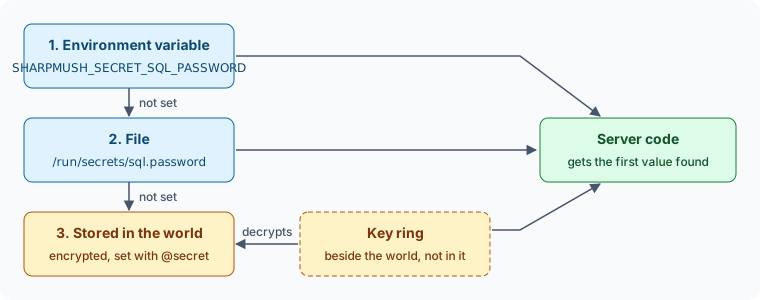
- An environment variable named
SHARPMUSH_SECRET_and the secret’s name in upper case, with.written as_.sql.passwordisSHARPMUSH_SECRET_SQL_PASSWORD. - A file named for the secret in
/run/secrets, the directory Docker Compose and Kubernetes mount secrets into.SHARPMUSH_SECRETS_PATHnames another directory. A newline at the end of the file is not part of the value. - The value stored with
@secretor the portal.
With Docker Compose:
services:  sharpmush-server:    secrets:      - sql.password
secrets:  sql.password:    file: ./sql-password.txt
The server reads the file each time it needs the secret, so replacing the file takes effect without a
restart. @secret shows which variable or file is in use. You can still store a value while an override
is there; it is used once the override is removed.
Importing from PennMUSH
Section titled “Importing from PennMUSH”PennMUSH keeps the SQL password in mush.cnf as sql_password. When you import a mush.cnf in the portal,
on its own or with a PennMUSH database, that value is stored as the sql.password secret, set by your
account, and is not kept with the configuration. If a database import fails and the configuration is put
back, the secret is put back too.
Secrets for web requests
Section titled “Secrets for web requests”Softcode cannot read a secret, but @http can send one in a request header, so a game can log in to
a web service without its password or token ever sitting in an attribute. Two things limit where it
goes:
- Only a secret whose name starts with
http.can be sent. - It goes only to the hosts named for it with
@secret/host, and only overhttps.
> @secret http.github.token=ghp_examplehttp.github.token is set. Its value is never shown again.> @secret/host http.github.token=api.github.com uploads.github.com@http may send http.github.token to: api.github.com uploads.github.com*.example.com covers every host under example.com. @secret/host with nothing after = takes
every host away. The hosts belong to the name, not the value: setting or clearing the value keeps
them, and they hold for a value given as an environment variable or a file. The listing shows them in
the For column. The portal’s Secrets page sets them too.
Calling Web Services shows how softcode names the secret in a request.
Backups and the key ring
Section titled “Backups and the key ring”The key ring is the directory lightning.dataprotection-keys beside the world
(SHARPMUSH_DATAPROTECTION_PATH moves it). The web server signs its cookies and forms with the same
keys.
- A copy of the world made with
@backupholds the secrets encrypted. Restored on a server without the key ring, the world keeps them but cannot read them:@secretlists each one asunreadable: set it again, and you set them again. - Restored together with its key ring, the world’s secrets work as before.
- The key ring replaces its key every 90 days and keeps the old ones. When the server reads a secret written with an older key, it stores it again with the current one, so a retired key can later be removed without losing the secret.
Back up the key ring, but keep its copies apart from the world’s where you can: then neither copy on its own opens a secret.
Secrets in plugins
Section titled “Secrets in plugins”A plugin declares each secret it reads, so @secret and the portal list it with a description even
before it is set. It registers a SecretDefinition from its IServiceRegistrar, and reads the value
through ISecretStore:
public void RegisterServices(IServiceCollection services){  services.AddSingleton(new SecretDefinition(    "discord.token", "The Discord bot's token.", ManagedBy: "discord.admin"));}
// later, in the plugin's own serviceif (await secrets.GetAsync("discord.token") is not string token){  return; // not set, or unreadable on this server}
ManagedBy names a permission that may set this secret besides config.admin. Someone holding
discord.admin sees and sets discord.token and nothing else.
GetAsync answers with the value, with “not found” when nothing sets it, or with an error when the
stored value cannot be decrypted on this server. Never write a value to the log, to an attribute or to
a player.