
Building Portal Applications
This page is for softcoders. It assumes you know how to set attributes and use functions like u(). It builds the Character Application form from start to
finish, then lists everything a page description can hold.
What a page description looks like
Section titled “What a page description looks like”A page description is written in JSON, a common way of writing nested lists of named values. It is built like an outline:
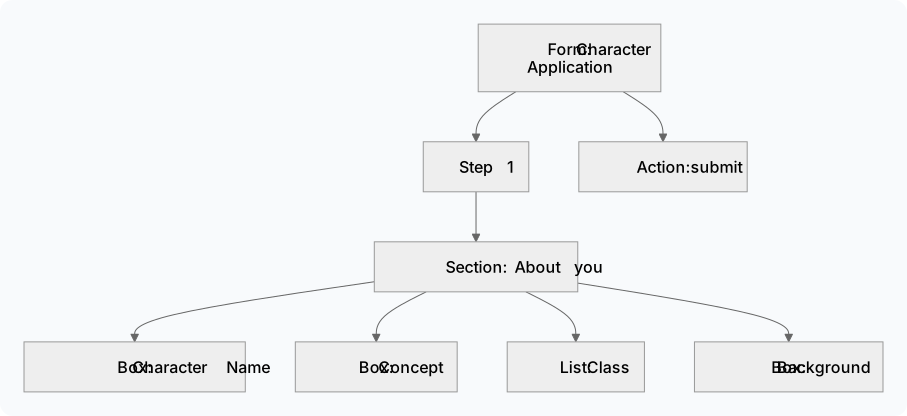
- The form has a title and a list of steps. Most forms have one step; a form with several shows Next and Back buttons.
- Each step has sections. A section is a titled card on the page.
- Each section has elements: boxes to type in, lists to pick from, text, pictures, tables and buttons.
- The form also names its actions: what each button does.
Here is a small form with one box and a Submit button:
{ "kind": "form", "title": "Character Application", "pages": [ { "sections": [ { "name": "About you", "elements": [ { "kind": "field", "key": "charname", "label": "Character Name", "type": "text" } ] } ] } ], "actions": { "submit": { "route": "/http/chargen/submit" } }}"kind": "form"makes it a form. Use"view"for a page that only shows information."key": "charname"is the name the box’s answer is sent under."label"is what the player reads.- An action named
submitputs a Submit button at the bottom. Itsrouteis where the answers go.
Step 1: write the page description in softcode
Section titled “Step 1: write the page description in softcode”You build JSON in softcode with the json() function. json(string,Hello) makes a piece
of text, and json(object,name,value,...) makes a group of named values. Building every
box by hand gets long, so start with two small helper attributes on your HTTP handler:
&FN`FIELD #8=json(object,kind,json(string,field),key,json(string,%0),label,json(string,%1),type,json(string,%2))&FN`CHOICE #8=json(object,value,json(string,%0),label,json(string,%1))FN`FIELDmakes one box. Give it the key, the label and the type:u(FN`FIELD,concept,Concept,text).FN`CHOICEmakes one choice in a list:u(FN`CHOICE,fighter,Fighter).
Now the page description itself. A website request for /http/chargen/schema runs the
attribute GET`CHARGEN`SCHEMA:
&GET`CHARGEN`SCHEMA #8=@respond/type application/json; think json(object, kind,json(string,form), title,json(string,Character Application), pages,json(array,json(object, sections,json(array,json(object, name,json(string,About you), elements,json(array, u(FN`FIELD,charname,Character Name,text), u(FN`FIELD,concept,Concept,text), json(object,kind,json(string,field),key,json(string,class),label,json(string,Class),type,json(string,select), options,json(array, u(FN`CHOICE,fighter,Fighter), u(FN`CHOICE,wizard,Wizard), u(FN`CHOICE,rogue,Rogue))), u(FN`FIELD,background,Background,textarea)))))), actions,json(object, submit,json(object,route,json(string,/http/chargen/submit))))@respond/type application/jsontells the website the answer is JSON.thinksends the page description back to the website.- The Class list is written out in full because it needs
options, the list of choices.
Step 2: answer the Submit button
Section titled “Step 2: answer the Submit button”When the player presses Submit, the website sends their answers to
/http/chargen/submit, which runs POST`CHARGEN`SUBMIT. The answers arrive in %0,
and json_query(%0,extract,$.charname) reads the one typed into the Character Name box.
The attribute must answer with ok set to true or false:
&POST`CHARGEN`SUBMIT #8=@respond/type application/json; think if(strlen(trim(json_query(%0,extract,$.charname))), json(object,ok,json(boolean,true),message,json(string,Thank you! Staff will read your application soon.)), json(object,ok,json(boolean,false),errors,json(object,charname,json(string,Please give your character a name.))))- If the name is filled in, the player sees Thank you! Staff will read your application soon.
- If it is empty, the player sees Please give your character a name. under the
Character Name box. The text goes under that box because the error is filed under
charname, the box’s key.
This example only checks the answers. A real form would also store them, for example with
@mail to staff or by setting attributes on the player.
Step 3: register it and try it
Section titled “Step 3: register it and try it”Register it as in By hand: register it yourself: slug
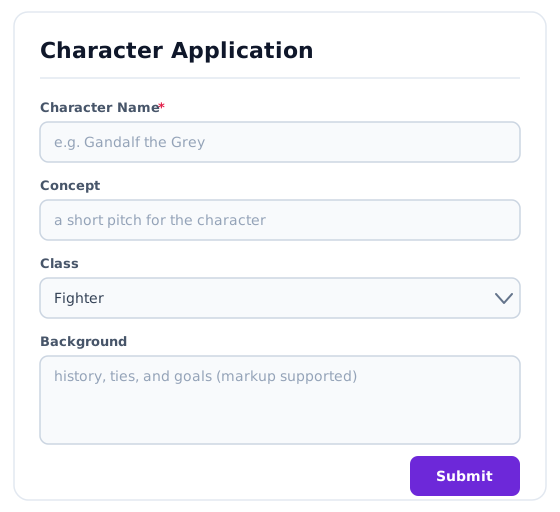
chargen, kind Page, minimum role Player, Schema URL http/chargen/schema, nav
placement Play. Open /apps/chargen and you see:
Changing the form as the player goes
Section titled “Changing the form as the player goes”The website never decides on its own to show or hide a box. When the form should change, the game sends a new page description, and the website draws that one instead.
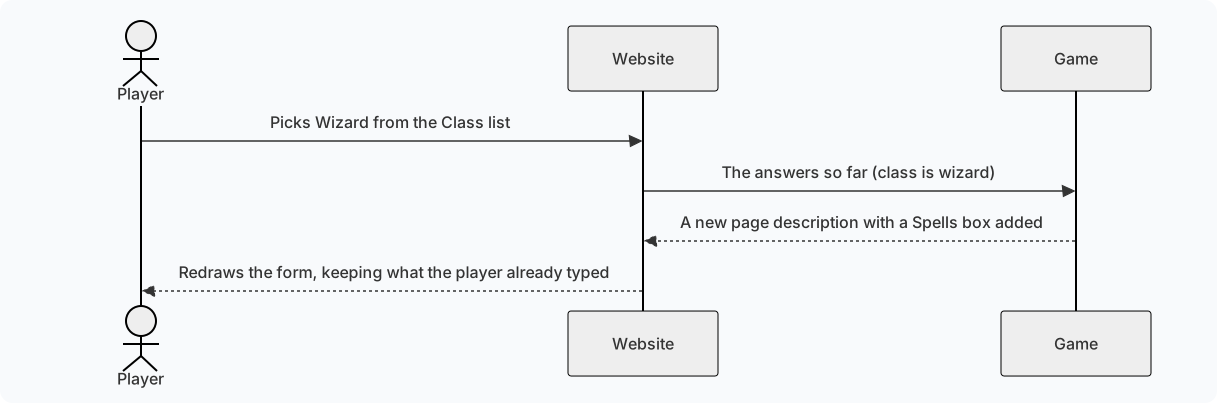
To set this up:
- On the Class box, add
"triggers_action": "class_changed". The website then runs that action whenever the choice changes. - Add a
class_changedaction whose route points at a new attribute. - In that attribute, read
classfrom%0and answer withoktrue and aschema: the whole page description again, with the extra box when the class iswizard.
You can do the same with a button instead: a button element names the action it runs.
Showing information instead of asking for it
Section titled “Showing information instead of asking for it”A view shows information and has no boxes to fill in. A character card, a list of
upcoming scenes and a faction roster are all views. A view’s information comes from a
second route, the Data URL, which answers like this:
{ "fields": { "name": { "value": "Ada" }, "concept": { "value": "Sky pirate with a secret" }, "notes": { "value": "Owes the guild money" } }}The page description lists what to show, in order, using the same keys:
{ "kind": "view", "title": "Character card", "pages": [ { "sections": [ { "elements": [ { "kind": "field", "key": "name", "label": "Name" }, { "kind": "field", "key": "concept", "label": "Concept" }, { "kind": "field", "key": "notes", "label": "Staff notes" } ] } ] } ]}A value that is left out, or marked "visible": false, is not shown. To show staff notes
only to staff, leave notes out of the answer for everyone else. Don’t send it with
"visible": false instead: that only stops the page from showing it, and anyone can still
read it in what their browser received.
On a form, the Data URL fills in boxes before the player starts typing, which is useful for an “edit your profile” page.
Knowing who is looking
Section titled “Knowing who is looking”Every route can tell who is using the website: %<viewer> holds the objid of the
character the person is signed in as, or is empty for a visitor who is not signed in. So
name(%<viewer>) is their character’s name. Use it to decide what each person sees,
and to check they are allowed to do what a button asks. The minimum role only hides the
link; your softcode is what actually protects your data.
%<viewer> is a named argument: @include passes it on to
the route’s steps, but a u() function does not see it, so hand it to one as an argument,
as in u(me/FN`CAN`EDIT,%<viewer>).
Reference
Section titled “Reference”Box types
Section titled “Box types”Each field element has a type:
type | What the player sees |
|---|---|
text | A one-line box. This is the type when none is given. |
textarea | A box several lines tall. |
mstring | A box several lines tall that keeps colour and other markup. |
number | A box for a number, with up and down arrows. |
slider | A slider. Set its ends with min and max in validation. |
boolean | An on/off switch. |
select | A list to pick one choice from. Needs options. |
multiselect | A list to pick several choices from. Needs options. |
radio | A set of round buttons to pick one choice from. Needs options. |
date | A calendar to pick a date from. |
hidden | Nothing. It carries a value along with the answers without showing it. |
A field can also have:
| Setting | What it does |
|---|---|
help | A short hint shown under the box. |
default | The value the box starts with. |
options | The choices for select, multiselect and radio: a list of { "value": "...", "label": "..." }. |
validation | Quick checks the website makes before anything is sent: required (true or false), min and max for numbers, max_length for text, and pattern. Your softcode should still check everything itself. |
triggers_action | An action to run whenever the value changes. |
span | How many columns the box takes when its section has several. |
Other elements
Section titled “Other elements”kind | What it shows | What it needs |
|---|---|---|
markdown | Formatted text, written in Markdown: bold, lists, links and headings. | value: the text. "format": "mstring" draws value as colour markup instead. |
image | A picture. | src_field: the data key holding the picture’s address; alt: a description of it. |
table | A table. | rows_field: the data key holding the rows; columns: a list of { "key": "...", "label": "..." }. A column can also have link, an address with {key} filled from the row; type chip, to show the cell as a chip; and color_key, the row key holding the chip’s colour. empty is shown when there are no rows. |
keyvalue | A list of names and values. A value sent as { "text": "...", "link": "..." } shows as a link. | fields: the data keys to show. |
graph | People or things joined by labelled lines, drawn around one in the middle. | src_field: the data key holding { "nodes": [...], "edges": [...] }. A node has an id, a label, an optional image, and focus on the one in the middle. An edge has from, to, a label, a tone for its colour, and directed for an arrow. link makes each node a link, with {label} or any other node key filled in; empty is shown when there are no edges. |
timeline | A list of dated entries, like comments on a job. | rows_field: the data key holding the entries. |
divider | A line across the section. | Nothing. |
button | A button. | label: its text; action: the action it runs. confirm asks a question first. values adds values to the answers it sends; color and variant style it. |
A section can set "columns": 2 (or more) to put its elements side by side. On a phone
they stack in one column.
Actions
Section titled “Actions”An action needs only a route. It can also have:
| Setting | What it does |
|---|---|
on_success | toast: a message to show when it works. navigate: an address to go to afterwards. merge_fields: fill boxes with the fields the game sends back. reset_fields: empty every box first. |
on_error | bind_field_errors: show errors under their boxes (on unless set to false). |
What a button’s route answers
Section titled “What a button’s route answers”| Setting | What it does |
|---|---|
ok | true if it worked, false if not. Always include it. |
message | A short message to show. |
errors | Problems to show. Each one is filed under a box’s key, or under _global for a problem with the whole form. |
fields | Values to put back into boxes. |
schema | A whole new page description to draw instead. |
data | New information for the page’s tables and lists. |
redirect | An address to go to, such as /apps/chargen/done. |
Longer addresses
Section titled “Longer addresses”An application answers every address under its slug, so /apps/jobs/12 still opens the
Jobs application. Put {path} in the Schema URL or Data URL to pass the rest along:
with http/jobs/data?at={path}, opening /apps/jobs/12 asks for
http/jobs/data?at=12. Anything after a ? in the website address is passed along too.