
Character Applications
Many games read a character before it plays. The chargen package keeps each character’s
application as a draft the player fills in, sends to staff, and talks over with them until
staff approve it. The same application is in the game with +app and in the web portal at
/apps/chargen.

| You are | You want to | Read |
|---|---|---|
| A player | apply for a character | Applying |
| Staff | read, comment on and decide applications | Reviewing |
| Staff | limit how many characters play at once | A cap and a waitlist |
| Staff | change the questions | Changing the form |
| Staff | let a background run over several attributes | Fields in chapters |
| Staff | install it and change its settings | Running applications |
In the game, +help app has the same commands in short form.
How an application moves
Section titled “How an application moves”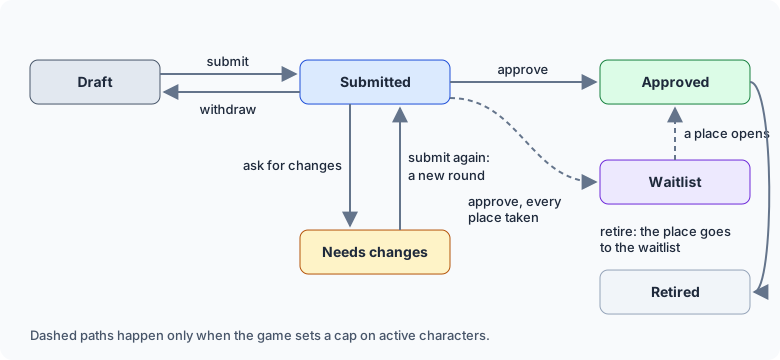
- Draft: the player’s to change. Staff cannot see it until it is first submitted.
- Submitted: staff have it. The player can still comment, and can withdraw it to change something.
- Needs changes: staff sent it back with comments. The player changes what they asked and submits again.
- Approved: the character gets the approved role and plays.
- Waitlist: approved, but every place is taken. It gets the next place that opens. Only when the game sets a cap.
- Retired: the character stopped playing and gave up its place.
Every submission is kept as a round, on the character. Staff see what changed since the round before, field by field.
Applying
Section titled “Applying”+app shows your application. A new one lists the fields with a line about each:
> +app/set concept=A lighthouse keeper who hears the sea talk back.[APP] Done: Concept saved.> +app/set archetype=Mystic[APP] Done: Archetype saved.+app/set <field>=<text> fills in a field, and an empty text clears it. For a long field,
+app/write <field> lets you type as many lines as you like; send .done on a line by itself to
save it. A field that comes in chapters takes
+app/set <field>/<chapter>=<text>.
Each answer is an attribute on your character, named for the field. Only +app changes it, so
staff see every change in the next round:
> examine me/CONCEPTCONCEPT [w #1]: A lighthouse keeper who hears the sea talk back.> &CONCEPT me=A sailor#-1 NO PERMISSION TO SET ATTRIBUTEWhen every required field is filled in, +app/submit sends it to staff and tells you where you
are in the queue:
> +app/submit[APP] Done: Submitted. Number 1 of 1 in the queue. Applications usually get an answer in about 2d.The typical wait is the middle of the latest decisions, so it follows how fast your staff
actually answer. +apps/queue shows the same to anyone, without names, and the places left when
the game has a cap:
> +apps/queue╔══════════════════════════════╡ Applications ╞══════════════════════════════╗║ Waiting: 1 application ║║ Typical wait: about 1d ║║ Places: 3 of 3 taken, 0 waiting ║╚════════════════════════════════════════════════════════════════════════════╝To change something after submitting, +app/withdraw takes it back to a draft.
When staff ask for changes
Section titled “When staff ask for changes”You hear when staff comment or send it back, by @mail if you are not connected. +app then
shows their message at the top and each comment under the section it is about:
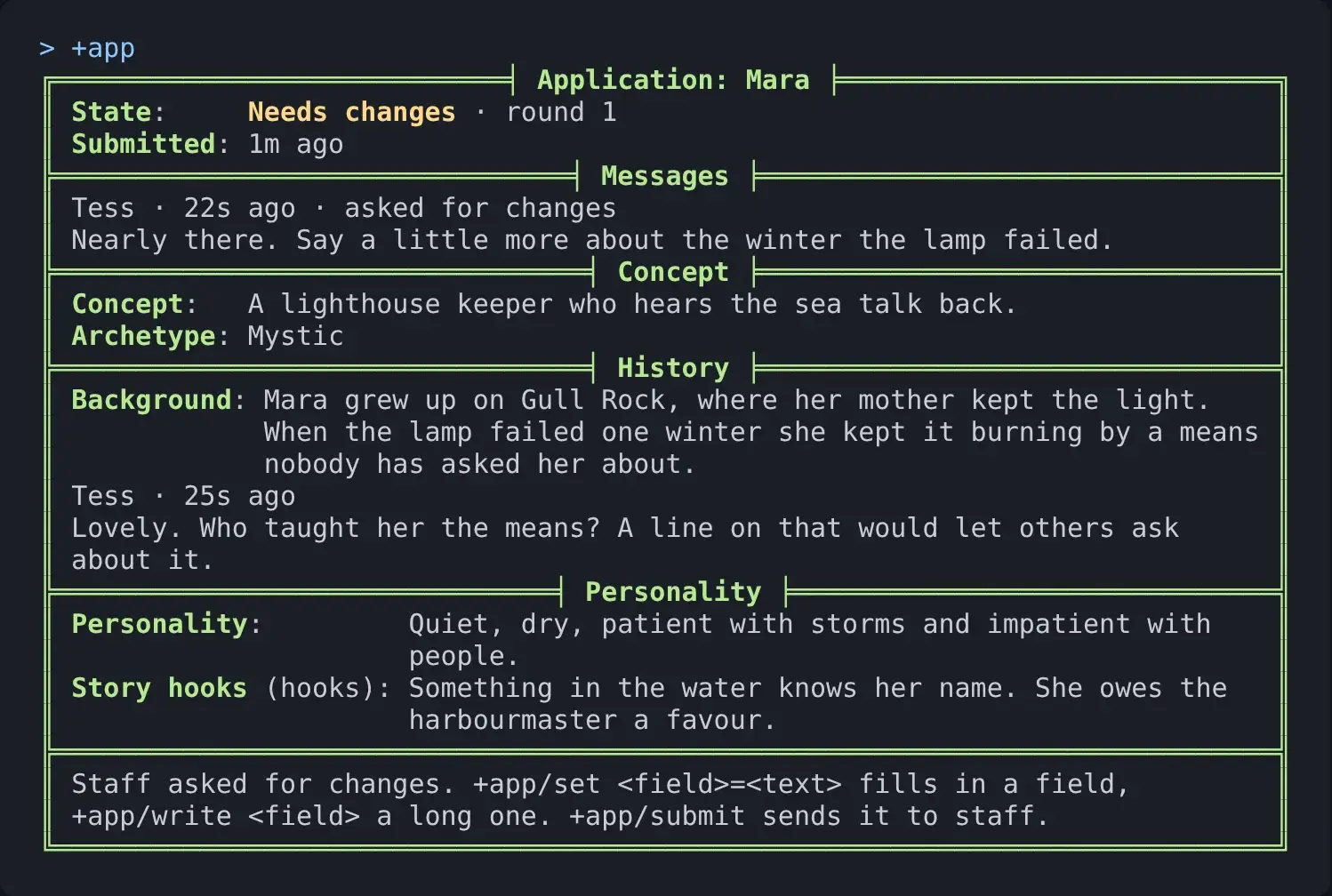
Change what they asked, answer a comment with +app/comment <section>=<text>, and submit again.
+app/comment =<text> is about the whole application.
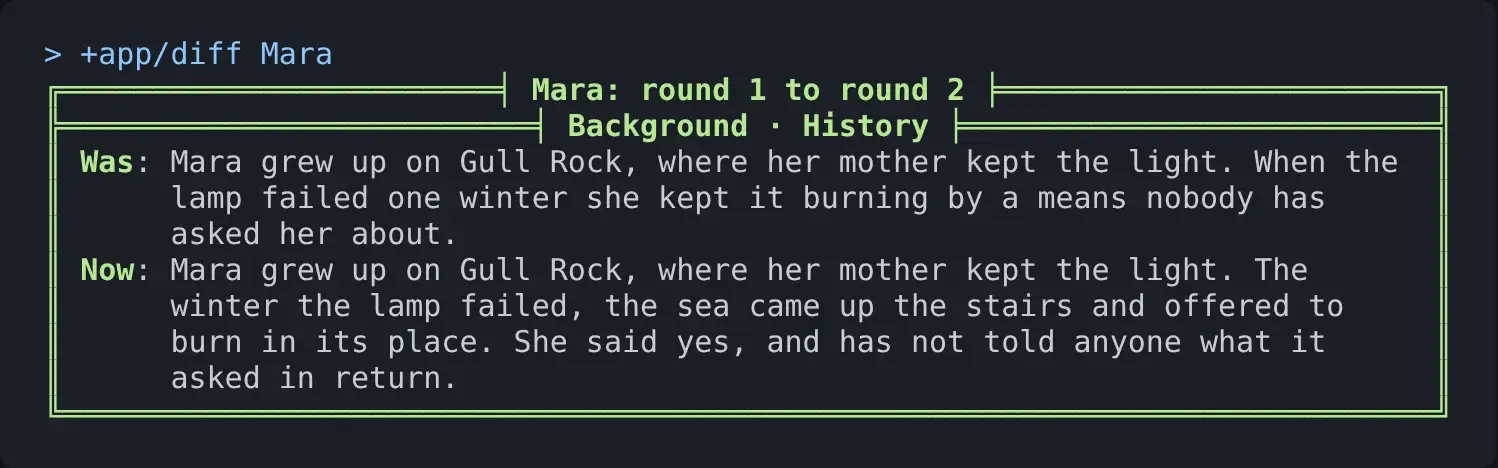
> +app/comment history=Added the bargain. Happy for anyone to ask her about it.[APP] Done: Comment added.> +app/submit[APP] Done: Submitted. Number 1 of 1 in the queue. Applications usually get an answer in about 2d.In +app, a * marks a field you changed since you last submitted. +app/diff lists them with
what each said and says now.
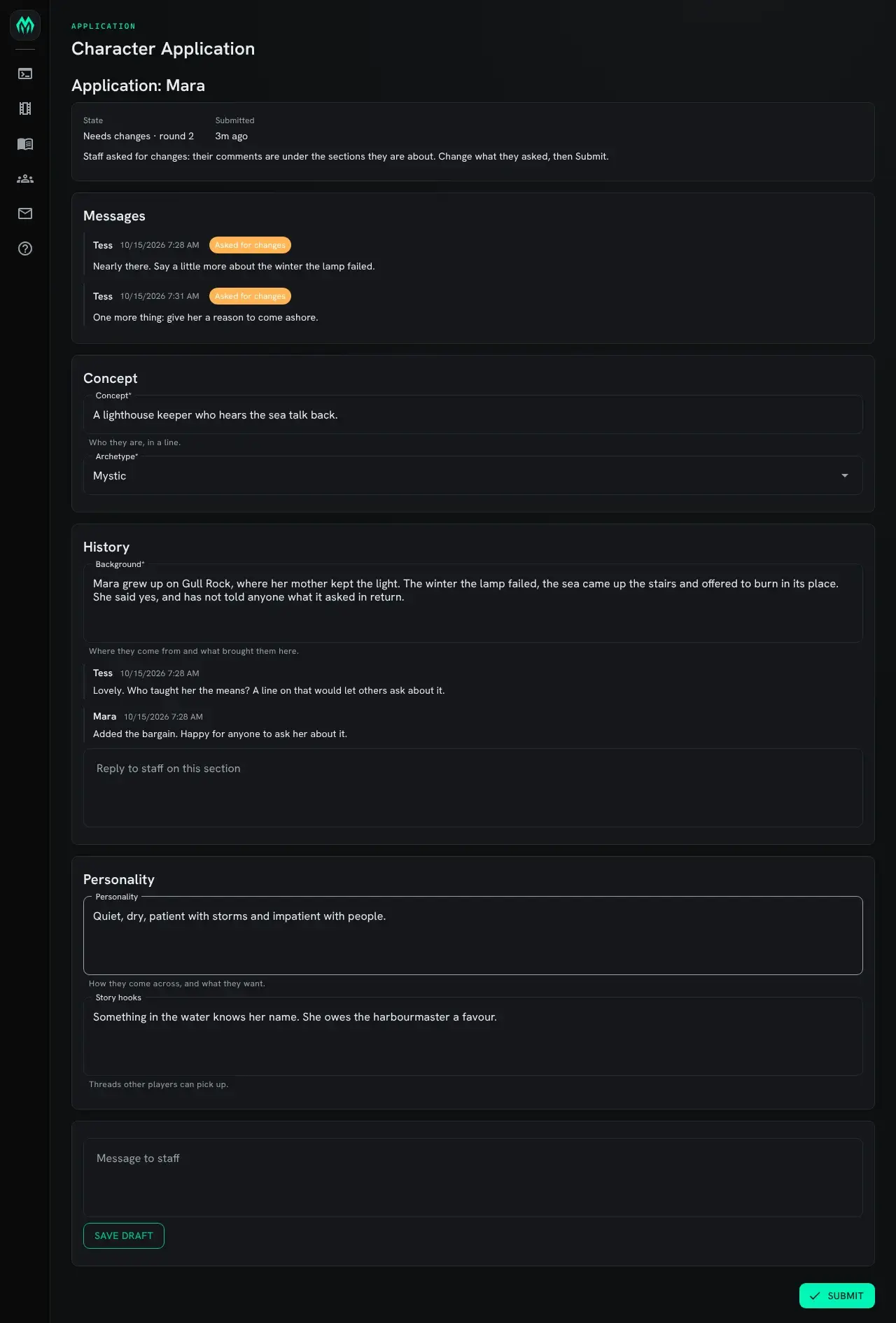
In the portal
Section titled “In the portal”/apps/chargen is the same application as a form. Staff comments sit under the sections they are
about, each with a box to reply. Save draft keeps your changes without sending them;
Submit sends them.
Reviewing
Section titled “Reviewing”Reviewers hold the application-reviewer role:
> @role/assign *Tess=application-reviewerTess now holds application-reviewer.+apps is the queue, the longest waiting first. Changed says how many fields changed since
the round before:

+app <name> reads one application as last submitted. +app/diff <name> shows each field that
changed since the round before; +app/diff <name>=<round> compares with an earlier round.
+apps/waitlist, +apps/all (every application not yet decided) and +apps/decided are the other
lists.
Talking it over
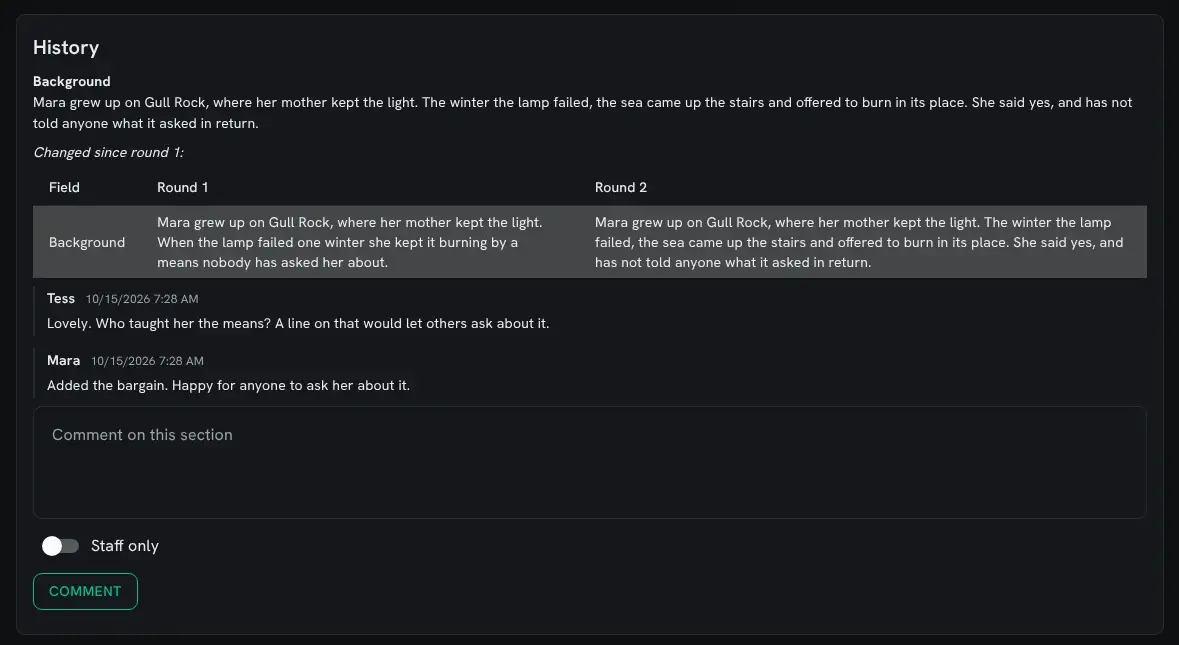
Section titled “Talking it over”Comments belong to a section, so the applicant reads them next to the answers they are about:
> +app/comment Mara/history=Lovely. Who taught her the means? A line on that would let others ask about it.[APP] Done: Comment added.> +app/note Mara/concept=Check with the sea-spirits plot before approving.[APP] Done: Staff note added. Mara does not see it.+app/note is the same as +app/comment, but only reviewers read it.
Deciding
Section titled “Deciding”> +app/return Mara=Nearly there. Say a little more about the winter the lamp failed.[APP] Done: Returned to Mara for changes.+app/return <name>=<what to change>sends it back. The message is required.+app/approve <name>[=<message>]approves it and gives the character the approved role.+app/retire <name>takes an approved character out of play: it loses the role.
Nobody decides their own application, even a wizard.
In the portal
Section titled “In the portal”For a reviewer, the application’s sidebar lists Waiting (the queue), Waitlist, Open and Decided. Waiting and Waitlist show how many are in them:
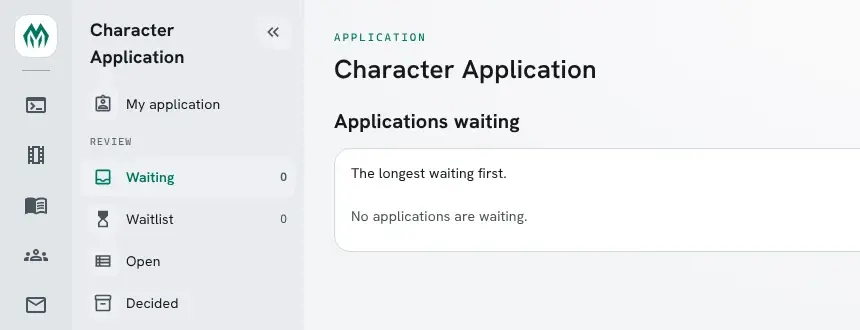
The queue:
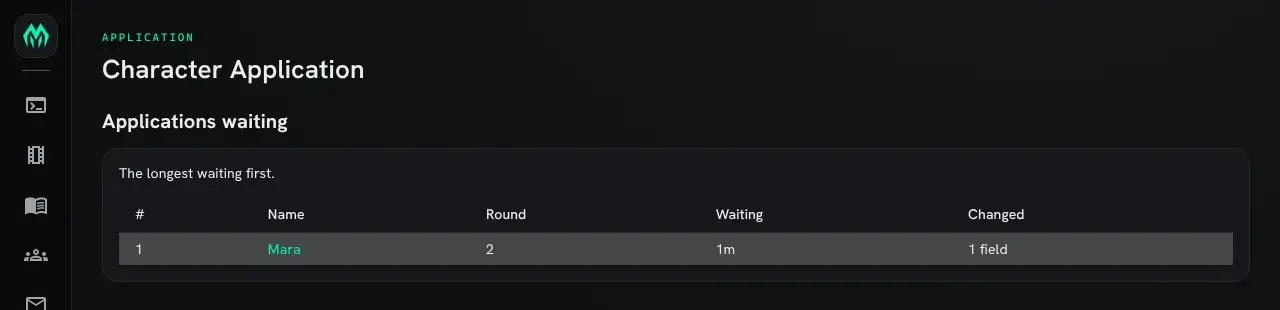
Opening an application shows each section with a table of what changed since the round before, the comments, a box for a new one with a Staff only switch, and at the end Ask for changes and Approve:
A cap and a waitlist
Section titled “A cap and a waitlist”A game can limit how many characters play at once. The cap counts holders of the approved role, and is off until you set it:
> +config chargen/cap=40[CONFIG] Done: chargen/cap is now 40, was 0.With every place taken, approving puts the application on the waitlist. Retiring a character gives its place to the first one waiting, at once:

Raising the cap admits the waitlist into the new places straight away. +config chargen/cap=0
turns the cap off.
Changing the form
Section titled “Changing the form”The questions are the game’s. The form is sections, and fields in them. +apps/fields lists them,
with the attribute each answer is kept in:
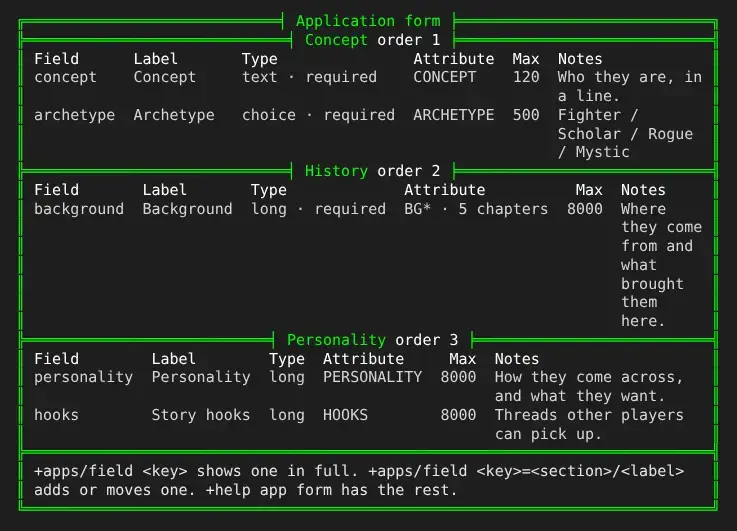
Changing it takes the config.admin permission:
> +apps/section skills=Skills[APP] Done: Added the section Skills. +apps/field <key>=skills/<label> puts a field in it.> +apps/field trade=skills/Trade[APP] Done: Added the field Trade to Skills. +apps/field/type trade=long makes it take many lines.> +apps/field/type trade=choice[APP] Done: Trade type: choice> +apps/field/choices trade=Sailor|Smith|Healer[APP] Done: Trade choices: Sailor|Smith|Healer> +apps/field/required trade=yes[APP] Done: Trade required: yes> +apps/field/help trade=What they do for coin.[APP] Done: Trade help: What they do for coin.Each field has these options, set with +apps/field/<option> <key>=<value>. An empty value puts
one back to its default.
| Option | Value |
|---|---|
label | What the form calls it. |
section | The section it is in. |
type | text (a line), long (paragraphs) or choice. |
choices | For a choice field, the choices, split by ` |
required | yes when it must be filled in before submitting. |
max | The most characters: 500 for text and 8000 for long by default. For a field in chapters, the most in each chapter. |
order | Where it comes in its section. |
help | A line shown under an empty field. |
attribute | The attribute on the character that holds the answer: the key by default. One with a * makes the field come in chapters. |
chapters | For a field in chapters, how many it may have: 20 by default, up to 100. |
+apps/section/order <key>=<number> moves a section; lower comes first.
+apps/field/remove <key> and +apps/section/remove <key> take things out. Answers already given
stay on the characters, and a new attribute does not move them.
Looking at one field
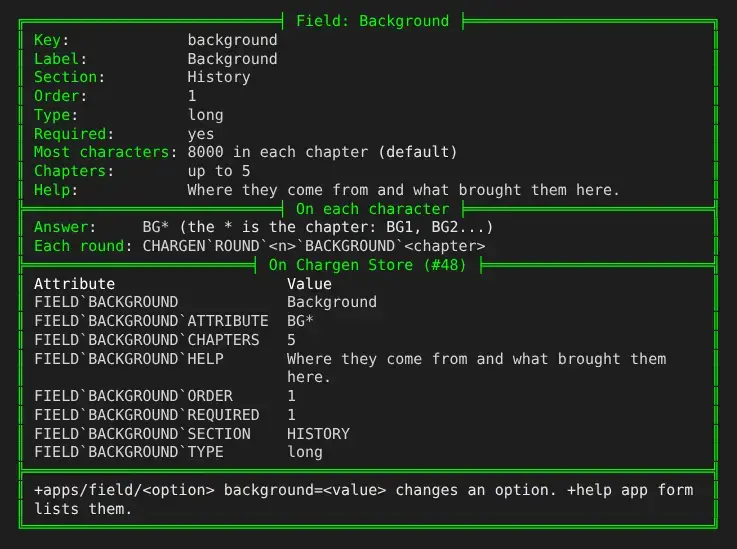
Section titled “Looking at one field”+apps/field <key> shows one field in full: every option, with (default) after the ones the
form leaves unset, the attributes each character keeps it in, and for staff who change the form
the attributes on the Chargen Store that define it:
Fields in chapters
Section titled “Fields in chapters”A long background often outgrows one attribute, and older games keep it as BG1, BG2 and so on. A
field whose attribute has a * in it comes in chapters, and the * stands for the chapter. The
form’s Background field starts that way, as BG*. To do the same for another field, or to change
how many chapters Background allows:
> +apps/field/attribute personality=PERS*[APP] Done: Personality attribute: PERS*> +apps/field/chapters background=5[APP] Done: Background chapters: 5+apps/field/attribute background=BACKGROUND puts Background back in one attribute.
Each chapter is then an attribute of its own, and max is the most characters in one chapter. A
character who already has BG1 and BG2, from an imported database, finds them as chapters 1 and 2.
The player writes a chapter with +app/set <field>/<chapter>=<text> or
+app/write <field>/<chapter>. A chapter is a word of up to 20 letters, digits, - and _,
usually a number, and the field named alone is chapter 1:
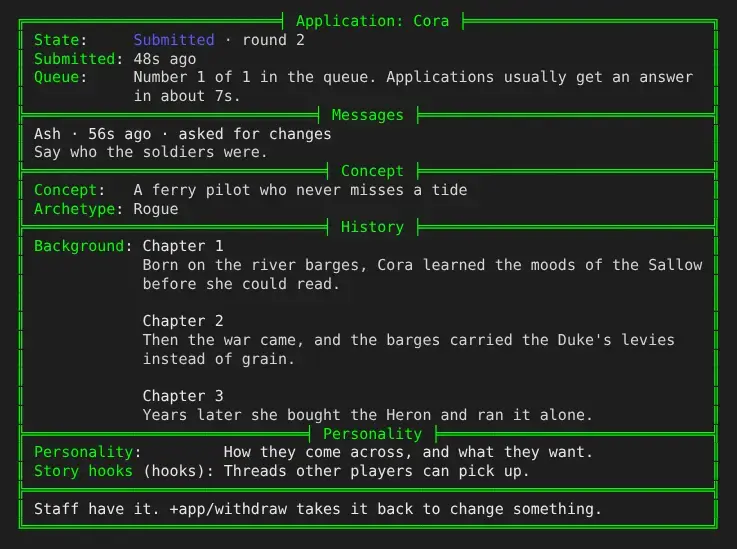
> +app/set background=Born on the river barges, Cora learned the moods of the Sallow before she could read.[APP] Done: Background chapter 1 saved.> +app/set background/2=Then the war came, and the barges carried soldiers instead of grain.[APP] Done: Background chapter 2 saved.+app shows every chapter in order, each under its name:
A submission keeps every chapter, and +app/diff shows only the chapters that changed:

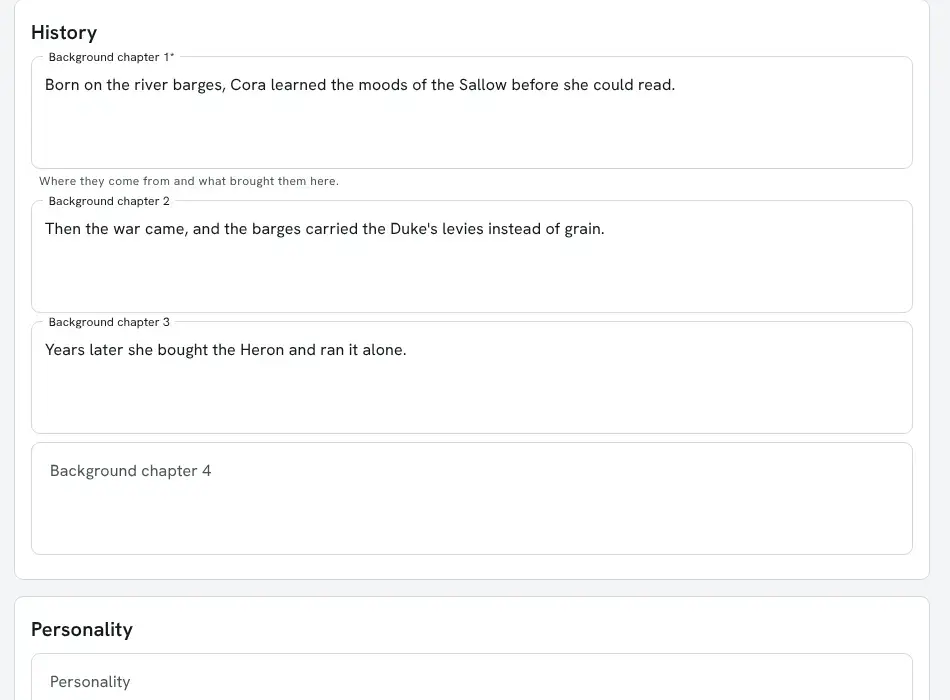
In the portal, each chapter has its own box, with an empty one for the next while there is room:
Running applications
Section titled “Running applications”Installing
Section titled “Installing”Applications ship with the server but are not installed on a new game. An administrator installs them from the portal:
- Open Packages in the admin area and choose Browse.
- Install
chargen, which gives+appand+apps. It needsplus-help,plus-configandhttp-handler; a new game already has them. - Install
chargen-appfor the portal page. It asks for the lowest portal role that may open the page, player by default.
The first-run setup also offers both.
Settings
Section titled “Settings”+config chargen lists the settings; +config chargen/<setting>=<value> changes one.
| Setting | Default | What it does |
|---|---|---|
cap | 0 | The most characters with the approved role. 0 is no cap. |
approved-role | approved | The role approval gives, and what the cap counts. |
show-queue | yes | Applicants see their place and the typical wait, and anyone can use +apps/queue. |
wait-sample | 20 | How many of the latest decisions the typical wait is the middle of. |
mail-offline | yes | Applicants who are not connected hear about decisions and comments by @mail. |
Approval gives the role and nothing else. To do more, set one of these attributes on the
Chargen object (@find Chargen):
| Attribute | Runs when |
|---|---|
ON`SUBMIT | an application is submitted |
ON`RETURN | staff ask for changes |
ON`APPROVE | a character is approved, including from the waitlist |
ON`WAITLIST | an approval goes on the waitlist |
ON`RETIRE | a character is retired |
Each runs as the Chargen object with %<character> the applicant’s objid. The decisions also get
%<actor>, the reviewer, and %<message>. This one sends every approved character to the docks
and makes it their home:
> &ON`APPROVE Chargen=@tel %<character>=#26; @link %<character>=#26Chargen/ON`APPROVE - Set.After the next approval, the character is there:
> think [loc(*Wren)] [home(*Wren)]#26:1792049674351 #26:1792049674351