
Bulletin Boards
BBoards is a bulletin board system for your game. Players read and write posts with
+bb commands, the same commands many MUSH players already know from Myrddin’s boards.
On top of that, posts can have comments, comments can have replies, and boards can sit
inside other boards.

This page has a part for players and a part for staff:
| You are | You want to | Read |
|---|---|---|
| A player | read and write on the boards | Numbers and paths to The reader |
| A moderator | pin, close, move or remove posts | Moderating |
| Staff | install the boards and set them up | Running the boards |
| A Myrddin player | know what changed | For Myrddin players |
In the game, +help bboards has the same commands in short form.
What boards are
Section titled “What boards are”A board is a place for posts on one subject, such as Announcements or Events. A post has a title and some text. Other players can comment on a post, and reply to a comment, so a discussion stays with the post it is about.
A board can hold other boards. A game might keep a few boards at the top and group the rest inside them. Staff can also put category headings over the boards at one level, such as Official and Community.
Every board remembers what you have read. New posts and new comments both count as new, so you can catch up on an old post that someone answered today.
Numbers and paths
Section titled “Numbers and paths”You never name a post by its title. Everything has a number, and you join numbers with
/ to make a path:
5is the fifth board at the top.5/1is the first thing inside board 5.5/3/7is comment 7 on post5/3.
Inside a board, its boards come first, then its pinned posts, then its other posts,
oldest first. One numbering runs down that whole list. So if board 5 holds two boards,
its first post is 5/3.
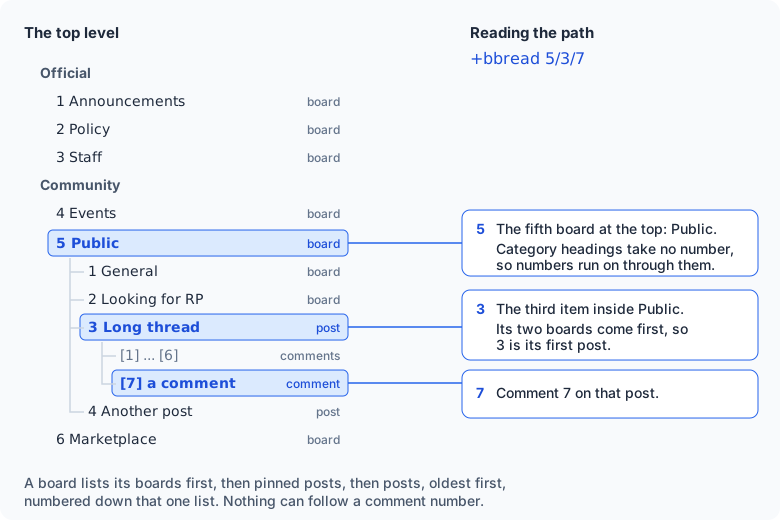
Category headings take no number. On a new game the boards are numbered 1 to 6 across both categories, Official first.
A board you can’t read keeps its number. If you can’t see board 3, your list goes 1, 2, 4, 5, 6, and board 5 is still 5 for everyone.
You can type a board’s name instead of its number, or the start of its name:
+bbread public/general is the same as +bbread 5/1. Post and comment numbers are
always numbers.
When numbers move
Section titled “When numbers move”A number is a place in a list, so it can change. Pinning a post moves it up. Removing or moving a post moves the ones after it up by one.
If a number you type has changed since you last looked at that board, the command stops and tells you what the number points at now:
> +bbcomment 6/12=Still for sale?[BBOARDS] Warning: The numbers on 6 have changed since you last looked. 6/12 is now "Swords".Type the command again to go ahead, or +bbread 6 to see the list.If that is the post you meant, type the same command again. If not, list the board and use the new number.
Reading
Section titled “Reading”| Type | To see |
|---|---|
+bbread | The boards you follow, with how many new things each has. |
+bbread 5 | Board 5: its boards and its newest posts. |
+bbread 5/3 | Post 5/3 and its comments. |
+bbread 5/3/7 | One conversation: comment 7 and every reply under it. |
+bblist | Your boards as a tree. |
+bbread/all | Every board you may read, followed or not. |
The board list
Section titled “The board list”+bbread on its own lists the top boards you follow:
> +bbread===================================< Boards >===================================# Board New Last Official1 Announcements 05:332 Policy 05:33 Community4 Events 1 05:375 Public (2 boards) 51 05:376 Marketplace 200 05:37=============================< 5 boards, 252 new >==============================+bbread <#> opens one. +bbnext reads what's new. +bbread/all lists all.This player can’t read board 3, Staff, so it is missing and the numbers skip it. The last lines of every screen say what to type next.
A board
Section titled “A board”+bbread 6 opens board 6. A busy board opens on its last page, where the newest
posts are. Each row has a mark at the left:
U: unread.P: pinned.T: times out soon.+3after the comment count: three comments are new to you.
To turn to another page, put the page number as a switch: +bbread/1 6 is the oldest
page, +bbread/2 6 the next. The page is always the last switch on the command, so
a command with other switches puts it at the end, as in +bbsearch/text/2.
A post and its comments
Section titled “A post and its comments”+bbread 5/3 shows the post, then its comments, ten to a page. +bbread/2 5/3 is
page 2.
A comment that answers the post starts at the left margin. Replies to it sit under it,
two spaces in, in the order they were written. A reply to a reply says which comment it
answers with re [n]:
[1] Tomas, Oct 09 05:37Does anyone know when the market opens?
  [2] Mira, Oct 09 05:40  At dawn, most days.
  [3] Tomas, Oct 09 05:41, re [2]  (new)  Thanks. Even on feast days?
Comment numbers belong to the post and count up in the order the comments were written.
Comments you haven’t read are marked (new), and in colour they stand out. Between the
post and its comments is a thin line with the comment count and the page.
One conversation
Section titled “One conversation”A thread with a hundred comments is hard to follow. +bbread 5/3/15 shows only the
conversation comment 15 belongs to: the comment at the margin that started it, and every
reply under it. Comment 15 is marked with * at the left.
The tree
Section titled “The tree”+bblist draws the boards you follow as a tree, with the boards inside boards shown
under them. Posts are not listed.
A deep tree stops a few levels down and says how many boards are below, for example
(+12 boards below). To see the rest, start the tree lower down:
+bblist 5+bblist 4/1/1/1+bbread/all is the same kind of tree, but it lists every board you may read, including
boards you have left, and says what you may do on each: read, post, comment.
+bbread/all 5 starts from board 5.
Keeping up
Section titled “Keeping up”Reading what’s new
Section titled “Reading what’s new”+bbnext opens the next post with something new on it. For a post you haven’t read,
you get the whole post. For a post you have read that has new comments, you get its
oldest ten new comments. Type +bbnext again to go on. The bottom line tells you how
many new things are left.
+bbnext 5stays on board 5 and the boards inside it.+bbnewis another name for+bbnext.
Seeing what’s new
Section titled “Seeing what’s new”+bbscan gives one line for each board with something new, and which posts:
> +bbscanMarketplace (#6): 3 unread (7, 9-10)Marking things read
Section titled “Marking things read”+bbcatchup 6marks board 6, and every board inside it, as read.+bbcatchup allmarks everything read.
A new character starts with nothing read. A game that wants new players to start with
everything read can run @force <player>=+bbcatchup all when it approves them.
Following boards
Section titled “Following boards”You follow every board you can read until you leave it. A board you follow shows in
+bbread, +bblist and +bbnext.
+bbleave 5stops following board 5. You can still read it, and+bbread/allstill lists it.+bbjoin 5follows it again. Everything on it counts as new.
Notices
Section titled “Notices”When someone posts on a board you follow, you get a one-line notice.
+bbnotify 5=offstops the notices for board 5. New posts there still count as new.+bbnotify 5=onstarts them again.+bbnotify offturns notices off on every board.+bboptions notify=offdoes the same.
Following one post
Section titled “Following one post”+bbfollow 5/3 tells you about every new comment on post 5/3. +bbunfollow 5/3 stops.
Writing
Section titled “Writing”Posting
Section titled “Posting”+bbpost 6/Selling a horse=A good grey mare. Ask Mira.That posts at once on board 6, with the title Selling a horse. The part before the
/ is the board; it can be a path, such as 5/1 for General inside Public.
For a longer post, start a draft and add to it a line at a time:
+bbpost 6/Selling a horse+bbwrite A good grey mare, five years old.+bbwrite She is calm around crowds.+bbproof+bbpost+bbpost <board>/<title>with no=starts the draft.+bbwrite <text>adds a line.+bbproofshows the draft so far.+bbpostalone posts it.+bbtossthrows it away.
Comments and replies
Section titled “Comments and replies”+bbcomment 6/4=Is she still for sale?+bbreply 6/4/2=Yes, until Friday.+bbcomment comments on a post. +bbreply answers one comment: 6/4/2 is comment 2
on post 6/4. The reply sits under the comment it answers, so each conversation stays
together.
A post holds at most 150 comments, unless staff change that number. A moderator can also close a post to comments.
Changing what you wrote
Section titled “Changing what you wrote”| Type | To |
|---|---|
+bbedit 6/4=grey/white | Change grey to white in your post. |
+bbedit 6/4=1/2^^^half | Use ^^^ in place of / when the text has a slash in it. |
+bbedit/all 6/4=<text> | Replace the whole text. |
+bbedit/title 6/4=<title> | Change the title. |
+bbedit 6/4/2=Friday/Sunday | Change your comment 2 on post 6/4. |
+bbremove 6/4 | Remove your post. |
+bbremove 6/4/2 | Remove your comment. |
When you remove a post, the posts after it move up one. A post that has comments keeps its place, marked as removed, so its comments can still be read. A comment with replies works the same way.
Markdown or SharpMUSH text
Section titled “Markdown or SharpMUSH text”Posts and comments are Markdown unless you say otherwise. Markdown is plain text with a few marks:
- A blank line starts a new paragraph.
*stars*around words make them stand out.%rstarts a new line.
Markdown text is kept exactly as you typed it and looks the same to everyone.
Add /mush to write SharpMUSH text instead, with colour and functions:
+bbpost/mush 4/Feast night=[ansi(hy,Tonight)] in the great hall.SharpMUSH text is worked out once, as you, at the moment you post it. What it produced
is kept, and nothing in it runs again when others read it. /mush works on
+bbpost, +bbcomment, +bbreply and +bbedit.
If you write SharpMUSH text most of the time, make it your default:
+bboptionsshows your settings.+bboptions format=mushmakes SharpMUSH text your default.+bboptions format=mdgoes back to Markdown./mdon one post or comment asks for Markdown when your default is SharpMUSH text.
Searching
Section titled “Searching”+bbsearch 6/Miralists Mira’s posts on board 6.+bbsearch/text 6/horselists posts and comments with the wordhorse, on board 6 and the boards inside it.
A search looks at the newest 250 posts. If there are more, it says so. Add a page
number to look further back: +bbsearch/2 6/Mira, +bbsearch/text/2 6/horse.
The reader
Section titled “The reader”+bbreader opens a reader where every line you type is a key. You can move around the
boards one letter at a time. +bbreader 5/3 opens it at post 5/3.
Nothing you type in the reader runs as a command except +bbread and +bbnext, so the
links on its screens work. To page someone or pose, leave with q first.
| Key | Does |
|---|---|
Enter or n | The next new thing, what +bbnext shows. |
| A number | Open that board, post or comment where you are. |
A path, such as 5/3 | Open it from anywhere. |
j and k | The next or previous comment in a thread, or page in a board. |
J and K | The next or previous post on the board. |
p | The comment this one answers. |
t | The whole thread. |
u | Up one level. |
c <text> | Comment on this post. |
r <text> | Reply to this comment. |
c or r alone | Write several lines. A line of just . posts them; .toss drops them. |
e <old>/<new> | Edit what you wrote here. |
f | Follow this post, or stop following it. |
m | Mark this board read. |
l | Show this screen again. |
? | List the keys. |
q | Leave the reader. |
In the portal
Section titled “In the portal”When your game has installed bboards-app, the portal has a Boards page under
Community. It shows the same boards, posts and comments as the +bb commands, with the
same numbers, and it obeys the same locks: a board you can’t read in the game isn’t on the
page either.
The side menu has What’s new, with a count of everything you haven’t read, All boards, New post, and every board you follow with its own count.
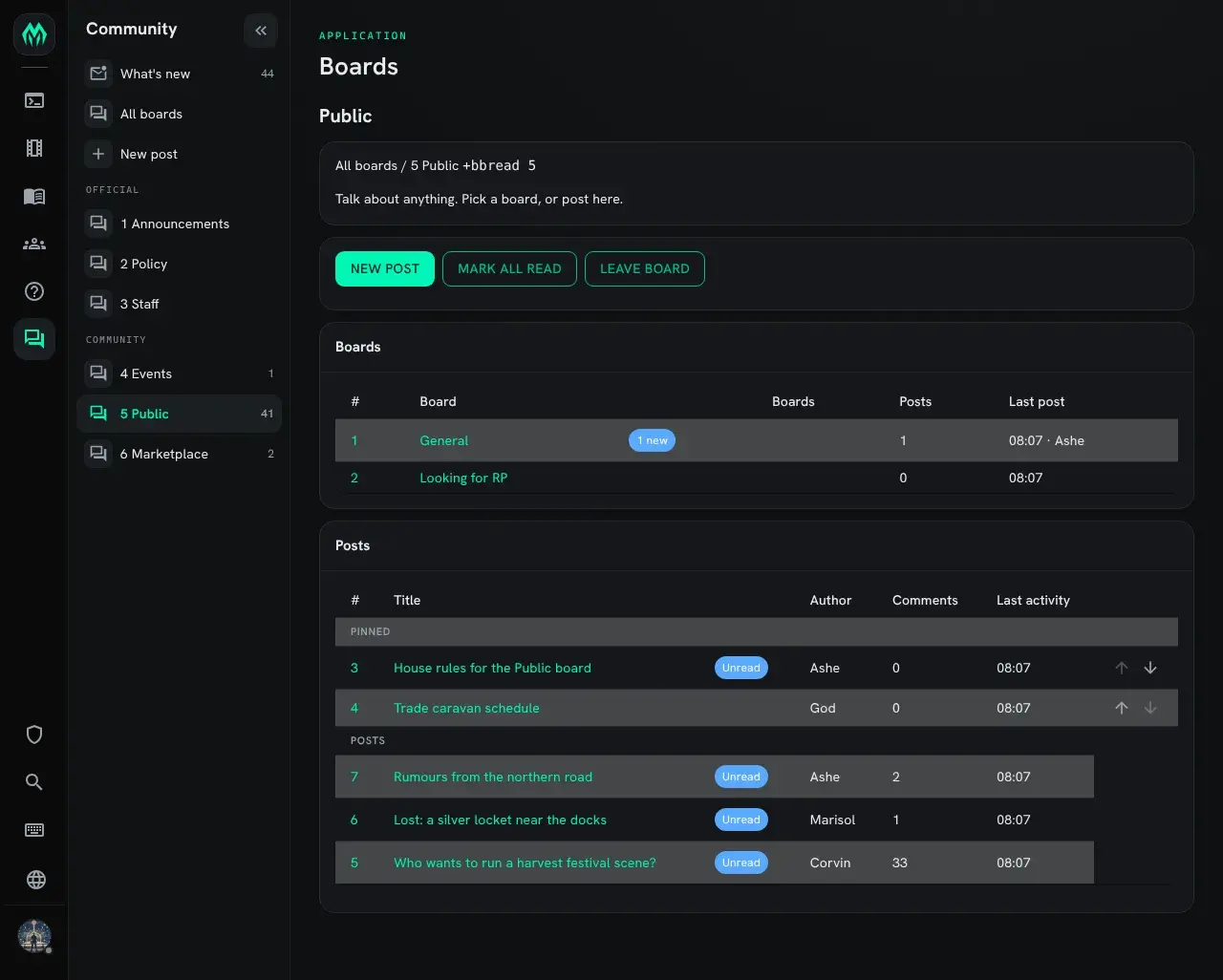
A board’s page lists its sub-boards and then its posts, pinned posts first. Its buttons do what the commands do:
| Button | Same as |
|---|---|
| New post | +bbpost |
| Mark all read | +bbcatchup <board> |
| Follow board or Leave board | +bbjoin or +bbleave |
A moderator also sees up and down arrows on pinned posts. They change the order the pins are shown in, for everyone.
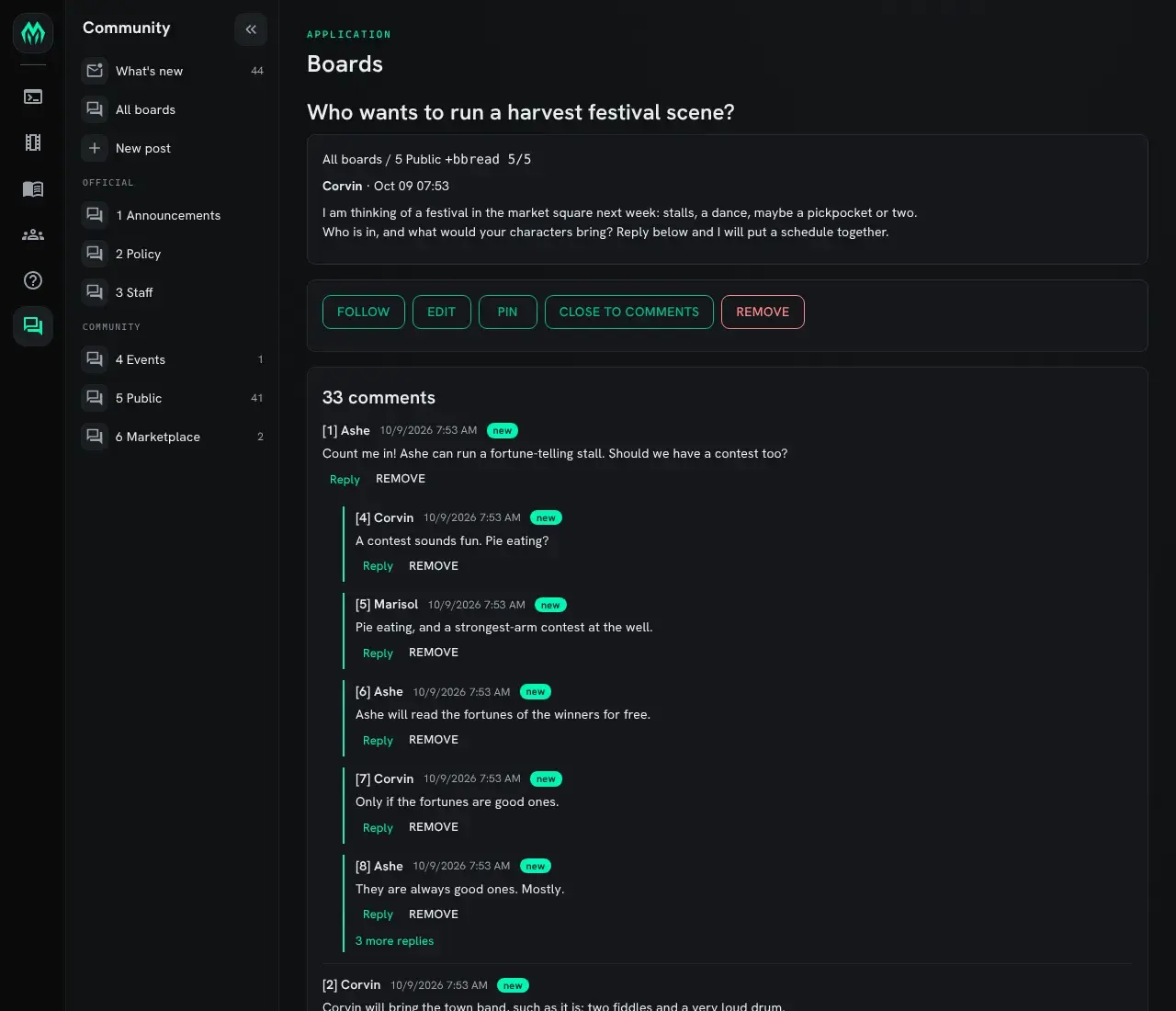
A post’s page shows its text and its comments, a few conversations to a page. Replies sit under the
comment they answer, as in One conversation. When a conversation is
long, “more replies” opens all of it. Reply under a comment opens it so you can answer;
the box at the bottom of the page comments on the post. “Written in” picks Markdown or
SharpMUSH text, as /md and /mush do.
Above the post are the buttons you are allowed to use: Follow, Edit and Remove for your own post, and for a moderator Edit, Remove, Pin and Close to comments on any post.
Editing in the portal replaces the whole text, like +bbedit/all. When a moderator edits a
comment or post someone else wrote as SharpMUSH text, the box starts empty: the author’s
code is never copied in, so saving can’t run it as the moderator.
Every page shows the command it matches, such as +bbread 5/5, so you can do the same
thing in the game.
Moderating
Section titled “Moderating”A board’s moderators are the people who pass its moderate lock (see Locks). Anyone with the BBoard Moderator role moderates every board they can read. Moderators can do this on any post on their boards:
| Type | To |
|---|---|
+bbpin 5/9 | Pin post 5/9 to the top of the board. |
+bbpin 5/9=1 | Move a pinned post to first place among the pins. |
+bbpin 5 | List board 5’s pins. |
+bbunpin 5/4 | Put a pinned post back in date order. |
+bbclose 5/4 | Stop new comments on a post. |
+bbopen 5/4 | Allow comments again. |
+bbmove 5/4 to 6 | Move a post, with its comments, to board 6. |
+bbtimeout 5/4=30 | Remove the post 30 days after its last activity. |
+bbtimeout 5/4=never | Keep the post. =default uses the board’s setting. |
Moderators can also use +bbedit and +bbremove on anyone’s post or comment.
Pinning, unpinning and moving all change the numbers of other posts, so the renumber check may ask you to type a command twice.
Running the boards
Section titled “Running the boards”Installing
Section titled “Installing”BBoards ships with the server but is not installed on a new game. An administrator installs it from the portal:
- Open Packages in the admin area and choose Browse.
- Install
bboards. It needsplus-helpandhttp-handler, which a new game already has. - To show the boards in the portal as well, install
bboards-app. See In the portal.
See Softcode Packages for how installing, upgrading and rolling back work.
The boards you start with
Section titled “The boards you start with”| # | Board | Category | Who may post | Notes |
|---|---|---|---|---|
| 1 | Announcements | Official | BBoard Admins | Anyone may comment. |
| 2 | Policy | Official | BBoard Admins | No comments. |
| 3 | Staff | Official | Wizards and BBoard Admins | Only wizards and BBoard Admins can see it. |
| 4 | Events | Community | Approved players | |
| 5 | Public | Community | Approved players | Holds 5/1 General and 5/2 Looking for RP. |
| 6 | Marketplace | Community | Approved players |
Everyone can read every board except Staff. “Approved players” means players with the
approved role. If your game doesn’t approve players, change the post locks on boards
4, 5 and 6 (see Locks).
The package adds two roles:
| Role | Can |
|---|---|
BBoard Admin (bboard-admin) | Make, set up, order, lock and remove boards. Moderate and read every board. |
BBoard Moderator (bboard-moderator) | Moderate every board they can read. |
Give one with @role/assign:
@role/assign Mira=bboard-moderatorTo make someone a moderator of one board only, don’t give them a role. Put them in that board’s moderate lock instead.
The commands below need the BBoard Admin role.
Making and moving boards
Section titled “Making and moving boards”| Type | To |
|---|---|
+bbnewgroup Trade | Make a board at the top. |
+bbnewgroup 5/Plots | Make a board inside board 5. |
+bbcleargroup 7 | Remove board 7 if it is empty. |
+bbcleargroup/confirm 7 | Remove board 7 and its posts. |
+bbparent 7=5 | Move board 7, and everything in it, inside board 5. |
+bbparent 5/3=top | Move board 5/3 to the top level. |
+bborder 6=up | Move board 6 up one among the boards of its category. =down moves it down. |
+bborder 6=1 | Move board 6 to first place in its category. |
A board that holds other boards can’t be removed until those are moved or removed.
Moving or reordering boards changes their numbers for everyone. Tell your players when you do it.
Categories
Section titled “Categories”A category is a heading over some of the boards at one level. Boards in no category are listed last, under Other boards.
| Type | To |
|---|---|
+bbcategory/create Out of Character | Make a category at the top level. |
+bbcategory/create 5/Plots | Make a category inside board 5. |
+bbcategory 7=Out of Character | Put board 7 in that category. =none takes it out. |
+bbcategory/rename Out of Character=OOC | Rename a category. |
+bbcategory/order OOC=1 | Make it the first category. |
+bbcategory/delete OOC | Remove a category. Its boards stay, in no category. |
For a category inside a board, put the board first, as in /create:
+bbcategory/rename 5/Plots=Stories.
Boards are numbered down the categories in order, so changing a category or its place renumbers the boards at that level.
Settings
Section titled “Settings”+bbinfo 5shows a board’s settings and locks, and which board a lock comes from.+bbconfigshows the defaults.+bbconfig allshows every board’s settings and locks in two tables.+bbconfig all 5starts from board 5.
Change a setting with +bbconfig <board>/<option>=<value>:
| Option | What it is | Example |
|---|---|---|
name | The board’s name. | +bbconfig 6/name=Market Square |
description | A line shown at the top of the board. | +bbconfig 6/description=Buying, selling and trading. |
color | The colour of the board’s name. | +bbconfig 1/color=hy |
timeout | Days after its last activity before a post is removed. 0 means never. | +bbconfig 6/timeout=60 |
pins | How many posts may be pinned, 0 to 10. | +bbconfig 1/pins=3 |
comments | The most comments a post may hold, 1 to 200. | +bbconfig 5/comments=200 |
anonymous | A name shown in place of the poster’s. | +bbconfig 4/anonymous=A Rumour |
+bbconfig default/<option>=<value> changes the default for boards that don’t set
their own: +bbconfig default/timeout=90.
Each board has four locks. You write them the way @lock takes them.
| Lock | Decides | Example |
|---|---|---|
read | Who may see the board. | +bblock 3/read=role^wizard |
post | Who may start posts. | +bblock 5/post=role^approved |
comment | Who may comment and reply. | +bblock 1/comment=role^approved |
moderate | Who moderates the board. | +bblock 4/moderate=role^storyteller |
storyteller here stands for any role your game has.
+bbwritelock 5=<lock> is the same as +bblock 5/post=<lock>.
A board with no lock of a kind takes it from the board it is in. For example, board 5,
Public, has the post lock role^approved. General (5/1) and Looking for RP (5/2) set
no post lock, so only approved players can post there too.
A board’s own lock replaces the one above it. To let only storytellers post on General, while any approved player can still post on Public itself:
+bblock 5/1/post=role^storytellerTo clear a lock, so the board takes it from the board above again, leave the lock empty:
+bblock 5/1/post=A few more examples:
+bblock 3/read=role^wizard|perm^softcode.bboards.admin+bblock 5/2/moderate=role^storyteller+bblock 6/comment=role^approvedAt the top, a board with no lock lets everyone read, post and comment, and nobody moderate except the people with the roles above. A board you can’t read hides the boards inside it as well.
For Myrddin players
Section titled “For Myrddin players”If you have used Myrddin’s bulletin board, most of what you type still works.
Works the same
Section titled “Works the same”| You type | It does |
|---|---|
+bbread | Lists the boards you follow, with what’s new. |
+bbread 2 | Lists board 2. |
+bbread 2/5 | Reads post 5 on board 2, now with its comments. |
+bbpost 2/<title>=<text> | Posts. |
+bbpost 2/<title>, +bbwrite, +bbproof, +bbtoss, +bbpost | The draft. |
+bbnext, +bbnew | Reads the next new thing. |
+bbscan | One line per board with something new. |
+bbcatchup 2, +bbcatchup all | Marks boards read. |
+bbleave 2, +bbjoin 2 | Stops and starts following a board. |
+bbnotify 2=off | Turns off new-post notices for a board. |
+bbedit 2/5=<old>/<new> | Changes your post. ^^^ works in place of /. |
+bbremove 2/5 | Removes your post. The posts after it move up one. |
+bbmove 2/5 to 3 | Moves a post. |
+bbsearch 2/<name> | Finds posts by someone. |
+bbtimeout 2/5=<days> | Sets when a post times out. |
+bbnewgroup, +bbcleargroup | Makes and removes boards. |
+bbwritelock 2=<lock> | Sets who may post. |
+bbconfig 2/timeout=<days>, +bbconfig 2/anonymous=<name> | Board settings. |
Different
Section titled “Different”- Boards hold boards. A board number can be a path, like
5/1. Inside a board, its boards come first, then its posts. - The renumber check. If a number has changed since you last listed the board, the command stops and tells you, instead of acting on a different post. Type it again to go ahead.
+bblistdraws the boards you follow as a tree.+bbread/alllists every board you may read.+bblocktakes a lock kind and an@locklock:+bblock 5/post=role^approved.+bbcatchupon a board also catches up the boards inside it.- Text is Markdown unless you add
/mush.
- Comments and replies:
+bbcomment,+bbreply, and+bbread <post>/<#>for one conversation. +bbreader, for moving around with single keys.+bbfollowand+bbunfollow, for one post’s comments.+bbsearch/text, to search what posts and comments say.+bboptions, for your format and notices.- For moderators:
+bbpin,+bbunpin,+bbclose,+bbopen. - For staff:
+bbinfo,+bborder,+bbparent,+bbcategory, theread,post,commentandmoderatelocks, and thename,color,description,pinsandcommentssettings.