
Scenes
A scene is a shared, logged piece of roleplay. Everyone in it poses as usual, the game keeps each pose, and the log can be read afterwards in the game and in the web portal.

| You want to | Read |
|---|---|
| find a scene and take part | Joining a scene |
| pose, and fix a pose afterwards | Posing |
| read what happened | Reading the log |
| run a scene of your own | Running a scene |
| plan one for later | Scheduling |
| follow scenes in a calendar app | Scenes in your calendar |
| install scenes, or add to them | Setting up scenes |
In the game, +help scene has the same commands in short form.
The examples follow Mira and Tobin in the Harbour Tavern.
Joining a scene
Section titled “Joining a scene”+scene lists the scenes running now, +scene/old the finished ones, and +scene/mine the ones
you have been in. A long list comes in pages: +scene/old/2 is the second page.
> +scene══════════════════════════════╡ Scenes: active ╞══════════════════════════════ID Title Where Cast Status 1 Smugglers at the Harbour Harbour Tavern 1 active══════════════════════════════════════════════════════════════════════════════1 scene+scene <id> shows one scene: who runs it, where it is, its pitch and who is in it. The scene’s
title, or the start of it, works as well as its number.
> +scene 1═════════════════════╡ Scene 1: Smugglers at the Harbour ╞════════════════════Status: activeOwner: MiraWhere: Harbour TavernCreated: Oct 15 11:54PM (game time)Scheduled: -Watchers: Anyone═══════════════════════════════════╡ Pitch ╞══════════════════════════════════A crate goes missing from the night boat.══════════════════════════════════╡ Players ╞═════════════════════════════════Status Name PosesOwner Mira 0══════════════════════════════════════════════════════════════════════════════+scene/join <id> puts you in the scene and makes it your focus, the scene your poses are
recorded into. Joining needs an approved character.
> +scene/join 1[SCENE] Done: Joined and focused on scene 1.+scene/leaveleaves your focused scene. If you never posed, you leave no trace.+scene/deactivatekeeps you a member but stops recording you.+scene/activate <id>starts again.
Posing
Section titled “Posing”Once you have joined, pose, say, semipose and @emit in the scene’s room are recorded as you
type them. There is nothing extra to type. Each recorded pose is shown under a line naming who posed
it and its number:
> pose sets a lantern on the bar and looks for the harbourmaster.═╡ Mira · pose 1 ╞════════════════════════════════════════════════╡ Scene 1 ╞═Mira sets a lantern on the bar and looks for the harbourmaster.The +scene/<mode> <id>=<text> commands name the scene instead of taking it from the room. They are
what the portal’s compose box sends:
+scene/pose,+scene/say,+scene/semiposeand+scene/emitwork like the ordinary commands.+scene/oocis out of character.+scene/narrateis the world speaking rather than a character: weather, a crowd, a storyteller’s line.
An out-of-character line is one line of its own:
> +scene/ooc 1=Back in five, the kettle is on.<OOC · 1> Tobin: Back in five, the kettle is on.+scene/as <name> poses under another name from then on, and +scene/as on its own goes back to
your own. Scene Pose Types covers the kinds of line, and how to hide the
ones you do not want to read.
Whose turn it is
Section titled “Whose turn it is”+pot, the pose tracker, lists the people in your focused scene with how long ago each last posed.
The one who posed longest ago is up next:
> +pot══════════════════════════╡ Pose Tracker - Scene 1 ╞══════════════════════════# Name Last pose Turn1 Mira 8s ago <- up2 Tobin 2s ago══════════════════════════════════════════════════════════════════════════════2 in scene - oldest pose is up nextFixing a pose
Section titled “Fixing a pose”These work on your own poses. A wizard can use them on anyone’s. <pose> is the number on the
line above the pose.
+scene/edit <pose>=<old>^^^<new>replaces one piece of text.+scene/rewrite <pose>=<text>replaces the whole pose.+scene/undo <pose>and+scene/redo <pose>step back and forward through its edits.+scene/delete <pose>takes it out of the log.
> +scene/edit 1=harbourmaster^^^harbour master[SCENE] Done: Pose 1 edited.The scene’s owner can move a pose with +scene/move <pose>=<after>. +scene/mark <pose>=<word>
marks a pose, such as a flashback, and +scene/unmark <pose>=<word> removes the mark. The pose’s
author or the scene’s owner can mark it.
Reading the log
Section titled “Reading the log”+scene/recall <n>shows the last<n>poses of your focused scene. On its own it shows two rounds, a round being one pose for each person in the scene. Staff change the number of rounds with+config scene/recall-rounds=<n>.+scene/recall <id>=<n>does the same for any scene you can see.+scene/log [<id>]shows the whole log.
> +scene/recall 3═╡ Mira · pose 1 ╞════════════════════════════════════════════════╡ Scene 1 ╞═Mira sets a lantern on the bar and looks for the harbour master.═╡ Tobin · pose 2 ╞═══════════════════════════════════════════════╡ Scene 1 ╞═Tobin says, "I saw the boat come in an hour ago."<OOC · 1> Tobin: Back in five, the kettle is on.In the web portal, Scenes lists the same scenes, and each scene has a page with its log.
Running a scene
Section titled “Running a scene”+scene/create <title> creates a scene in the room you are in and makes it your focus. You own it.
It records poses at once. When staff set +config scene/default-status=new, a new scene waits for
+scene/start instead.
> +scene/create Smugglers at the Harbour[SCENE] Done: Scene 1 created and focused (status: active).> +scene/pitch A crate goes missing from the night boat.[SCENE] Done: Pitch set for scene 1.+scene/title [<id>=]<text>renames it.+scene/pitch [<id>=]<text>says what it is about, on its card and its page in the portal.+scene/set [<id>/]<detail>=<value>sets a detail such as its verse or a content warning. See Scene Details.+scene/pausestops it for now. It leaves the live list for the schedule.+scene/startresumes it.+scene/finishcloses it. A finished scene stays finished.
> +scene/finish[SCENE] Done: Scene 1 finished.Anyone holding the scene.close permission can finish a scene they do not own with
+scene/finish <id>. The scene package defines it; allow it on a role with
@role/allow helper=scene.close.
Who can read it
Section titled “Who can read it”A scene is public: it is listed in +scene and anyone can read its log. +scene/private [<id>]
hides it and its log from everyone but its members, and +scene/public [<id>] puts it back. Who may
pose is decided by who has joined, not by this setting.
> +scene/private 2[SCENE] Done: Scene 2 is now private.Scheduling
Section titled “Scheduling”+scene/schedule <title>=<when> announces a scene before it happens. <when> is a date and time,
such as 2026-12-31 20:00, or a time from now: +3d, +12h or +1w.
> +scene/schedule Market day=+3d[SCENE] Done: Scheduled scene 2 "Market day" for Sun Oct 18 23:55:34 2026 (game time).+scene/upcoming (also +scenes and +events) lists the next 30 days. +scene/upcoming <days>
looks further, and all shows everything. The RSVP column counts the owner too.
> +scene/upcoming═════════════════════════════╡ Scheduled Scenes ╞═════════════════════════════Day Time ID Title Status RSVPSun Oct 18 23:55 2 Market day scheduled 1══════════════════════════════════════════════════════════════════════════════1 in the next 30 days · game time> +scene/tag 2[SCENE] Done: RSVP'd to scene 2.+scene/tag <id>(or+scene/rsvp) RSVPs without joining.+scene/untag <id>(or+scene/unrsvp) withdraws it.+scene/reschedule <id>=<when>moves it, and+scene/unschedule <id>(or+scene/cancel) cancels it.+scene/start [<id>]starts a scheduled scene in the room you are in.
A scheduled or paused scene records nothing until its owner starts it. Times you type are read in
your own time zone, the one +timezone sets, and every list and message shows times in it. Without
one, times are the game’s. Time and Time Zones covers zones, and
Scene Availability finds a time a group is free.
In the portal, Scenes has Start a scene and Schedule a scene. A scheduled scene has no room until it starts: it runs wherever its host is when they start it.
Scenes in your calendar
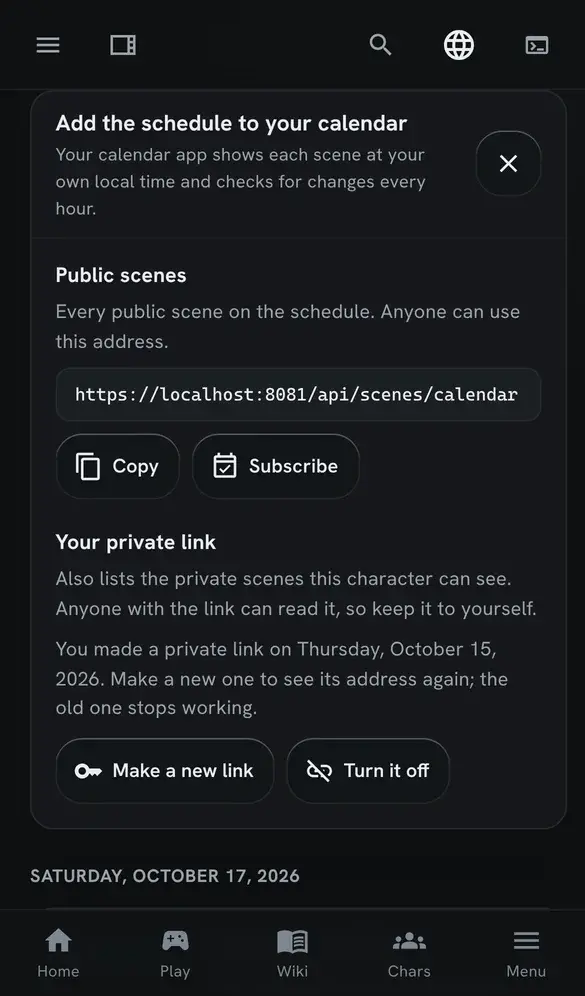
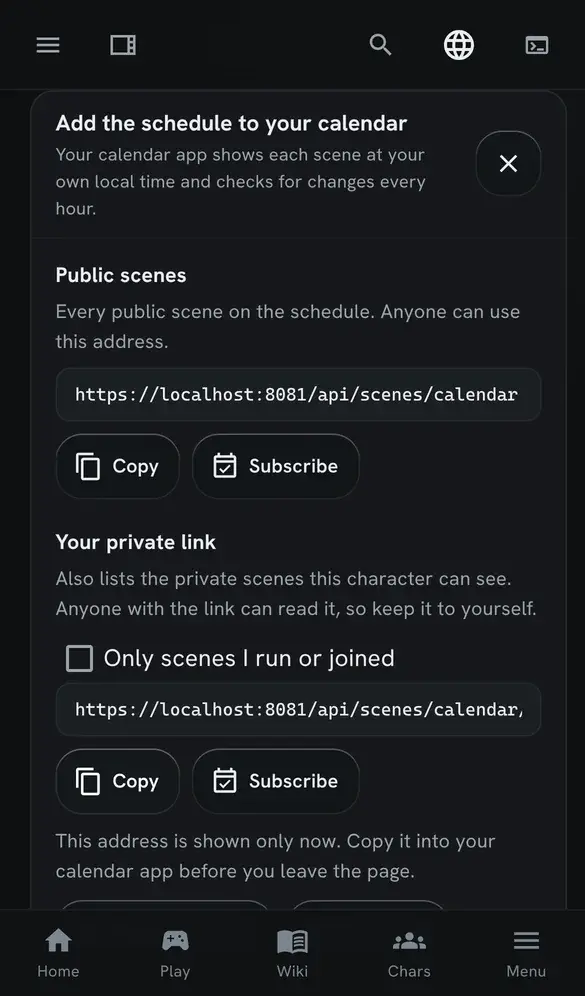
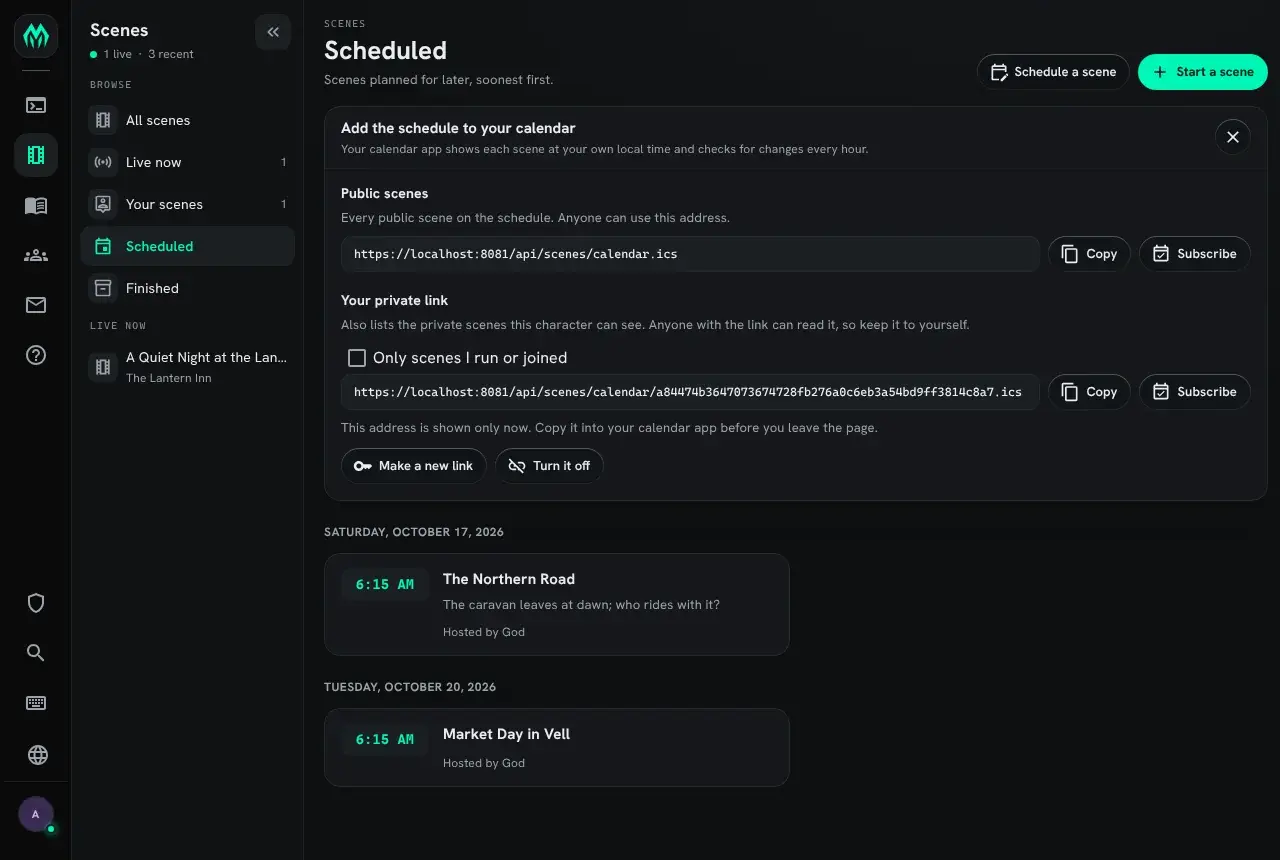
Section titled “Scenes in your calendar”The Scheduled list under Scenes has an Add to calendar button. It opens a card with calendar addresses. Paste an address into a calendar app (Google Calendar, Apple Calendar, Outlook and Thunderbird all accept one), or press Subscribe to hand it to the calendar app on your device.
Each scene appears at your own local time. The feed gives every start time in UTC, and the calendar app converts it to the zone your device is set to, so two players in different countries both see the right time. Scenes have no end time, so each event lasts two hours. The calendar app checks for changes every hour.
The public feed
Section titled “The public feed”The first address lists every public scene on the schedule. Anyone can use it, without signing in, so a game can also put it on its website.
https://<your game>/api/scenes/calendar.icsIt lists the scenes that were given a start time: those still to come, those running, and those that started in the last 14 days. A scene started on the spot, with no time set, does not appear.
Your private link
Section titled “Your private link”A private link adds the private scenes your character can see. Press Make my private link, then copy the address before you leave the page: the server keeps only a fingerprint of it, so it cannot show it to you again.
Tick Only scenes I run or joined before you copy it to leave out the scenes you have nothing to
do with. That adds ?scope=mine to the address.
Anyone who has the address can read the feed, so keep it to yourself. If it gets out, press Make a new link: the old address stops working at once. Turn it off removes the link without making a new one.
The link belongs to the character you are playing in that browser tab. Switch characters to make a link for another one.
What an event holds
Section titled “What an event holds”This is a scene from a test server’s public feed, as a calendar app reads it:
BEGIN:VEVENTUID:scene-2@localhostDTSTAMP:20261015T065628ZLAST-MODIFIED:20261015T061529ZDTSTART:20261017T061525ZDTEND:20261017T081525ZSUMMARY:The Northern RoadDESCRIPTION:The caravan leaves at dawn\; who rides with it?\n\nRun by God\n \nhttps://localhost:8081/scenes/2URL:https://localhost:8081/scenes/2STATUS:CONFIRMEDTRANSP:TRANSPARENTEND:VEVENTThe title is the scene’s title. The description holds its pitch, who runs it, and a link to the scene in the portal. A scene that has a room also gives the room’s name as the event’s location. The event is marked as free time, so it does not block your calendar.
Setting up scenes
Section titled “Setting up scenes”Scenes are the scene package, which a new game installs. It runs on the Scene plugin that ships
with the server and needs no other package. Without the plugin running, the package does not install,
and turning the plugin off removes the package. The portal shows its Scenes pages only while the
package is installed.
Two bridge packages, also installed on a new game, join scenes to the rest of the game: scene-help
puts the scene topics in +help, and scene-config puts the scene settings in +config. Without
them, scenes still run, but +help scene and +config scene find nothing. See
Bridge Packages.
Other packages add to scenes. Each has its own page:
| Package | Adds | Page |
|---|---|---|
scene-here | The command palette’s entries for the scene in your room | The Command Palette |
scene-verse | A verse, a canon and a content warning on each scene | Scene Details |
scene-safety | Lines, veils, pause and skip | Scene Safety |
scene-availability | When each character is free, and who can make a scene | Scene Availability |
highlights | Favourite poses, and a page of them | Highlights |
summary | A one-line summary of a long pose | Pose Summaries |
timeline | An IC date on each scene | IC Dates and Timelines |
discord-scenes | Scheduled scenes as events on the Discord server | Discord |
A package of your own can change what +scene shows, with filters on the Scene Logger; +help scene filters lists them.