
Scene Details
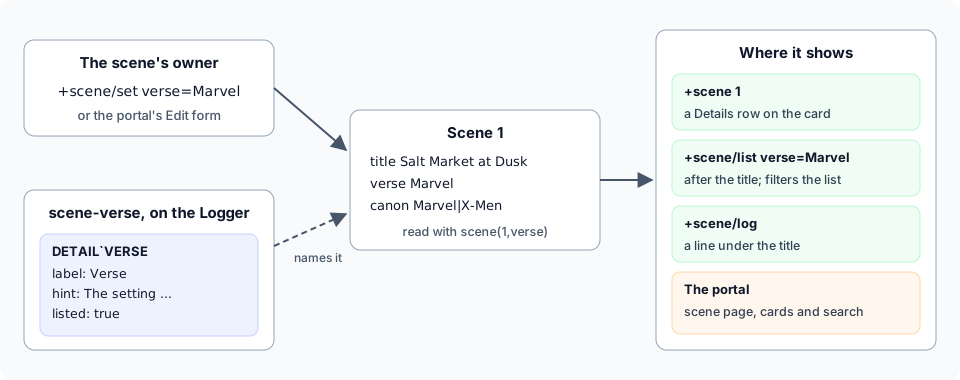
A scene has a title and a pitch. Players often want to say more: which verse or setting it takes place in, which canon it draws on, whether it carries a content warning, which era it is set in. These are a scene’s details. The scene’s owner sets them, they show on the scene’s card, at the top of its log and on its page in the portal, and players can list scenes by them.
The scene package keeps any detail an owner names. A game can also list the details it uses, with a
name and a hint for each. The scene-verse package lists three, a verse, a canon and a content
warning, and shows them more prominently.
A single pose can carry something of its own too, such as being a flashback. That is a mark, covered further down.
Setting a scene’s details
Section titled “Setting a scene’s details”+scene/set <detail>=<value> sets a detail on your focused scene. The detail is any word you choose:
> +scene/create Salt Market at Dusk[SCENE] Done: Scene 1 created and focused (status: active).> +scene/set verse=Marvel[SCENE] Done: Scene 1: Verse is now Marvel.> +scene/set canon=Marvel|X-Men[SCENE] Done: Scene 1: Canon is now Marvel · X-Men.> +scene/set era=1980s[SCENE] Done: Scene 1: Era is now 1980s.+scene/set <id>/<detail>=<value>sets one on a scene you own without focusing it.+scene/set <detail>=with nothing after the=clears it.|splits several values.
Only the scene’s owner, or staff, can set its details, as with its title and pitch. A detail’s name is
a word of letters, digits, - and _, and it can’t be one of the things a scene already has:
> +scene/set title=Oops[SCENE] Warning: 'title' is a scene field already, so it can't be a detailUse +scene/title and +scene/pitch for those.
+scene/details says which details your game lists. With only the scene package installed, it
lists none:
> +scene/details[SCENE] Warning: This game lists no scene details. You can still set your own: +scene/set <name>=<value>.Where details show
Section titled “Where details show”The scene’s card, from +scene <id>, has a Details section between the pitch and the players. Details
the game does not list go by name:
> +scene 1=======================< Scene 1: Salt Market at Dusk >=======================Status: activeOwner: IlsaWhere: Lower DocksCreated: Oct 14 11:06PMScheduled: -Watchers: Anyone===================================< Pitch >==================================Lanterns, rumours and a missing ledger.==================================< Details >=================================Canon Marvel · X-MenEra 1980sVerse Marvel==================================< Players >=================================Status Name PosesOwner Ilsa 1==============================================================================+scene/log puts every detail on the line under the scene’s title:
> +scene/log=< Scene 1: Salt Market at Dusk >=============================================Canon: Marvel · X-Men · Era: 1980s · Verse: Marvel=< Ilsa · pose 1 >================================================< Scene 1 >=Ilsa sets her lantern down on the crate.In the portal, the scene’s page lists them under Details beside the log. Each value there is a link to every scene that gives the detail the same value.
Finding scenes by detail
Section titled “Finding scenes by detail”Give a detail and a value after +scene/list, +scene/old or +scene/mine. Case does not matter,
and * matches anything, so canon=*x-men* finds every scene whose canon mentions X-Men:
> +scene/list canon=*x-men*======================< Scenes: active · canon=*x-men* >======================ID Title Where Cast Status 1 Salt Market at Dusk Lower Docks 1 active==============================================================================1 sceneA page number goes before the detail: +scene/old/2 verse=Marvel. Bare +scene takes no detail,
because +scene <id> shows a scene’s card; use +scene/list instead.
In the portal, the search box on a character’s Scenes page matches details as well as titles, pitches
and rooms. On the scene list, clicking a detail’s value shows only the scenes with that value, such as
every scene whose verse is Marvel. A line over the list says what it is narrowed to, with a button back
to every scene. The address is /scenes?detail=verse&value=Marvel, so it can be shared.
The scene list’s sidebar has a section for each detail the game lists: the values scenes give it, the ones most scenes give first, with how many scenes give each. A value is counted once per scene, and a scene you can’t open is not counted.
On the portal’s scene cards
Section titled “On the portal’s scene cards”A scene’s card in the portal’s scene list shows the details the game lists (listed) on a line under
its pitch, each with its name: Content warning Violence, Blood Verse Marvel. They come in the
game’s order. A detail with a tone shows its values in that theme colour, so a
content warning stands out. The line over the card keeps only the scene’s state: live, paused or
private.
Verse, canon and content warnings
Section titled “Verse, canon and content warnings”The scene-verse package comes with SharpMUSH but is not installed on a new game. Install it from
the admin panel’s Packages page. It lists three details:
| Detail | Name | What goes in it |
|---|---|---|
warning | Content warning | What a reader may want to know before joining; several are allowed |
verse | Verse | The setting or universe the scene takes place in |
canon | Canon | The source works the scene draws on; several are allowed |
> +scene/details===============================< Scene details >==============================Detail Name What goes in it Takeswarning Content warning What a reader may want any text, several split by | to know before joining, such as violence. Split several with |.verse Verse The setting or any text universe the scene takes place in.canon Canon The source works the any text, several split by | scene draws on. Split several with |.==============================================================================You can set other details too: +scene/set <name>=<value>.Players still set any other detail they like. With the package installed:
- The content warning and the verse follow the title in
+scene,+scene/oldand+scene/mine, and show on the portal’s scene cards. - The three show first on the card, in the order of the table above, so the content warning is read
first. Its tone is
warning, so it is in the reader’s warning colour wherever it appears. - Whoever joins a scene with a content warning is told it as they join.
+scene/verseslists the verses of the scenes running now.
> +scene/set warning=Violence[SCENE] Done: Scene 1: Content warning is now Violence.> +scene/list==============================< Scenes: active >==============================ID Title Where Cast Status 1 Salt Market at Dusk · Violence · Marvel Lower Docks 1 active==============================================================================1 sceneAnother player joining sees the warning:
> +scene/join 1[SCENE] Done: Joined and focused on scene 1.[SCENE] Content warning: Violence> +scene/verses=============================< Verses played now >============================Verse ScenesMarvel 1==============================================================================+scene/list verse=<verse> lists a verse's scenes.Uninstalling the package stops listing the three. Scenes keep the values they were given, and those then show by name, like any other detail.
In the portal
Section titled “In the portal”The scene’s owner sets details from the Edit button on the scene’s page. Each detail the game
lists has its own field, with its hint underneath. A detail with choices is a drop-down, and one that
takes several lets the owner tick more than one. Saving runs +scene/set as the owner’s character, so
a value the game refuses is refused here too, with the same message.
Marking a pose
Section titled “Marking a pose”Some poses are not like the rest of the scene: a flashback, a dream, a vision. +scene/mark gives one
pose a mark, and +scene/unmark takes it off. The pose’s author or the scene’s owner can mark it.
> pose sets her lantern down on the crate.=< Ilsa · pose 1 >================================================< Scene 1 >=Ilsa sets her lantern down on the crate.> +scene/mark 1=flashback[SCENE] Done: Pose 1 marked flashback.> +scene/recall 1=1=< Ilsa · pose 1 >====================================< Scene 1 · flashback >=Ilsa sets her lantern down on the crate.> +scene/unmark 1=flashback[SCENE] Done: Pose 1 is no longer marked flashback.A mark is one word. A pose can have several. In the portal, the scene’s page offers a chip for each mark used in the scene, and picking one shows only the poses that have it.
Listing details
Section titled “Listing details”Staff holding the layout.admin permission decide which details the game lists. Each is one
attribute on the Scene Logger, DETAIL`<KEY>, holding JSON:
| Field | What it does |
|---|---|
label | Its name, as players read it |
hint | One line saying what goes in it, shown by +scene/details and under the portal’s field |
choices | The values it allows; without it, any text |
many | true when a scene may give several values, split by | |
listed | true to show it after the title in lists, on the portal’s scene cards and in the scene list’s sidebar |
tone | The theme colour its values show in, in +scene and the portal; without it, the text’s own colour |
order | Its place, lowest first |
hidden | true to keep it for code: it never shows, on a card, in +scene or the sidebar, and a search never reads it |
sort | Another detail’s key whose number orders scenes by this one, earliest first, as the timeline package’s icdate sorts by icsecs |
The tone is one of the theme colours tone() takes, as for pose types:
foreground, primary, secondary, tertiary, muted, success, warning, error or info.
hidden and sort are for packages, which set them in their manifest; see
IC Dates and Timelines. The commands write the JSON for you and refuse
anything that would not read:
+scene/detail/add <detail>=<name>lists a new one.+scene/detail/set <detail>/<field>=<value>changes one field.choicestakes the values split by|;manyandlistedtakeyesorno;tonetakes a theme colour, or nothing to clear it.+scene/detail <detail>shows one in full.+scene/detail/remove <detail>stops listing it. Scenes keep the values they had.
For example, a game with a fixed set of moods:
> +scene/detail/add mood=Mood[SCENE] Done: Added scene detail mood. +scene/detail/set mood/<field>=<value> changes it.> +scene/detail/set mood/choices=Light|Tense|Dark[SCENE] Done: Scene detail mood: choices set.> +scene/detail/set mood/listed=yes[SCENE] Done: Scene detail mood: listed set.> +scene/detail/set mood/hint=How the scene feels.[SCENE] Done: Scene detail mood: hint set.> +scene/detail mood=============================< Scene detail mood >============================Detail: moodName: MoodWhat goes in it: How the scene feels.Takes: Light, Tense, or DarkIn lists: yesTone: -Order: 50==============================================================================A player who gives a value that is not a choice is told which ones there are. One that differs only in case is kept the way the choice is written:
> +scene/set mood=gloomy[SCENE] Warning: Mood can be Light, Tense, Dark> +scene/set mood=tense[SCENE] Done: Scene 1: Mood is now Tense.The open-details setting decides whether players may set details the game does not list. It is
yes as shipped. Turn it off to keep them to the list (see
Game Settings with +config):
> +config scene/open-details=no[CONFIG] Done: scene/open-details is now no, was yes.Changing what +scene shows
Section titled “Changing what +scene shows”A package can change what +scene shows without editing the scene package. It adds a filter to
the Scene Logger: an attribute named FILTER`<point>`<name>. Where +scene draws that point, it
passes what it would show through every filter on the point with chain(), in name order. Each filter
gets what would be shown as %0 and returns what is shown instead, and the next filter gets that.
| Point | %0 | Also given |
|---|---|---|
CARD | The body of the card from +scene <id>, between its title and its last rule | %1 the scene |
LIST`TITLE | A scene’s title in +scene, +scene/old and +scene/mine, with its listed details | %1 the scene |
LOG`HEAD | The lines over +scene/log | %1 the scene |
POSE`RULE | The right side of the line over a pose, as plain text | %1 the scene, %2 the pose |
DETAIL`SHOW | A scene’s value for a detail, everywhere it is shown | %1 the scene, %2 the detail |
JOIN | What a player is told when they join | %1 the scene, %2 the player |
HELP | The command list +scene/help shows |
A filter runs as the Scene Logger, with %# the player reading. For example, these two filters show
every verse in capitals and put a scene’s era at the top of its card:
&FILTER`DETAIL`SHOW`CAPS <Scene Logger>=if(strmatch(%2,verse),ucstr(%0),%0)&FILTER`CARD`ERA <Scene Logger>=if(strlen(scene(%1,era)),Set in the [scene(%1,era)].%r)%0> +scene/set verse=Marvel[SCENE] Done: Scene 1: Verse is now MARVEL.> +scene 1=======================< Scene 1: Salt Market at Dusk >=======================Set in the 1980s.Status: activeOwner: IlsaWhere: Lower DocksCreated: Oct 14 11:06PMScheduled: -Watchers: Anyone===================================< Pitch >==================================Lanterns, rumours and a missing ledger.==================================< Details >=================================Content warning ViolenceVerse MARVELCanon Marvel · X-MenMood TenseEra 1980s==================================< Players >=================================Status Name PosesOwner Ilsa 1Participant Ann 0==============================================================================The scene-verse package works this way. Its content warning takes its colour from its tone, and
one filter tells a joiner about it:
objects: - ref: verse target: "{{scene/logger}}" attributes: DETAIL`WARNING: |- {"label":"Content warning","hint":"What a reader may want to know before joining, such as violence. Split several with |.","many":true,"listed":true,"tone":"warning","order":5} FILTER`JOIN`VERSE: |- %0[if(strlen(scene(%1,warning)),%r[notice(SCENE,Content warning: [u(%!/FUN`DETAIL`SHOW,%1,warning)])])]Because the package attaches its attributes to the scene package’s Scene Logger, uninstalling it
takes its filters and its DETAIL attributes away again. See Managing attributes on an object you didn’t create
for how attaching works.
In softcode
Section titled “In softcode”A detail is a key of the scene, so scene() reads it. A listed detail reads empty until it is set.
> think scene(1,verse)Marvel> think scene(1,details)canon era verse| Function | Returns |
|---|---|
scene(<id>,<detail>) | The scene’s value for a detail; several are split by | |
scene(<id>,details) | The details the scene has a value for: the listed ones in order, then the rest by name |
scenedetails() | The details the game lists, in order |
scenedetail(<detail>[,<field>]) | One field of a listed detail: label (the default), hint, choices, many, listed, tone, order, hidden or sort |
scenedetailvalue(<detail>,<value>) | The value as the detail would keep it, or #-1 and why it would be refused |
scenedetailcheck(<detail>,<json>) | Empty when the JSON reads as a detail, or #-1 and why not |
A pose’s marks are its tags: scenepose(<scene>,<pose>,tags).
Writing a detail from softcode goes through @scene/set <id>/<detail>=<value>, which only the Scene
Logger and wizards can run. Players use +scene/set, which checks that they own the scene first.