
Relationships
The relationships package keeps what characters are to each other: siblings, rivals, a mentor and a student. One player asks, the other confirms, and only then does anyone else see it.
It also gives every character a card. +rel <name> shows a few of their +finger fields, what
they are to you, a note only you see, and the relationships of theirs you may see. In the portal
the same card opens when you rest the pointer on a name, and a character’s profile draws their
relationships as a web.
| You are | You want to | Read |
|---|---|---|
| A player | see who you know | Your relationships |
| A player | ask someone, or answer | Asking and confirming |
| A player | look someone up | A character’s card |
| A player | keep one to the two of you | Hiding a relationship |
| A player | keep a note about someone | Notes |
| Staff | add a type or a card line | Running the package |
In the game, +help rel has the same commands in short form.
Your relationships
Section titled “Your relationships”+rel lists yours:
> +rel════════════════════════════╡ Your relationships ╞════════════════════════════Name Relationship About SinceAsh Sibling Raised him after the fire 15 Oct 2026Moth Student - 15 Oct 2026Rook Parent - 15 Oct 2026══════════════════════════════════════════════════════════════════════════════+rel <name> shows someone's card · +rel/types lists the types · +help rel══════════════════════════════════════════════════════════════════════════════Relationship is what that character is to you: Rook is Wren’s parent, and Moth her student.
+rel/types lists the types a game has, and the side each one gives the other character:
> +rel/types════════════════════════════╡ Relationship types ╞════════════════════════════Type Key The other sideAlly ally AllyChild child ParentColleague colleague ColleagueEnemy enemy EnemyFamily family FamilyFriend friend FriendMentor mentor StudentParent parent ChildPartner partner PartnerRival rival RivalSibling sibling SiblingStudent student Mentor══════════════════════════════════════════════════════════════════════════════+rel/set <name>=<type> · a type is named by its key or its label══════════════════════════════════════════════════════════════════════════════Asking and confirming
Section titled “Asking and confirming”+rel/set <name>=<type> says what someone is to you. Here Rook asks Moth to be a friend:
> +rel/set Moth=friend[REL] Done: You asked Moth. They show as your Friend once they confirm it.Moth is told, with the commands to answer:
[REL] Rook asked to be your Friend. +rel/confirm Rook · +rel/decline RookUntil Moth answers, the ask shows in both lists. Moth’s +rel has it under Asking you:
> +rel════════════════════════════╡ Your relationships ╞════════════════════════════Name Relationship About SinceAsh Friend - 15 Oct 2026Wren Mentor - 15 Oct 2026════════════════════════════════╡ Asking you ╞════════════════════════════════Rook: Friend · +rel/confirm Rook · +rel/decline Rook══════════════════════════════════════════════════════════════════════════════+rel <name> shows someone's card · +rel/types lists the types · +help rel══════════════════════════════════════════════════════════════════════════════and Rook’s under Waiting on them:
══════════════════════════════╡ Waiting on them ╞═════════════════════════════Moth: Friend+rel/confirm <name> takes the other side of the type. For a friend that is Friend again; when
Wren says Rook is her Parent, Rook confirming makes Wren his Child.
> +rel/confirm Rook[REL] Done: Rook is your Friend now.Rook hears:
[REL] Done: Moth confirmed it. Moth is your Friend.+rel/decline <name> turns an ask down, and nothing is kept. Confirming or declining when nobody
asked is refused:
> +rel/decline Rook[REL] Warning: Rook is not asking you anything.Changing or ending one
Section titled “Changing or ending one”+rel/set on a confirmed relationship changes your side, and the other player confirms it again.
Until they do, the card shows both sides:
> +rel/set Moth=rival[REL] Done: You asked Moth. They show as your Rival once they confirm it.With you: You asked: Friend · Asks you: Rival+rel/end <name> ends it for both of you, confirmed or not:
> +rel/end Rook[REL] Done: You and Rook have no relationship now.Rook hears [REL] Moth ended your relationship.
A line about it
Section titled “A line about it”+rel/text <name>=<text> adds a line about a relationship, shown beside it in +rel and on the
other character’s card. Nothing after the = clears it.
> +rel/text Rook=Shares a cell block with him[REL] Done: About Rook: Shares a cell block with himWhat you type is kept as you typed it. Brackets and percent signs are plain text.
A character’s card
Section titled “A character’s card”+rel <name> shows that character’s card:
> +rel Ash════════════════════════════════════╡ Ash ╞═══════════════════════════════════Full Name: Ash ValePronouns: he/himWith you: SiblingYour note: Owes me for the boat.Last scene together: The fire at Ashford · 11m ago═══════════════════════════════╡ Relationships ╞══════════════════════════════Name Relationship About SinceMoth Friend - 15 Oct 2026Wren Sibling - 15 Oct 2026══════════════════════════════════════════════════════════════════════════════+finger Ash · +rel/set Ash=<type> · +rel/note Ash=<text>══════════════════════════════════════════════════════════════════════════════From the top:
- Full Name and Pronouns are the character’s
+fingerfields. A field they left empty or hid is left out. Staff choose the fields; see Settings. - With you is what they are to you.
- Your note is yours alone. See Notes.
- Last scene together is the latest scene you both belong to, and how long since anyone posed
in it. It needs the
relationships-scenepackage, which needs the Scene System. - Relationships lists theirs that you may see: confirmed and not hidden, or involving you.
A line with nothing to show is left out. Moth, who has no note about Ash, gets the same card without Your note.
Hiding a relationship
Section titled “Hiding a relationship”+rel/hide <name> keeps your side of a relationship to the two of you and staff. If either side
is hidden, the relationship is:
> +rel/hide Rook[REL] Done: Only you and Rook and staff see it now.Wren, looking at Rook, no longer sees Moth among his relationships. A hidden relationship is
marked in the two players’ own lists. Rook hid his rivalry with Ash, so his +rel shows:
Ash Rival (hidden) - 15 Oct 2026+rel/unhide <name> shows it again:
> +rel/unhide Rook[REL] Done: Everyone sees it again.Hiding clears the visual flag on your side’s attribute, so the portal follows it too.
+rel/note <name>=<text> keeps a note about anyone, related to you or not. Only you see it, on
their card in the game and in the portal:
> +rel/note Rook=Knows where the key is.[REL] Done: Your note about Rook: Knows where the key is.Nothing after the = clears it:
> +rel/note Wren=[REL] Done: Your note about Wren is cleared.In the portal
Section titled “In the portal”Two application packages show the same relationships in the portal. Each needs relationships.
The web
Section titled “The web”relationships-app adds a Relationships panel to every character’s profile. The character
sits in the middle with the people they know around them, each line labelled and coloured by its
type. When the two sides differ, as Parent and Child do, an arrow points from a character to the
one they are that to: Rook’s arrow to Wren reads Parent. Under the web is the same list as +rel.
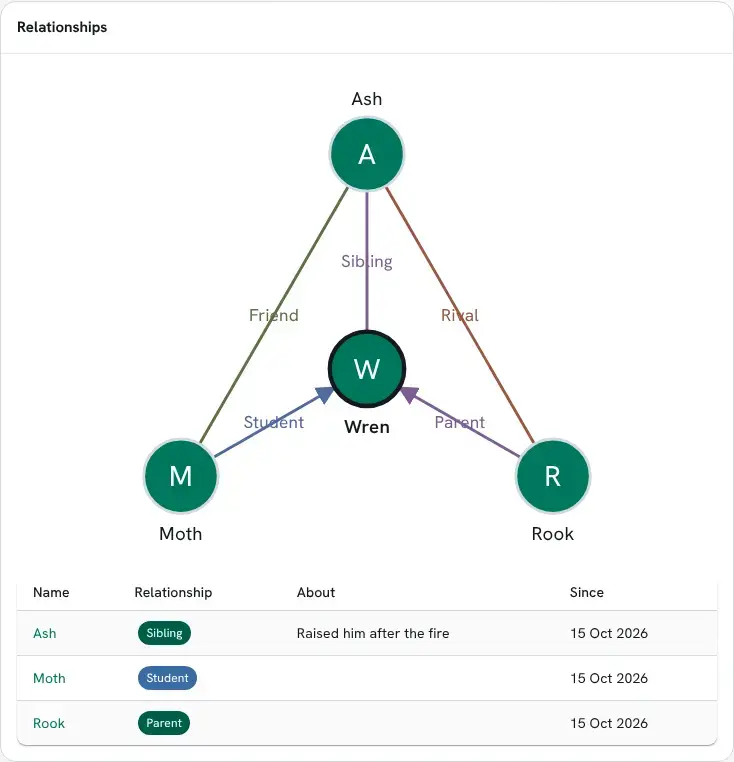
Each name is a link to that character’s profile. A visitor who is not signed in sees the relationships nobody hid, and a screen reader is given them as a list.
The panel joins the profile without a layout change. An administrator can still move it from Layout in the admin area.
The name card
Section titled “The name card”relationships-card adds the card’s lines to the portal’s name card. Rest the pointer on a name
in a scene and the card opens with the character’s profile header and, for a signed-in player,
the lines between you. Last scene together links to the scene’s log.
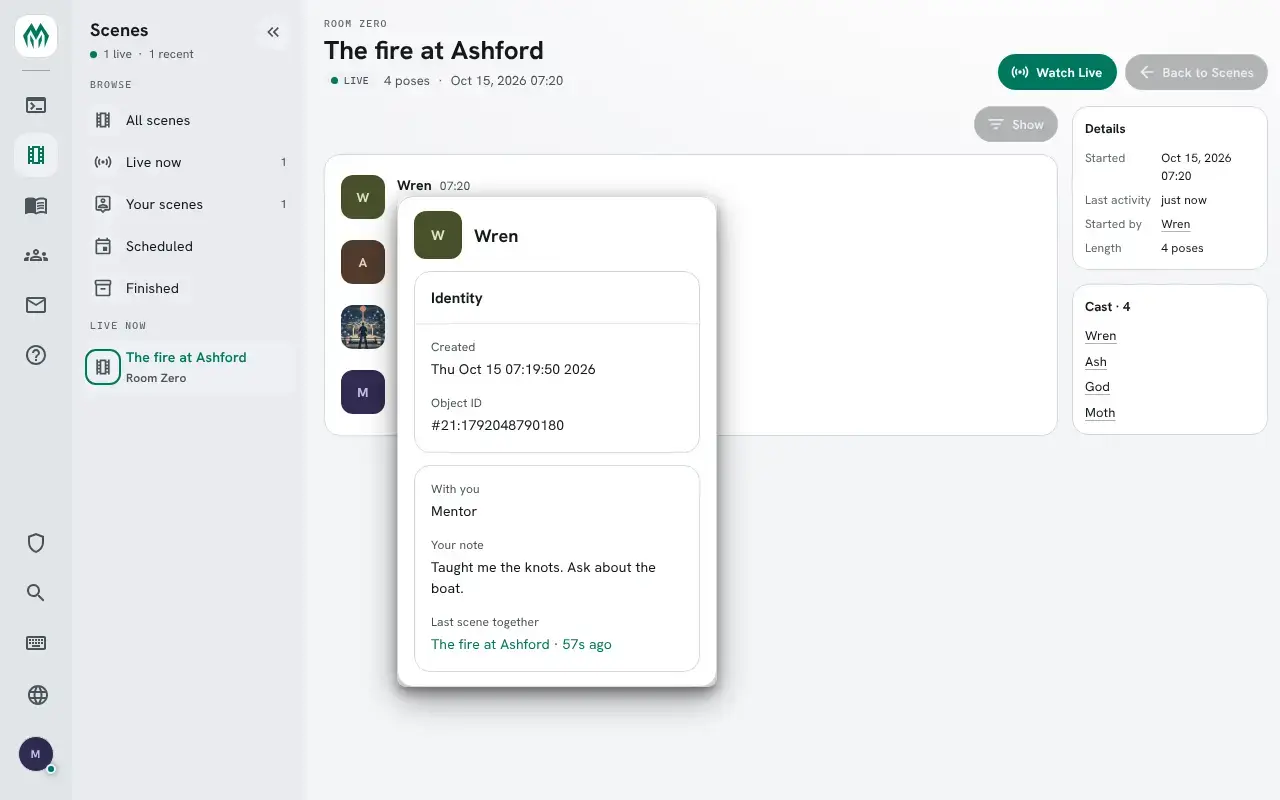
Escape closes the card. The same lines show on a character’s sheet in the Play page.
Running the package
Section titled “Running the package”Installing
Section titled “Installing”None of the four packages is installed on a new game. An administrator installs them from the portal:
- Open Packages in the admin area and choose Browse.
- Install
relationships. It needsfinger,plus-help,plus-configandhttp-handler; a new game already has all butfinger. - Install
relationships-scenefor Last scene together. It needs the Scene System, so a game without it skips this one. - Install
relationships-appfor the web andrelationships-cardfor the name card.
See Softcode Packages for how installing, upgrading and rolling back work.
Settings
Section titled “Settings”+config relationships lists the settings and +config relationships/<setting>=<value> changes
one, with the config.admin permission. See Game Settings with +config.
| Setting | What it is | Default |
|---|---|---|
card-fields | The +finger fields at the top of a card, by key. | FULLNAME PRONOUNS |
note-length | The longest note, in characters, 1 to 8000. | 2000 |
text-length | The longest line about a relationship, 1 to 1000. | 200 |
web-reach | How far the web reaches: 1 draws a character and the people they know, 2 adds the people those know. | 1 |
card-fields takes only keys +finger has:
> +config relationships/card-fields=fullname pronouns bogus[CONFIG] Warning: relationships/card-fields: bogus is not a +finger field. +finger/fields lists them.To add a field:
> +config/add relationships/card-fields=age[CONFIG] Done: relationships/card-fields is now fullname, pronouns, age, was fullname, pronouns.The types are attributes on the Relationships object in the master room, one each, named
DATA`TYPE`<KEY> with the label as the value. Under each:
DATA`TYPE`<KEY>`PAIRis the key the other side takes. Parent’s isCHILD. Without one, both sides take the same key.DATA`TYPE`<KEY>`TONEis the colour the web draws it in, atone()name such asgreenorwarning.
Find the object’s number with @find:
> @find RelationshipsRelationships(#19TW)Relationships Help(#20T)*** 2 objects found ***The numbers on your game will differ. To add a Cousin type, which both sides take, drawn in purple:
> &DATA`TYPE`COUSIN #19=CousinRelationships/DATA`TYPE`COUSIN - Set.> &DATA`TYPE`COUSIN`TONE #19=purpleRelationships/DATA`TYPE`COUSIN`TONE - Set.Players can use it at once:
> +rel/set Rook=cousin[REL] Done: You asked Rook. They show as your Cousin once they confirm it.Taking a type away leaves the relationships that use it, shown by their key.
Card lines
Section titled “Card lines”The card’s own lines are attributes on the Relationships object too, named
LINE`<order>`<KEY> with the label as the value. SHOW`<KEY> works out the line, with
%<target> the character on the card and %<viewer> the reader; an empty result leaves the line
out. LINK`<KEY>, worked out the same way, makes the line a link in the portal.
The package ships With you (010) and Your note (020), and relationships-scene adds
Last scene together this way. For a line with when the character was last on:
> &LINE`030`SEEN #19=Last onRelationships/LINE`030`SEEN - Set.> &SHOW`SEEN #19=if(hasflag(%<target>,connected),now,get(%<target>/LASTLOGOUT))Relationships/SHOW`SEEN - Set.> +rel Rook═══════════════════════════════════╡ Rook ╞═══════════════════════════════════With you: CousinLast on: now═══════════════════════════════╡ Relationships ╞══════════════════════════════Name Relationship About SinceWren Cousin - 15 Oct 2026══════════════════════════════════════════════════════════════════════════════+finger Rook · +rel/set Rook=<type> · +rel/note Rook=<text>══════════════════════════════════════════════════════════════════════════════Staff with the softcode.relationships.see permission see every relationship, the hidden ones
too, marked (hidden). The package gives it to nobody but the administrator, so a game hands it
out:
> @role/allow wizard=softcode.relationships.seeRole Wizard: allows softcode.relationships.see.Where the data lives
Section titled “Where the data lives”Each player keeps their own side on themselves:
RELATION`<key>holds the type’s key: what the other character is to them.RELATION`<key>`TEXTandRELATION`<key>`SINCEsit under it.RELNOTE`<key>holds their note.
<key> is the other character’s object ID with the # dropped and the : written as _, since
an attribute name can hold neither: #20:1792045608032 is 20_1792045608032.
Shared scenes in your own code
Section titled “Shared scenes in your own code”sceneshared(<player>, <player>[, <count>]) lists the scenes both players belong to, the latest
activity first, keeping those the caller may see. It comes with the Scene System:
> think sceneshared(me,Ash,3)1