
Pose Summaries
The summary package adds +summary, one line that sums up your last pose for the people
in the room with you now. Use it after a long pose, so someone who arrives late or reads
quickly can follow.
> +summary Bars the door and will not let anyone leave.[SUMMARY] Mira: Bars the door and will not let anyone leave.- Only the room you are in hears it. Nobody elsewhere does.
- It is kept nowhere. A scene running in the room does not record it.
- What you type is shown as you typed it. Nothing in it is evaluated.
| You are | You want to | Read |
|---|---|---|
| A player | sum up a pose | Summing up a pose |
| A player | know who sees it | Who hears it |
| Staff | install it, change the length limit | Running the package |
| A coder | change the line the room sees | Changing the line |
In the game, +help summary has the same command in short form.
Summing up a pose
Section titled “Summing up a pose”+summary <text> tells everyone in your room, you included, one line with your name and the
text:
> :sets her glass down very slowly, glances at the door twice, then at Bram, and finally slides the key across the table without a word.Mira sets her glass down very slowly, glances at the door twice, then at Bram, and finally slides the key across the table without a word.> +summary Slides Bram the key, without a word.[SUMMARY] Mira: Slides Bram the key, without a word.The text is shown exactly as you typed it. Brackets, percent signs and semicolons are plain
text, so +summary Pays [twice] the price; 50% up front shows just that.
A summary is refused, and nobody hears it, when:
- it is empty;
- it is given a switch, such as
+summary/all; - it is longer than the limit, 200 characters on a new game;
- you are gagged, or the room’s Speech lock does not let you speak.
> +summary[SUMMARY] Warning: What happened? +summary <text> sums up your last pose in a line for the room.> +summary/all Leaves.[SUMMARY] Warning: +summary takes no switches. +summary <text> sums up your last pose.One over the limit says how long it was:
[SUMMARY] Warning: Keep a summary to 200 characters. That one is 230.A summary that is too long is refused, not cut short, so nothing you did not mean to send reaches the room.
Who hears it
Section titled “Who hears it”Everyone in your location hears the summary, and nobody elsewhere does. Here Mira and Bram are in the Salt Tavern, and Kit is in another room:
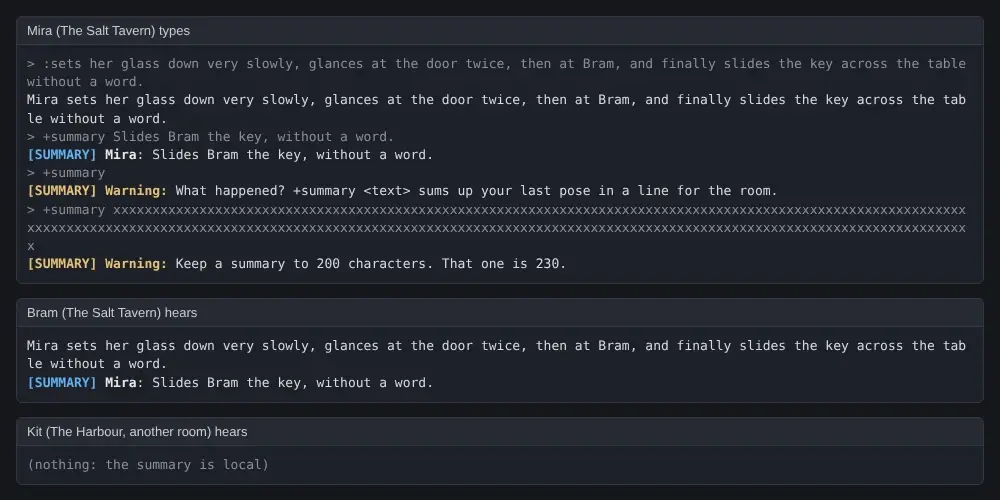
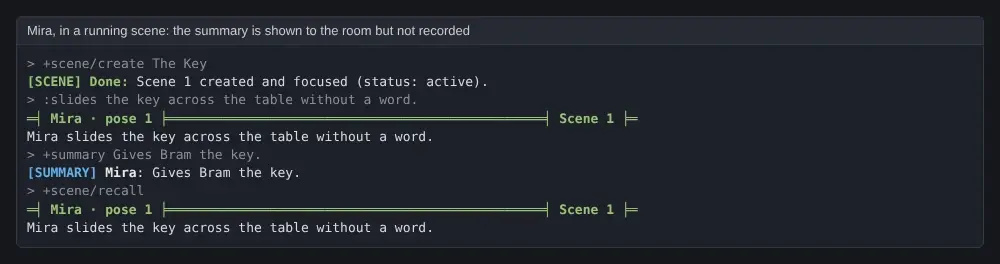
A summary is not part of the scene. A scene running in the room records your poses, says
and emits, but not a summary: it is not in +scene/recall, and not in the scene archive.
Running the package
Section titled “Running the package”Installing
Section titled “Installing”The summary package ships with the server but is not installed on a new game. An administrator installs it from the portal:
- Open Packages in the admin area and choose Browse.
- Install
summary. It needsplus-helpandplus-config, which a new game already has.
It adds the command +summary for everyone. It is a game command, which is matched before
softcode $-commands, so a +summary your game already has in softcode stops running once
the package is in.
It makes one object in the master room, Summary, which runs the command and holds the
setting, and puts its +help topics in an object inside it.
See Softcode Packages for how installing, upgrading and rolling back work.
Settings
Section titled “Settings”The one setting is set with +config summary:
| Setting | What it changes | Default |
|---|---|---|
max-length | The longest summary, in characters, from 20 to 2000. A longer one is refused, not cut. | 200 |
> +config summary/max-length=300[CONFIG] Done: summary/max-length is now 300, was 200.Changing the line
Section titled “Changing the line”Another package can change the line the room is told with a filter on the Summary object:
an attribute named FILTER`SUMMARY`LINE`<name>. Filters run in name order with chain().
Each is given the line so far as %0, the player as %1 and the summary as typed as %2,
and returns the line.
A filter a package attaches to the Summary object goes away when that package is uninstalled.