
Extension Points
An extension point is a place in a package where another package can plug in. The package names
an attribute tree, such as FILTER`REPORT, and runs whatever attributes it finds one level below
it. Another package adds an attribute there, named after itself, such as FILTER`REPORT`TIDE.
Nothing has to be registered, and no package edits another’s code. Installing a package adds its attributes; uninstalling it removes them, and the point carries on with whatever is left.
This page covers:
- filter points, which pass a value through every attribute below them;
- trigger points, which run every attribute below them when something happens;
- the points the server itself offers: events, watched attributes, and registries;
- using a point from a package;
- choosing a point.
The examples on this page build a small Weather object in the master room, not set NO_COMMAND.
+weather reports the sky, and later +sky <sky> changes it.
Filter points
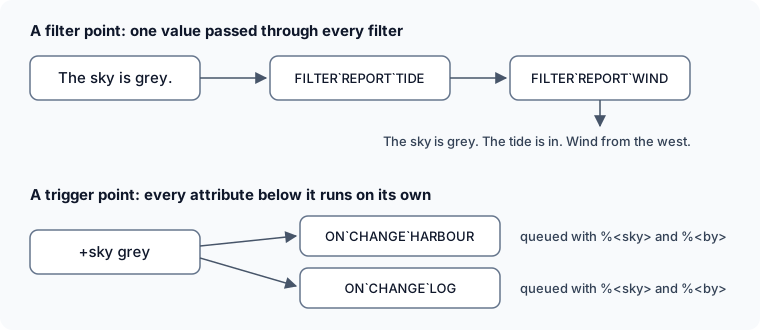
Section titled “Filter points”A filter point passes a value through every attribute below it, in name order. Each attribute gets
the value as %0 and returns the value to show instead. The next attribute gets that. The function
that does this is chain().
Make the point where the value is shown. lattr() finds the attributes below it, and chain() runs
them:
> &SKY Weather=clearWeather/SKY - Set.> &CMD`WEATHER Weather=$+weather:@pemit %#=[chain(iter(lattr(%!/FILTER`REPORT`*),%!/%i0),The sky is [v(SKY)].,%#)]Weather/CMD`WEATHER - Set.> +weatherThe sky is clear.With nothing below FILTER`REPORT, chain() returns the value it was given. Now two filters
fill the point:
> &FILTER`REPORT`TIDE Weather=%0 The tide is in.Weather/FILTER`REPORT`TIDE - Set.> &FILTER`REPORT`WIND Weather=%0[if(match(grey stormy,v(SKY)),%bWind from the west.)]Weather/FILTER`REPORT`WIND - Set.> &SKY Weather=greyWeather/SKY - Set.> +weatherThe sky is grey. The tide is in. Wind from the west.Anything after the value in chain() reaches every filter as %1, %2 and so on. Here %1 is the
player reading, %#. A filter runs as the object it is on, so v(SKY) reads the Weather’s sky.
A filter can end the chain with ibreak(). The filters after it do not run, and what it returned is
shown. Filters run in name order, so FILTER`REPORT`FOG runs before TIDE and WIND:
> &FILTER`REPORT`FOG Weather=if(strmatch(v(SKY),foggy),Fog hides everything.[ibreak()],%0)Weather/FILTER`REPORT`FOG - Set.> &SKY Weather=foggyWeather/SKY - Set.> +weatherFog hides everything.> &SKY Weather=clearWeather/SKY - Set.> +weatherThe sky is clear. The tide is in.The scene package has seven filter points, among them CARD for a scene’s card, JOIN for what
a player is told when they join, and HELP for the command list of +scene/help. See
Changing what +scene shows.
Trigger points
Section titled “Trigger points”A trigger point runs every attribute below it when something happens. Use one when other packages should act on the change, rather than change what is shown.
@dolist walks the attributes, and @trigger/args queues each one with
named arguments:
> &CMD`SKY Weather=$+sky *:&SKY me=%0; @pemit %#=The sky is now %0.; @dolist lattr(me/ON`CHANGE`*)=@trigger/args me/##=sky,%0,by,%#Weather/CMD`SKY - Set.> &ON`CHANGE`HARBOUR Weather=@pemit %<by>=The harbour master looks up at the %<sky> sky.Weather/ON`CHANGE`HARBOUR - Set.> +sky stormyThe sky is now stormy.The harbour master looks up at the stormy sky.Each attribute is queued on its own, so it runs after +sky has finished. A trigger point cannot
change what the command that raised it shows; that is what filter points are for.
Pass what happened by name, as sky and by are here, so a package can read %<sky> without
knowing the order of the arguments.
Points the server offers
Section titled “Points the server offers”The server has points of the same shape, which a package uses without the package that raises them:
| Point | Where | What it does |
|---|---|---|
| Events | <EVENT>`<PACKAGE> on the event handler | Runs when the game reports an event, such as a page or a rename. See Events |
| Watched attributes | WATCH`<ATTRIBUTE>`<PACKAGE> on the event handler | Runs when an attribute staff chose to watch is set or cleared on any object. See help @attribute |
| Feed taps | An attribute on your own object, named with @feed/tap <kind>=<object>/<attribute> | Runs after each line a feed of that kind delivers, with who heard it. radio-scene logs radio lines into scenes this way. See help @feed taps |
| Setting changes | ACONFIG on a system’s object | Runs after +config changes one of its settings. See Reacting to a change |
Packages also offer registries: an object other packages attach one leaf to, naming their own
object. +help reads SRC`<NAME> on its librarian, and +config reads SYSTEM`<NAME> on its
registry. A registry leaf is usually all a bridge package holds.
From a package
Section titled “From a package”A package fills another’s point with an attach entry: it adds attributes to the other package’s
object, and uninstalling it takes them away. Say a weather package creates the Weather object
as {{weather/weather}}. A harbour package fills both its points:
depends:  - package: weather    version: ">=1.0"
objects:  - ref: weather_points    target: "{{weather/weather}}"    attributes:      FILTER`REPORT`TIDE: |-        %0 The tide is in.      ON`CHANGE`HARBOUR: |-        @pemit %<by>=The harbour master looks up at the %<sky> sky.
The dependency is what makes {{weather/weather}} a legal target. See
Managing attributes on an object you didn’t create.
When the harbour has a use of its own, and the weather report is only one more thing it can do,
put the weather part in a third package, harbour-weather, that depends on both. See
Bridge Packages.
Offering a point
Section titled “Offering a point”- Name each point for where it is used, as
FILTER`REPORTandON`CHANGE, and run only one level below it. A package keeps any helpers deeper or under its ownFUNtree. - Name what goes below after the package, as
FILTER`REPORT`TIDE. Two packages never write the same attribute, and the name decides the order. - Work with nothing below the point. The package does what it did before any other was installed.
- Say what each point is given. List the points in your help, with what
%0is and what the other arguments are, as+help scene filtersdoes. - Keep a point’s arguments. Another package’s code depends on them. Add new ones at the end, or as new names.
Choosing a point
Section titled “Choosing a point”| You want to | Use |
|---|---|
| Change a line, a card or a list another package shows | A filter point |
| Do something when something changes in another package | A trigger point |
| Do something when something happens in the game | An event |
| Do something when an attribute changes on any object | A watched attribute |
| Show your package’s help, settings or pages in another package’s screen | A registry leaf |