
Letting Your Players Build
Players can build their own corner of the game: a shop, a house, a ship. They build it apart from the rest of the world, using their own building quota. When it is ready they file a job, staff look it over and open the exits that join it to the grid, and the rooms can then stay with the builder, go to a group of builders, or go to someone else.
Everything here uses commands every SharpMUSH game has, plus +request and +job from the Jobs
package. Nothing needs to be installed beyond Jobs.
| You are | You want to | Read |
|---|---|---|
| A player | see how much you can build | Your building quota |
| A player | build an area | Building your area |
| A player | have it joined to the game | Asking to join the grid |
| Staff | review a request and join an area | Joining an area to the grid |
| Anyone | decide who owns the rooms afterwards | Who owns an area |
| Staff | give someone more room to build | Changing quotas |
The examples follow Mira, a player, and Rook, a member of staff. Market Square (#30) is a room on
the grid that staff own.
Your building quota
Section titled “Your building quota”Your quota is how many objects you may own. Every room, exit and thing you build takes one slot.
@quota shows how many you have used:
> @quotaMira's quota: 0/20 objects used.A new player starts with the number in the starting_quota @config option, 20 unless your game
changed it. When the quota is used up, building stops with:
Sorry, your building quota has run out.Destroying something gives its slot back once it is gone. @destroy marks an object for
destruction and the game removes it a few minutes later; @destroy it a second time to remove it
at once:
> @destroy #35Market(#35E) is scheduled to be destroyed.> @destroy #35Halted: Market(#35)Destroyed.Building your area
Section titled “Building your area”Build your area away from everyone else, then ask for it to be joined to the grid. Start with one
room. @dig/teleport makes it and takes you there:
> @dig/teleport Clockmaker's WorkshopClockmaker's Workshop created with room number 31.> @desc here=Shelves of half-finished clocks tick out of step.Clockmaker's Workshop/DESCRIBE - Set.Write down the room number. You need it to come back, and staff need it to find the room.
@dig with exit names makes the next room and the exits to and from it in one go. The first name
after = is the exit from where you stand to the new room, the second is the way back. Names
separated by ; are aliases, so garden and g work as well as the full name:
> @dig Back Garden=Garden <G>;garden;g,Workshop <W>;workshop;wBack Garden created with room number 32.Opened exit #33Trying to link...Linked exit #33 to #32Opened exit #34Trying to link...Linked exit #34 to #31> garden═╡ Back Garden(#32Rn) ╞═══════════════════════════════════════════════════════You see nothing special.Obvious exits:Workshop <W>That one command used three slots, one room and two exits:
> @quotaMira's quota: 4/20 objects used.Getting in and out
Section titled “Getting in and out”Until staff join your area to the grid, there is no exit between the two. home takes you back to
your home on the grid, and @tel takes you to any room you own:
> homeThere's no place like home...═╡ Market Square(#30Rn) ╞═════════════════════════════════════════════════════Stalls crowd the cobbles under striped awnings.> @tel #31═╡ Clockmaker's Workshop(#31Rn) ╞═════════════════════════════════════════════Shelves of half-finished clocks tick out of step.Obvious exits:Garden <G>You can’t join your area to the grid yourself. You can only open exits in rooms you own, and only link them to rooms you own. Trying anyway still makes the exit, unlinked, and it takes a slot:
> @open Market;m=#30Opened exit #35Trying to link...You can't link to that.@destroy an exit like that so it stops using your quota.
Asking to join the grid
Section titled “Asking to join the grid”When your area is ready, file a job in the Building bucket. Say which rooms are yours, by number, and where you would like the way in:
> +request Building/Link my workshop=Clockmaker's Workshop (#31) and Back Garden (#32) are ready. An exit from Market Square would suit.[JOBS] Done: Filed job 1 in Building: Link my workshop. Staff aim to answer within 7 days. +job 1 shows it.+job 1 shows the job and anything staff write back. When staff finish, you are told:
[JOBS] Rook completed your job 1: Link my workshop. +job 1 shows it.Joining an area to the grid
Section titled “Joining an area to the grid”This part is for staff.
The Building bucket is worked by anyone with the job-admin-building role, or job-admin for
every bucket. A wizard needs the role too:
> @role/assign Rook=job-admin-buildingRook now holds job-admin-building.+jobs lists what is waiting, and +job <#> reads one:
> +job 1══════════════════════════╡ Job 1: Link my workshop ╞═════════════════════════Bucket: BuildingStatus: NewPriority: NormalFiled: Oct 15 04:46 by Mira...═════════════════════════╡ Mira · Oct 15 04:46 · #1 ╞═════════════════════════Clockmaker's Workshop (#31) and Back Garden (#32) are ready. An exit fromMarket Square would suit....Visit the rooms before joining them. @tel #31 takes a wizard anywhere, and examine shows who
owns each room and what exits it has.
To join the area, stand in the grid room and open an exit to the player’s room, with a return exit named after the grid room:
> @open Clockmaker's Workshop <C>;clock;c=#31,Market Square <M>;market;mOpened exit #37Trying to link...Linked exit #37 to #31Opened exit #38Trying to link...Linked exit #38 to #30You own both exits, so the player can’t remove the way in, and they don’t count against the player’s quota. Then close the job, which tells the player:
> +job/complete 1=Linked from Market Square. Take the clock exit from the square.[JOBS] Done: Job 1 is closed: completed.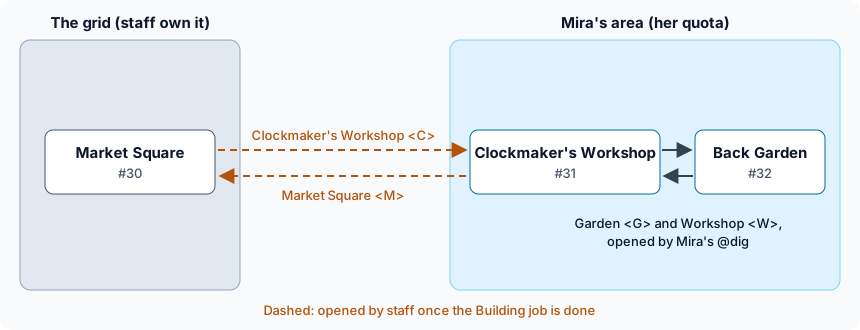
Who owns an area
Section titled “Who owns an area”Once an area is on the grid, decide who should own its rooms:
| Choice | Who can change the rooms | Whose quota |
|---|---|---|
| Leave it with the builder | the builder | the builder’s |
| Give it to a shared player | everyone on that player’s list | nobody’s |
| Pass it to another player | the new owner | the new owner’s |
| Staff take it over | staff | nobody’s |
Doing nothing is a fine answer for one player’s home. A shop or a ship that several people look after is better with a shared player.
A shared player for an area
Section titled “A shared player for an area”A shared player is a character set SHARED. Nobody needs to play it. Anyone who passes its zone lock controls everything it owns, and can give it what they own.
Staff make one for the area and list who may build there:
> @pcreate Clockworks=clockpass1New player 'Clockworks' (#39) created with password 'clockpass1'> @set *Clockworks=SHAREDClockworks - SHARED set.> @lock/zone *Clockworks=*MiraClockworks(#39) - Zone locked.The builder then gives each room and exit to it. A room is given from inside it, or by number:
> @chown here=ClockworksOwner changed.> @chown #32=ClockworksOwner changed.> @chown #33=ClockworksOwner changed.> @chown #34=ClockworksOwner changed.> @quotaMira's quota: 0/20 objects used.Mira can still change the rooms, and they no longer count against her quota. Exits staff opened stay
with staff; @chown #38=Clockworks tells Mira Permission denied.
To let someone else build there, staff change the lock. | means “or”:
> @lock/zone *Clockworks=*Mira|*TomasClockworks(#39) - Zone locked.Taking a name off the lock takes away that player’s control at once.
Passing a room to another player
Section titled “Passing a room to another player”To hand a room to another player, set it CHOWN_OK and lock it to them, so nobody else can take it:
> @dig AtticAttic created with room number 40.> @set #40=CHOWN_OKAttic - CHOWN_OK set.> @lock/chown #40=*TomasAttic(#40) - Chown locked.Anyone else who tries is refused:
> @chown #40=mePermission denied.The new owner takes it with @chown <room>=me, then clears HALT and CHOWN_OK:
> @chown #40=meHalted: Attic(#40)Owner changed.> @set #40=!HALTAttic - HALT reset.> @set #40=!CHOWN_OKAttic - CHOWN_OK reset.The room now takes a slot of Tomas’s quota and frees one of Mira’s. If Tomas has no slot left, he
is told Sorry, your building quota has run out. and the room stays with Mira.
A thing works the same way, but has to be in the new owner’s hands: hand it over first.
Staff taking an area over
Section titled “Staff taking an area over”A wizard can @chown anything to anyone, and @chownall moves everything one player owns:
> @chown #32=RookHalted: Back Garden(#32)Owner changed.> @chownall/rooms Mira=RookHalted: Spare Room(#45)Ownership changed for 1 objects./rooms limits @chownall to rooms; /exits and /things work the same way, and with none of
them it moves everything.
Changing quotas
Section titled “Changing quotas”Staff with the players.moderate permission, which the wizard role has, change one player’s quota
with @quota/set and list everyone’s with @quota/all:
> @quota/set Mira=30Quota for Mira set to 30.> @quota/allQuota listing for all players:Player Used/Quota=========================================God 9/999999Package Manager 17/999999Rook 4/20Mira 0/30Tomas 3/20Ada 2/20Clockworks 3/20The number is the total, not an addition, and setting it below what a player already owns stops
them building without taking anything away. @allquota <number> sets every player’s quota at once.
A request for more quota is a job like any other: +request Building/More quota=....
Letting others into a room
Section titled “Letting others into a room”Four flags open a room you own to other players. Each has a lock, so you can choose who:
| Flag | Others can | Lock |
|---|---|---|
LINK_OK | link exits to the room | @lock/link |
OPEN_OK | open exits in the room | @lock/open |
JUMP_OK | @tel into the room | @lock/teleport |
ABODE | make the room their home with @link me=here | none |
An unset lock lets everyone through. To let only Tomas link exits to your workshop:
> @set #31=LINK_OKClockmaker's Workshop - LINK_OK set.> @lock/link #31=*TomasClockmaker's Workshop(#31) - Link locked.Tomas can now open an exit in one of his own rooms and link it to the workshop. Anyone else gets
You can't link to that.
> @open Workshop;w=#31Opened exit #42Trying to link...Linked exit #42 to #31