Supporting MUD Clients
A MUD client such as Mudlet can do more than show the game’s text. Told where the player is, it draws a map; told their health, it draws a gauge; told the channel lines, it keeps them in a window of their own. The game tells it these things over GMCP, beside the text.

SharpMUSH handles GMCP itself: it agrees to it with each client, remembers what the client asked for, and plays sounds. What the game tells a client about its rooms, channels and characters comes from softcode packages, because only the game knows what a room’s area or a character’s health is. The MUD kit is a set of those packages, ready to install.
| You want to | Read |
|---|---|
| see how the pieces fit | How it works |
| know what each client asks for | What GMCP is |
| set a game up for Mudlet | Installing the MUD kit |
| look up a GMCP message field by field | MUD Kit Packages |
| draw health gauges | gmcp-char and Watched attributes |
| play sounds and music | Sounds and GMCP Softcode |
| write your own GMCP softcode | Functions for GMCP softcode |
| see a whole session | A worked Mudlet session |
Every example on this page was run on a SharpMUSH server with the MUD kit installed, and the output shown is what it sent.
How it works
Section titled “How it works”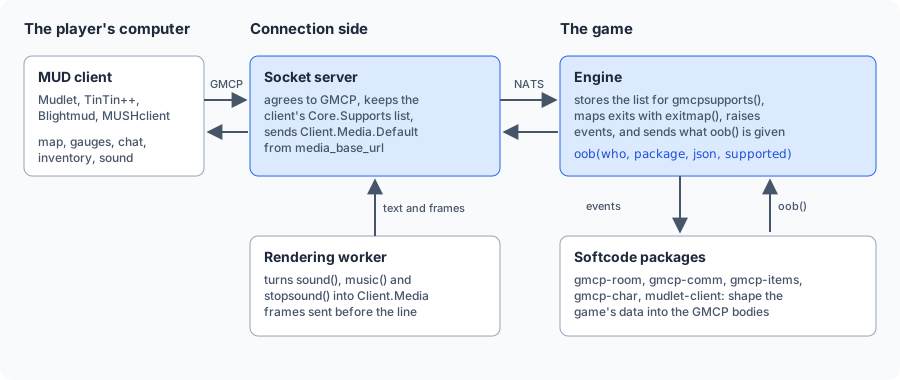
- The socket server agrees to GMCP with each telnet client and keeps the list of modules the client
asked for. It sends
Client.Media.Defaultwhen the game has amedia_base_url. - The engine keeps that list for
gmcpsupports(), raises events such asOBJECT`MOVEandSOCKET`GMCP, runs the handlers of watched attributes when one changes, and sends whatever softcode hands tooob(). - The packages hear those events on the event handler, shape the game’s data into the standard
GMCP messages, and send them with
oob(..., supported), which skips a client that did not ask for them. Mudlet’sClient.GUIandClient.Mapare the exception: see When Mudlet does not list a module. - The rendering worker turns
sound(),music()andstopsound()in a line intoClient.Mediamessages, which the socket server sends just before the line.
What GMCP is
Section titled “What GMCP is”GMCP is a telnet option. When a client connects, the game offers it and the client agrees. From then on
either side can send a message: a package name, such as Room.Info, and a body in JSON.
Room.Info {"num":26,"name":"Garden","area":"Town","environment":"garden","exits":{"south":0},"coords":"3,4,0"}A client can say which modules it wants with Core.Supports.Set, a list of module names each with a
version, and add or remove modules later with Core.Supports.Add and Core.Supports.Remove. A module
covers everything under it: Room covers Room.Info and Room.Players.
What each client sends:
| Client | Core.Supports | What the MUD kit sends it |
|---|---|---|
| Mudlet | Char 1, Char.Skills 1, Char.Items 1, Room 1, IRE.Rift 1, IRE.Composer 1, External.Discord 1, Client.Media 1 | Room, Char, Char.Items, External.Discord, Client.Media, and Client.GUI and Client.Map. Not Comm, which Mudlet does not list: see below |
| Blightmud, TinTin++, MUSHclient | none, unless a script sends one | everything |
| The web portal | not used | everything sent with oob() |
An empty list means the client never said, not that it wants nothing, so a client that lists nothing is sent everything. A client that sent a list is sent only what is on it.
When Mudlet does not list a module
Section titled “When Mudlet does not list a module”Stock Mudlet does not list Comm, so it is not sent channel lines (Comm.Channel.Text) or its
channel list. A Mudlet script adds the module, and the game’s own Mudlet interface package is the place
for it:
sendGMCP([[Core.Supports.Add ["Comm.Channel 1"] ]])>> Core.Supports.Add ["Comm.Channel 1"]> think gmcpsupports(me, Comm.Channel)1> @chat Market=Anyone about now?<Market> Wren says, "Anyone about now?"<< Comm.Channel.Text {"channel":"Market","talker":"Wren","text":"\u003CMarket\u003E Wren says, \u0022Anyone about now?\u0022"}Here >> is a GMCP message the client sent, << one the game sent, and > a command typed in the game.
Mudlet does not list Client either, but the interface package (Client.GUI) and the map
(Client.Map) are sent to every connection that agreed to GMCP, because the script that would add
Client lives in the very interface being offered. A client that does not know them ignores them.
Installing the MUD kit
Section titled “Installing the MUD kit”The MUD kit is bundled with the server but not installed until you choose it. Install it from the portal’s Packages page, from the bundled catalogue:
| Package | Sends |
|---|---|
gmcp-room | Room.Info, Room.Players, Room.AddPlayer, Room.RemovePlayer |
gmcp-comm | Comm.Channel.Text, Comm.Channel.List |
gmcp-items | Char.Items.List, Char.Items.Add, Char.Items.Remove |
gmcp-char | Char.Name, Char.Vitals, Char.Status |
mudlet-client | Client.GUI, Client.Map, External.Discord.Info, External.Discord.Status, and +gui |
mud-kit | nothing itself: it installs the five above and adds the +help gmcp overview |
Each of the five installs and uninstalls on its own, so a game takes only what it uses. They need
plus-help and plus-config, which are installed with them. Every package adds its handlers to the
event handler (#9 in a new game) one level below the event, such as OBJECT`MOVE`GMCPROOM, beside
the handlers already there. See Events.
Staff change each package’s settings with +config, for example +config gmcp-room:
> +config mudlet-client/gui-url=https://example.org/game.mpackage[CONFIG] Done: mudlet-client/gui-url is now https://example.org/game.mpackage, was none.Players read about it with +help gmcp.
Each message the kit sends, field by field, with each package’s settings, is in MUD Kit Packages.
Watched attributes
Section titled “Watched attributes”A gauge has to change the moment the health behind it does. Rather than read every player’s attributes over and over, the game can run code whenever an attribute changes. Staff choose which attributes, so attributes nobody watches cost nothing.
@attribute/watch <attribute> watches a standard attribute: every time a copy of it is set, cleared or
wiped, on any object and by any command or function, the event handler runs its attributes named
WATCH`<attribute> and WATCH`<attribute>`*. Only staff with config.admin can watch an attribute.
See @attribute.
You rarely need to do this yourself for the MUD kit: gmcp-char watches each attribute its vitals and
status settings name, and puts its own handler on the event handler. See
What gmcp-char does.
A worked Mudlet session
Section titled “A worked Mudlet session”Two players connect to a game with the MUD kit installed. Wren plays in a stock Mudlet 4.19 and Tam in a client that agrees to GMCP and lists nothing, as TinTin++ does. Staff have set:
> +config mudlet-client/gui-url=https://example.org/game.mpackage> +config mudlet-client/map-url=https://example.org/map.xml> +config mudlet-client/discord-invite=https://discord.gg/example> +config gmcp-char/status=LEVEL> @config/set media_base_url=https://example.org/soundsWren has FULLNAME Wren of the Marsh, LEVEL 3, MAXHP 40 and HP 25. North of Room Zero is a
Garden in the area Town, with terrain garden and coordinates 3, 4, 0.
-
Wren connects. The game offers GMCP, Mudlet agrees, and is sent where the game’s sounds are. Mudlet says hello and lists its modules, and Wren logs in:
<< Client.Media.Default {"url":"https://example.org/sounds/"}>> Core.Hello {"client": "Mudlet", "version": "4.19.1"}>> Core.Supports.Set ["Char 1", "Char.Skills 1", "Char.Items 1", "Room 1", "IRE.Rift 1", "IRE.Composer 1", "External.Discord 1", "Client.Media 1"]<< Client.Map {"url":"https://example.org/map.xml"}<< Char.Name {"name":"Wren","fullname":"Wren of the Marsh"}<< Char.Vitals {"hp":25,"maxhp":40}<< Char.Status {"name":"Wren","fullname":"Wren of the Marsh","level":3}<< Char.Items.List {"location":"inv","items":[]}<< Char.Items.List {"location":"room","items":[]}<< Room.Info {"num":0,"name":"Room Zero","area":"","environment":"","exits":{"north":26}}<< Room.Players [{"name":"Wren","fullname":"Wren of the Marsh"}]<< Client.GUI {"version":"1.0","url":"https://example.org/game.mpackage"}<< External.Discord.Status {"game":"SharpMUSH","details":"Playing Wren","starttime":1792059570}Mudlet is offered the map as soon as it says hello, and the game’s interface once Wren has logged in. It did not list
Comm, so there is noComm.Channel.List. -
Wren speaks on a channel with
@chat Market=Anyone about?. The line shows in her main window only: noComm.Channel.Textis sent. -
A script adds Comm. After
Core.Supports.Add ["Comm.Channel 1"], the next channel line also goes to Mudlet’s chat window.+gui onoffers the interface again at once:>> Core.Supports.Add ["Comm.Channel 1"]> @chat Market=Anyone about now?<< Comm.Channel.Text {"channel":"Market","talker":"Wren","text":"\u003CMarket\u003E Wren says, \u0022Anyone about now?\u0022"}> +gui on<< Client.GUI {"version":"1.0","url":"https://example.org/game.mpackage"}[GUI] Done: Your client will be offered the game's interface when you connect. It was offered just now. -
Tam connects in the same room. Tam’s client listed nothing, so it is sent every package, and Wren is told Tam arrived:
Tam << Room.Players [{"name":"Wren","fullname":"Wren of the Marsh"},{"name":"Tam","fullname":"Tam"}]Wren << Room.AddPlayer {"name":"Tam","fullname":"Tam"}Tam << Client.GUI {"version":"1.0","url":"https://example.org/game.mpackage"}Tam << Comm.Channel.List [] -
Wren is hurt and goes up a level. gmcp-char watches both, so her gauges and status change at once:
> &HP *Wren=20Wren << Char.Vitals {"hp":20,"maxhp":40}> &LEVEL *Wren=4Wren << Char.Status {"name":"Wren","fullname":"Wren of the Marsh","level":4} -
A door creaks. Wren’s Mudlet plays
https://example.org/sounds/door.wav; Tam sees the line alone, as shown in Sounds and music. -
Mudlet asks for Discord presence, then Wren walks north. Her mapper gets the Garden with its area, terrain and coordinates, and Tam’s client takes her out of the room:
Wren >> External.Discord.Hello {"user": "wren", "private": false}Wren << External.Discord.Info {"inviteurl":"https://discord.gg/example"}Wren << External.Discord.Status {"game":"SharpMUSH","details":"Playing Wren","starttime":1792059569}Wren << Char.Items.List {"location":"room","items":[]}Wren << Room.Info {"num":26,"name":"Garden","area":"Town","environment":"garden","exits":{"south":0},"coords":"3,4,0"}Wren << Room.Players [{"name":"Wren","fullname":"Wren of the Marsh"}]Tam << Room.RemovePlayer "Wren"
The whole session, as the two clients saw it:
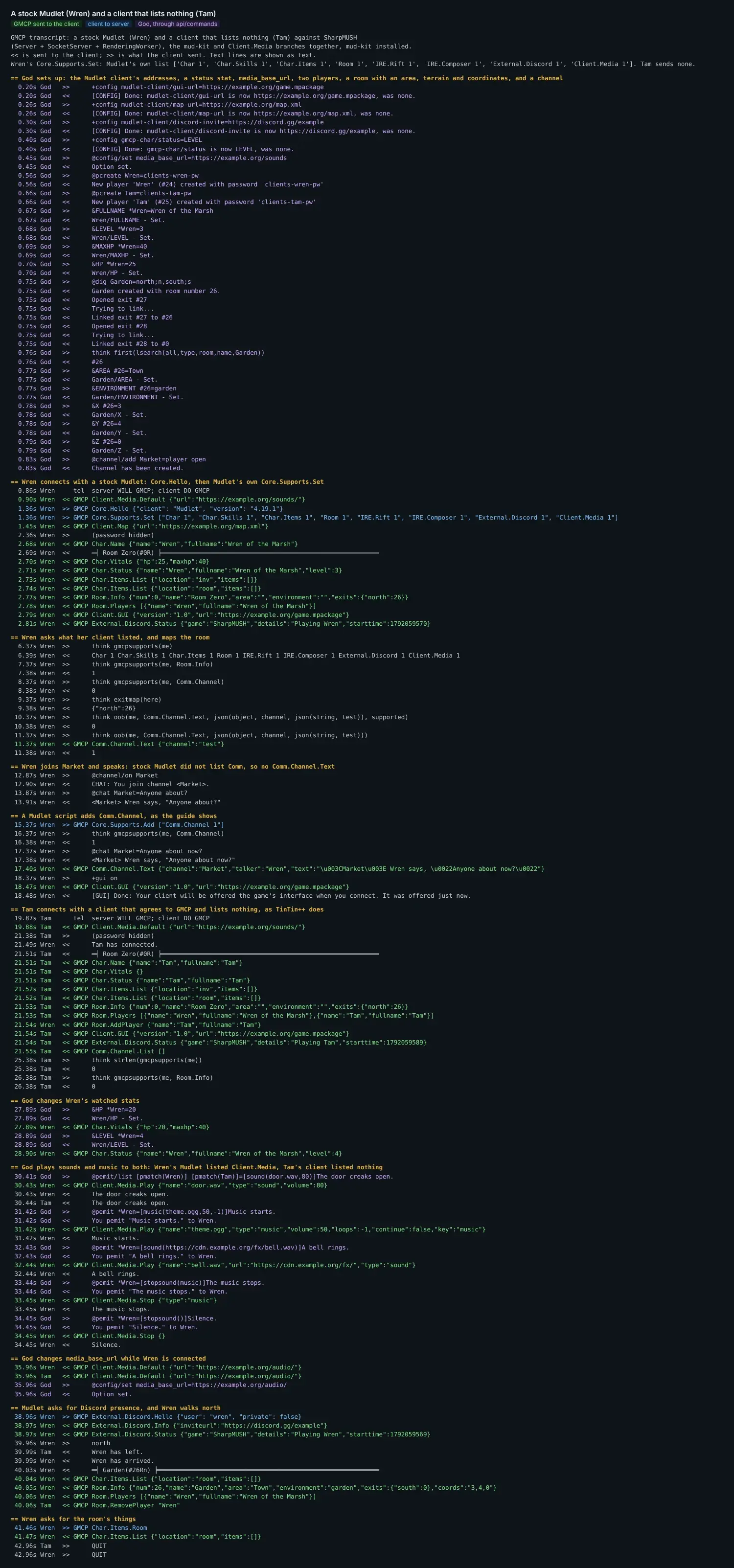
A second session, two Mudlet clients whose scripts added Comm and Client to their lists: Alice and Bob connect, join a
channel, talk, page, and Alice is handed a lantern, drops it and walks north. Only the MUD kit’s messages
are shown: