
Info Files and Journals
The info package gives players three places to write things down:
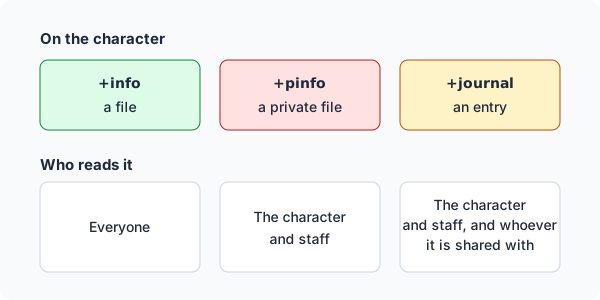
+infokeeps files about a character that anyone can read: a background, contacts, what they own.+pinfokeeps private files, which only the character and staff read.+journalis a character’s own journal. An entry stays private until the player shares it, with a few people or with everyone.
| You are | You want to | Read |
|---|---|---|
| A player | keep files about your character | Info files |
| A player | write something long | Writing a line at a time |
| A player | keep a journal | Journals |
| Staff | read and lock players’ files | Staff |
| Staff | install it and change its settings | Running the package |
In the game, +help info and +help journal have the same commands in short form.
Info files
Section titled “Info files”+info <file>=<text> saves a file:
> +info Background=Mara grew up above her mother's net shop on the Shale Coast, and ran cargo for the harbour guild until the guild ran out of work.[INFO] Done: Your info file Background is saved.The same command with a file you already have replaces its text. +info on its own lists your
files:
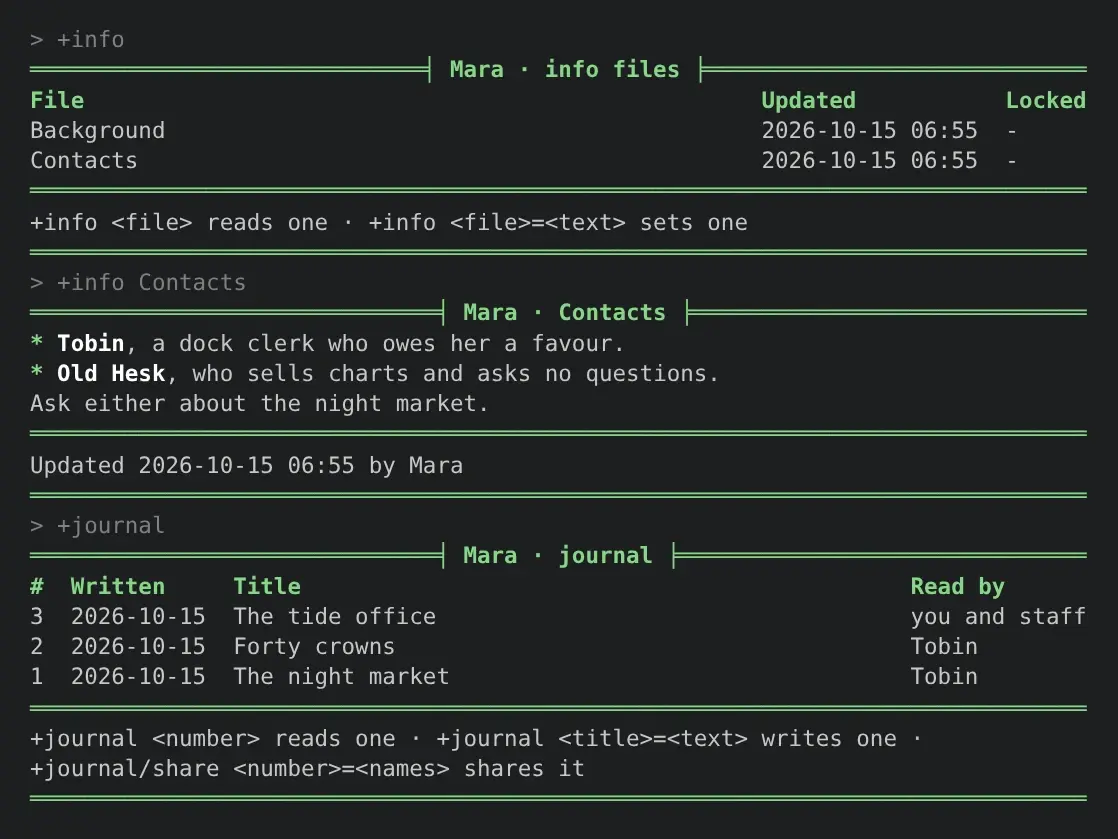
> +info═════════════════════════════╡ Mara · info files ╞════════════════════════════File Updated LockedBackground 2026-10-15 06:55 -Contacts 2026-10-15 06:55 -══════════════════════════════════════════════════════════════════════════════+info <file> reads one · +info <file>=<text> sets one══════════════════════════════════════════════════════════════════════════════+info <file> reads one. The start of its name is enough when only one file starts with it, and
+info <file>|<file> reads several at once.
In a terminal, in the reader’s own colours:
Anyone reads someone else’s files. +info <name> lists them and +info <name>/<file> reads one:
> +info Mara/Back═════════════════════════════╡ Mara · Background ╞════════════════════════════Mara grew up above her mother's net shop on the Shale Coast, and ran cargo forthe harbour guild until the guild ran out of work.══════════════════════════════════════════════════════════════════════════════Updated 2026-10-15 06:55 by Mara══════════════════════════════════════════════════════════════════════════════A name on its own is tried as a player first, so +info Mara lists Mara’s files even if you have
a file called Mara. +info me/Mara reads your own.
Private files
Section titled “Private files”+pinfo takes every command +info does, and keeps the files to you and staff:
> +pinfo Secrets=Owes the harbourmaster forty crowns. [OOC: open to plots about this.][INFO] Done: Your private file Secrets is saved.Anyone else is refused:
> +pinfo Mara/Secrets[INFO] Error: Only Mara and staff read Mara's private files.Changing a file
Section titled “Changing a file”+info/get <file>shows the command that saves the file again, with its text exactly as stored. Copy it, change it and send it back.+info/rename <file>=<new name>renames one.+info/delete <file>deletes one, and+info/delete <file>|<file>several.
> +info/get Background+info Background=Mara grew up above her mother's net shop on the Shale Coast, and ran cargo for the harbour guild until the guild ran out of work.What you type is kept as you typed it. Brackets and percent signs are plain text, never code, so
[OOC: open to plots about this.] above is stored and shown just as it is.
A file’s name is up to 30 characters and cannot hold a slash, a bar, an equals sign, a comma or a backtick. Its text is up to 8000 characters. A game can change both.
Text is shown as Markdown: *emphasis*, a dash at the start of a line for a list, and an empty
line between paragraphs. See the next section for writing more than one line.
Writing a line at a time
Section titled “Writing a line at a time”A command is one line, so a long text with paragraphs or a list is written with /write. It works
for all three commands:
+info/write <file>and+pinfo/write <file>+journal/write <title>
Each line you type is added to the text, and nothing you type runs as a command until you finish.
.undoon a line by itself drops the last line..doneon a line by itself saves it.@input/cancelthrows it away.
> +info/write ContactsWriting your info file Contacts. Type it a line at a time, with an empty line between paragraphs. .done on a line by itself saves it, .undo drops the last line, and @input/cancel throws it away.> - *Tobin*, a dock clerk who owes her a favour.> - *Old Hesk*, who sells charts and asks no questions.>> Ask either about the night market.> .done[INFO] Done: Your info file Contacts is saved.> +info Contacts══════════════════════════════╡ Mara · Contacts ╞═════════════════════════════* Tobin, a dock clerk who owes her a favour.* Old Hesk, who sells charts and asks no questions.Ask either about the night market.══════════════════════════════════════════════════════════════════════════════Updated 2026-10-15 06:55 by Mara══════════════════════════════════════════════════════════════════════════════An hour after you start, what you have written is saved as if you had typed .done. Saving runs
the same checks as the one-line command, so a file staff locked while you were writing stays as it
was.
Journals
Section titled “Journals”+journal <title>=<text> writes an entry. Only you and staff read it until you share it:
> +journal The night market=Nobody followed me past the fish stalls. I am almost sure of it.[INFO] Done: Journal entry 1, The night market, is written. You and staff read it until you share it: +journal/share 1=<names> or all.+journal lists your entries, newest first, and +journal <number> reads one.
Sharing an entry
Section titled “Sharing an entry”+journal/share <number>=<names> lets those players read it, and tells them it is there:
> +journal/share 1=Tobin[INFO] Done: Tobin reads journal entry 1, The night market, now.If Tobin is connected, he hears:
[INFO] Mara shared a journal entry with you: +journal Mara/1Names are split at commas when there are any, else at spaces: +journal/share 1=Tobin Hesk and
+journal/share 1=Tobin, Old Hesk both work. +journal/share <number>=all lets everyone read it.
The list’s Read by column says who reads each entry:
> +journal══════════════════════════════╡ Mara · journal ╞══════════════════════════════# Written Title Read by2 2026-10-15 Forty crowns you and staff1 2026-10-15 The night market Tobin══════════════════════════════════════════════════════════════════════════════+journal <number> reads one · +journal <title>=<text> writes one ·+journal/share <number>=<names> shares it══════════════════════════════════════════════════════════════════════════════+journal/unshare <number>=<names> takes some players off, and +journal/unshare <number> keeps
the entry to you and staff again:
> +journal/unshare 1[INFO] Done: Only you and staff read journal entry 1, The night market, now.Reading someone’s journal
Section titled “Reading someone’s journal”+journal <name> lists what someone has shared with you, and +journal <name>/<number> reads an
entry. You see only you or everyone in the Read by column, never who else it was shared with:
> +journal Mara══════════════════════════════╡ Mara · journal ╞══════════════════════════════# Written Title Read by1 2026-10-15 The night market you══════════════════════════════════════════════════════════════════════════════+journal Mara/<number> reads one══════════════════════════════════════════════════════════════════════════════> +journal Mara/2[INFO] Warning: There is no entry '2' in Mara's journal that you can read.Changing an entry
Section titled “Changing an entry”+journal/edit <number>=<text>replaces its text.+journal/get <number>shows the/editcommand with the text exactly as stored.+journal/title <number>=<title>renames it.+journal/delete <number>deletes it. The other entries keep their numbers.
Long lists
Section titled “Long lists”A list longer than your screen comes in pages. Ask for a page with its number as the last switch, and the last line of each page names the command for the next:
+info/2is the second page of your files,+info/2 Maraof Mara’s.+journal/2is the second page of your journal.
A page past the end says how many there are:
> +info/2[INFO] Warning: There is only one page.Staff with the softcode.info.staff permission look after players’ writing. The package gives it to
nobody but the administrator, so a game hands it out. To every wizard, through their role:
> @role/allow wizard=softcode.info.staffRole Wizard: allows softcode.info.staff.Or to one player, with @permission/allow <player>=softcode.info.staff.
They can:
- read anyone’s private files with
+pinfo <name>and+pinfo <name>/<file>. - change anyone’s
+infoand+pinfofiles with+info <name>/<file>=<text>,/write,/renameand/delete. The player is told. - read every journal entry:
+journal <name>lists them all, shared or not.
Locking a file
Section titled “Locking a file”+info/lock <name>/<file> locks a file so only staff change it, for an approved background or a
staff note. +info/unlock <name>/<file> frees it, and +info/lset <name>/<file>=<text> saves a file
and locks it in one step. +pinfo takes the same switches.
> +info/lock Mara/Background[INFO] Done: Mara's info file Background is locked: only staff change it now.> +info Mara═════════════════════════════╡ Mara · info files ╞════════════════════════════File Updated LockedBackground 2026-10-15 06:55 lockedContacts 2026-10-15 06:55 -══════════════════════════════════════════════════════════════════════════════+info Mara/<file> reads one══════════════════════════════════════════════════════════════════════════════Mara is told, and is refused if she tries to change it:
> +info Background=Rewritten.[INFO] Error: Staff locked Background, so only staff change it.To leave every file of an approved character to staff, turn on the approval-lock setting. See
Settings.
Running the package
Section titled “Running the package”Installing
Section titled “Installing”The info package ships with the server but is not installed on a new game, because +info and
+journal are names a game may already use. An administrator installs it from the
portal:
- Open Packages in the admin area and choose Browse.
- Install
info. It needsplus-helpandplus-config, which a new game already has.
It adds +info, +pinfo and +journal for everyone. They are game commands, which
are matched before softcode $-commands, so a +info your game already has in softcode stops
running once the package is in.
See Softcode Packages for how installing, upgrading and rolling back work.
Settings
Section titled “Settings”+config info lists the settings and +config info/<setting>=<value> changes one, with the
config.admin permission. See Game Settings with +config.
| Setting | What it is | Default |
|---|---|---|
name-length | The longest name of a file or title of an entry, in characters, 1 to 60. | 30 |
length | The longest text of a file or entry, in characters. | 8000 |
approval-lock | Once a character is approved, only staff add, change or delete their +info and +pinfo files. | no |
markdown | Show the text of files and entries as Markdown. Off shows it as typed. | yes |
> +config info/approval-lock=yes[CONFIG] Done: info/approval-lock is now yes, was no.The game’s own limit on an attribute’s length caps length too. A text over that limit is refused,
never cut short.
Where the writing is kept
Section titled “Where the writing is kept”Files and journal entries are attributes on the character, so they move with it:
| Attribute | What it holds |
|---|---|
INFOFILE`<n>`NAME, TEXT, SET, BY, LOCKED, LOCKEDAT | +info file <n> |
PINFOFILE`<n>`... | +pinfo file <n>, the same leaves |
JOURNAL`<n>`TITLE, TEXT, AT, EDITED, SHARE | journal entry <n>; SHARE is empty, all, or the readers’ object ids |
The package flags each of these trees wizard and no_command the first time it writes one, so a
player cannot change them with &. Code reads them with get(); for example, the text of a
character’s first file:
> think get(*Mara/INFOFILE`1`TEXT)Mara grew up above her mother's net shop on the Shale Coast, and ran cargo for the harbour guild until the guild ran out of work.Uninstalling the package leaves the files and journal entries on the characters.