
Events
An event is something the game reports to softcode: an object was renamed, a player connected,
someone paged someone. Each event has a name such as OBJECT`RENAME and a set of arguments, such
as the old and new name.
Events go to one object, the Event Handler. A new game already has one, #9, and the
event_handler setting points at it. To hear an event, set an attribute on #9 named after it.
This page covers:
- hearing an event;
- letting several packages hear the same event;
- stopping an event, for the few events that allow it;
- hearing an event from a package;
- running code whenever an attribute changes;
- PennMUSH’s events, for a game moved from PennMUSH.
The full list of events and their arguments is in the event list.
Hearing an event
Section titled “Hearing an event”Set an attribute on #9 named after the event. Its code runs every time the event happens:
> &OBJECT`RENAME #9=@pemit #1=%<oldname> is now %<name>.Event Handler/OBJECT`RENAME - Set.> @create LampCreated: Object #16.> @name Lamp=Brass LampName set.Lamp is now Brass Lamp.The code gets the event’s arguments by name, as %<oldname> and %<name> here, and by position,
as %0, %1 and so on (see Named Arguments). %# is whoever caused
the event. When nobody did, such as a scheduled check, %# is #1.
The code runs as #9, which is a wizard object, so it may do anything a wizard may. It runs after
the command that caused it, in a queue entry of its own: the rename is done and shown before the
event’s code starts, and a slow or broken handler never holds the command up.
Several attributes on one event
Section titled “Several attributes on one event”A game rarely has one thing that wants to hear an event. The scene package, a jobs package and a logging package might all want to hear pages. If they shared one attribute, each would have to edit the others’ code.
So #9 runs the attribute named after the event, then every attribute one level below it, in
name order. Each package adds an attribute below the event, named after itself, and never touches
anyone else’s:
> &OBJECT`RENAME`ZLOG #9=@pemit #1=Logged: %<name>Event Handler/OBJECT`RENAME`ZLOG - Set.> &OBJECT`RENAME`AUDIT #9=@pemit #1=Audit: %<name>Event Handler/OBJECT`RENAME`AUDIT - Set.> &OBJECT`RENAME`AUDIT`HELPER #9=@pemit #1=Helper ran.Event Handler/OBJECT`RENAME`AUDIT`HELPER - Set.> @name Brass Lamp=LampName set.Brass Lamp is now Lamp.Audit: LampLogged: Lamp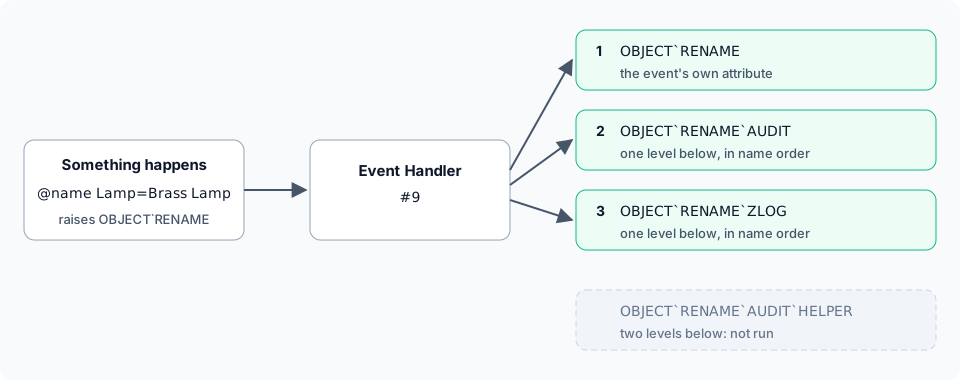
Three rules decide what runs:
- Only one level below the event.
OBJECT`RENAME`AUDIT`HELPERdid not run. A package keeps its helper code below its own attribute, where the event will not run it by mistake. - Name order.
AUDITran beforeZLOG. The event’s own attribute, when it has one, runs first. - An empty attribute runs nothing. Empty one package’s attribute to silence it and leave the others running:
> &OBJECT`RENAME`AUDIT #9=Event Handler/OBJECT`RENAME`AUDIT - Set.> @name Lamp=Old LampName set.Lamp is now Old Lamp.Logged: Old LampEach attribute runs in a queue entry of its own, as if it had been started with @trigger. One that
fails, or runs out of time, does not stop the others.
Stopping an event
Section titled “Stopping an event”A few events are stoppable: the event list marks them. On a stoppable event, the attributes run
one after another in a single queue entry, as if they had been started with @include, so an
earlier one can claim the event. It calls stopevent(), finishes, and the ones after it do not run.
SOCKET`GMCP is stoppable. It happens when a client sends a GMCP message, such as Mudlet saying
hello when it connects:
> &SOCKET`GMCP`A #9=think [if(strmatch(%<package>,Core.Hello),stopevent())]Event Handler/SOCKET`GMCP`A - Set.> &SOCKET`GMCP`B #9=@pemit #1=GMCP: %<package>Event Handler/SOCKET`GMCP`B - Set.A client that sends Core.Hello and then Char.Login shows only the second to #1:
GMCP: Char.LoginSOCKET`GMCP`A ran first, saw Core.Hello and stopped the event, so SOCKET`GMCP`B never heard
it. Char.Login reached both.
stopevent() anywhere else, including in an event that is not stoppable, stops nothing and returns
an error:
> think stopevent()#-1 NOT HEARING A STOPPABLE EVENTHearing an event from a package
Section titled “Hearing an event from a package”A package adds its attributes to the Event Handler the same way, in its package.yaml.
{{$event_handler}} is whatever object the game’s event_handler setting names, so the package
works on a game that moved its handler off #9. Name the attribute after the event and then after
the package:
objects: - ref: handler target: "{{$event_handler}}" attributes: PAGE`MESSAGE`TALLY: |- &PAGES me=[add(get(me/PAGES),1)]The bundled comm-feed and room-contents packages are built this way: comm-feed hears pages as
PAGE`MESSAGE`COMMFEED, room-contents hears room changes as ROOM`CONTENTS`ROOMCONTENTS, and timeline hears a scene starting
as SCENE`STATUS`TIMELINE (see IC Dates and Timelines). See
Softcode Packages and the package format.
Watched attributes
Section titled “Watched attributes”The game can run code whenever an attribute changes, instead of reading every object’s attributes over and over. Staff choose which attributes, so attributes nobody watches cost nothing.
@attribute/watch <attribute> watches a standard attribute: every time a copy of it is set, cleared or
wiped, on any object and by any command or function, the event handler runs its attributes named
WATCH`<attribute> and WATCH`<attribute>`*. Each package keeps a handler of its own one level
below, such as WATCH`HP`GAUGE, so packages do not edit each other’s. A handler gets the object as
%0 or %<objid>, the attribute’s full name as %1 or %<attribute>, the old and new values as %2
and %3 (%<old> and %<new>), and whoever changed it as %4 or %<enactor>.
The attribute has to be in the attribute table first; @attribute/access <attribute>=none adds it.
@attribute/watch <attribute>= stops watching it, and attrwatch(<attribute>) tells softcode what it
is watched with. Only staff with config.admin can watch an attribute. See
@attribute.
> @attribute/access HP=none> &HP me=20> @attribute/watch HP> &WATCH`HP`LOG #9=@pemit %<objid>=HP went from %<old> to %<new>.> &HP me=15Output: after the last line you are told HP went from 20 to 15.
A package watches an attribute with watch: on an attribute entry; see
Attribute watches.
PennMUSH events
Section titled “PennMUSH events”SharpMUSH raises every PennMUSH event, so a handler written for PennMUSH keeps working.
A SharpMUSH game writes every change to disk as it happens, so its dump is a backup. @dump and
@backup both take one, show everyone the dump messages, and raise the dump events. @dbck reads
the newest backup through and raises DB`DBCK when it passes:
> &DUMP`COMPLETE #9=@pemit #1=dump`complete enactor %# message %0 forking %1Event Handler/DUMP`COMPLETE - Set.> &DB`DBCK #9=@pemit #1=db`dbck enactor %#Event Handler/DB`DBCK - Set.> @dbckCheck failed: there is no backup to check yet; run @backup first> @dumpCopying the world. The game keeps running; this may take a while.GAME: Saving database. Game may freeze for a few moments.GAME: Save complete.Backup 20261015-022454-530 written (1.5 MB). Keeping 2.dump`complete enactor #1 message GAME: Save complete. forking 0> @dbckBackup 20261015-022454-530 checked: 91 tables, 1886 entries read.db`dbck enactor #1When the server’s SHARPMUSH_BACKUP_INTERVAL is set, it also takes a backup on that schedule. It
warns everyone five minutes and one minute before each one, with DUMP`5MIN and DUMP`1MIN;
a warning is given only when the interval is longer than it. With the interval at 2m and
&DUMP`1MIN #9=@pemit #1=dump`1min enactor %# message %0 set, #1 sees:
GAME: Database save in 1 minute.dump`1min enactor #1 message GAME: Database save in 1 minute.A player who types a command the game does not understand, somewhere they do not control, raises
LOG`HUH:
> &LOG`HUH #9=@pemit #1=log`huh %0Event Handler/LOG`HUH - Set.Bob, standing in Room Zero, types zzfrobnicate, and #1 sees:
log`huh HUH: Bob(#15) in Room Zero(#0) [God]: zzfrobnicateThe rest are PLAYER`INACTIVITY after players idle past idle_timeout are disconnected
(idle_timeout is 0, nobody, unless you set it), the SQL events, SIGNAL`USR1 and
SIGNAL`USR2 in place of a restart and a backup when the server is sent those signals, and
HTTP`FAIL for an HTTP request the server cannot read. The
event list describes each one.