
Census
The census package adds +census. It counts the game’s characters by what staff choose:
how many play in each theme, how many of the Marvel characters have not logged in for a year,
how the approved characters split by gender.
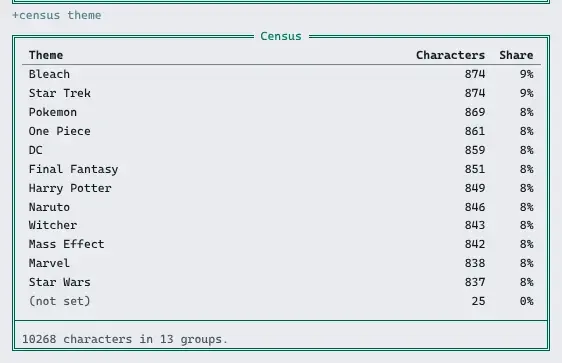
- Each thing the census counts by is a dimension: theme, gender, role, when someone was last on.
- Staff add dimensions with
+config, and choose which ones players see. - Filters and dimensions join with
/, so one line can ask a narrow question. - Guests, God and the package manager are never counted.
| You are | You want to | Read |
|---|---|---|
| A player | count or list characters | Asking the census |
| A player | ask a narrower question | Joining terms |
| Staff | count by something new | Adding a dimension |
| Staff | count only some characters | Who is counted |
| Staff | install it | Installing |
| A coder | count by something an attribute does not hold | Adding a kind |
In the game, +help census has the same in short form.
Asking the census
Section titled “Asking the census”+census alone lists the dimensions you can use and how many characters are counted:
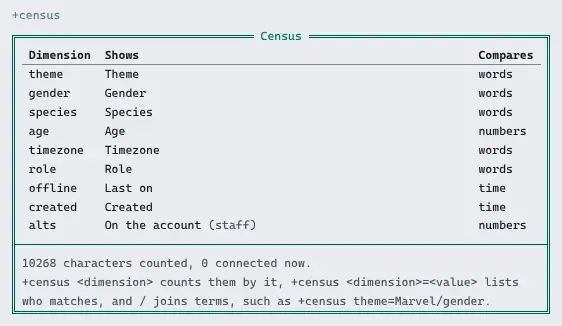
There are two kinds of question:
- How many?
+census <dimension>counts the characters holding each value, most first:+census theme,+census gender,+census role. - Who?
+census <dimension>=<value>lists the characters who match, by name:+census role=approved,+census theme=Marvel.
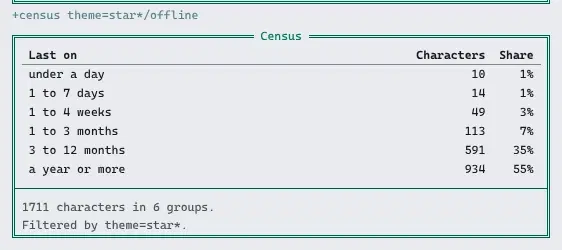
Values compare without case, and * and ? match anything, so theme=star* finds both Star
Wars and Star Trek. With nothing after it, theme= finds characters with no theme, and
theme!= those with one.
Numbers and times also take <, <=, > and >=. A time is a number and a unit, s,
m (minutes), h, d, w or y, and a number alone is days:
| Ask | Finds |
|---|---|
+census offline>30d | characters last on more than 30 days ago |
+census created<1w | characters made this week |
+census age>=18 | characters whose age is 18 or more |
Times are counted in spans, from now (connected) to a year or more:
A long answer comes in pages. The page is the last switch: +census/2 theme=Marvel, and each
page but the last ends with the line for the next.
Joining terms
Section titled “Joining terms”Terms join with /, and a character must match every filter:
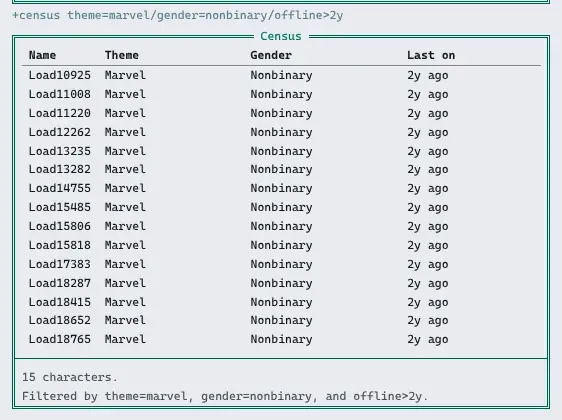
> +census theme=Marvel/offline>1y> +census role=approved/gender> +census theme/genderThe first lists the Marvel characters nobody has seen for a year. The second counts the approved characters by gender. The third counts every pair of theme and gender, up to two dimensions at a time:

A list has a column for each dimension filtered by:
Adding a dimension
Section titled “Adding a dimension”Dimensions are a table in +config census/dimensions. Changing it
needs the config.admin permission. Each dimension has:
- a name, what players type, such as
theme; - a label, the column heading, such as
Theme; - a kind, how a character’s value is read (below);
- a path, what the kind reads, such as the attribute
APP`THEME; - compare as:
text,numberorduration; - seen by:
everyone, orstaff, the default; - an order, lower first.
| Kind | Reads |
|---|---|
attribute | the attribute the path names |
role | the highest of the roles the path names that the character holds; any role when it is empty |
offline | how long since the character was last on, 0 while they are connected |
created | how long since the character was made |
alts | how many characters are on the character’s account |
A game that keeps each character’s theme in APP`THEME adds it like this:
> +config/add census/dimensions/theme=Theme[CONFIG] Done: Added census/dimensions/theme. +config census/dimensions/theme shows it.> +config census/dimensions/theme/path=APP`THEME[CONFIG] Done: census/dimensions/theme/path is now APP`THEME, was none.> +config census/dimensions/theme/access=everyone[CONFIG] Done: census/dimensions/theme/access is now everyone, was staff.+config census/dimensions lists them all:
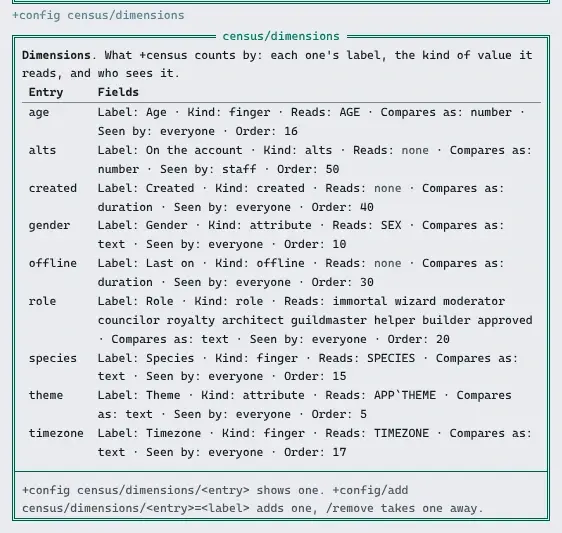
A new game has gender (the SEX attribute), role, offline (Last on), created, and
alts, which only staff see. Where the finger package is installed, the
census-finger package adds species, age and timezone from +finger.
On a big game, give the attribute an index so a filter such as theme=Marvel reads the
index instead of every character:
> @attribute/access APP`THEME=none> @attribute/index APP`THEME=type:playerhelp @attribute in the game has more on indexes.
Who is counted
Section titled “Who is counted”+config census/scope holds filters every census starts from, written as +census takes
them. It is empty on a new game, so every character is counted but guests, God and the
package manager. To count only approved characters who were on in the last 90 days:
> +config census/scope=role=approved/offline<90dEach answer’s footer then says Counting only role=approved/offline<90d. Staff with the
softcode.census.staff permission, which wizards and royalty hold, count every character
anyway with +census/all, and see the dimensions only staff see.
Big games
Section titled “Big games”On a game of ten thousand characters, counting everyone by an attribute takes about four
seconds, and a list of who matches a few filters about as long. +census finds the characters, then
counts them in parts with @dolist, as +who does, so each part runs as its own queue entry
with its own function limit, and players’ commands are answered in between. A filter on an
attribute with an index starts from the index, and answers in a second or two.
A breakdown with more than 400 different values asks for a filter instead of listing them all.
Installing
Section titled “Installing”The census package ships with the server but is not installed on a new game. An administrator installs it from the portal:
- Open Packages in the admin area and choose Browse.
- Install
census. Its+helptopics and+configsettings come with it, through thecensus-helpandcensus-configbridges, wherever+helpand+configare installed. - Where
+fingeris installed, installcensus-fingertoo, to count by its fields.
It adds +census as a $-command on an object in the master room, Census, which also
holds the settings. The dimensions are kept on the Census Store inside it. A game that
already has a +census of its own should remove that first, or both answer.
See Softcode Packages for how installing, upgrading and rolling back work.
Adding a kind
Section titled “Adding a kind”A package adds a kind of dimension with an attribute named KIND`<NAME> on the
Census. It is given a list of characters as %0 and the dimension’s path as %1, with
the reader as %#, and returns each one’s value as the reader may see it, one line each, in
the same order. Reading the whole list in one call keeps a census on a big game fast.
Two more attributes are optional:
KIND`<NAME>`TESTdecides a filter itself. It gets the characters, the path, the comparison and the value, and returns the characters it keeps. Therolekind has one, sorole=approvedfinds an approved wizard too.KIND`<NAME>`FINDgets the path, the comparison and the value, and returns the only characters that can match, or#-1to look at everyone. Theattributekind’s reads an index.
census-finger is one such package: its finger kind reads a field as +finger shows it to
the reader. A kind a package attaches goes away when that package is uninstalled.