
Staff List
The staff package adds +staff, and +stafflist for the same list. It shows who the
game’s staff are and what each of them looks after: John is the Head Director, Jim is a
Builder.
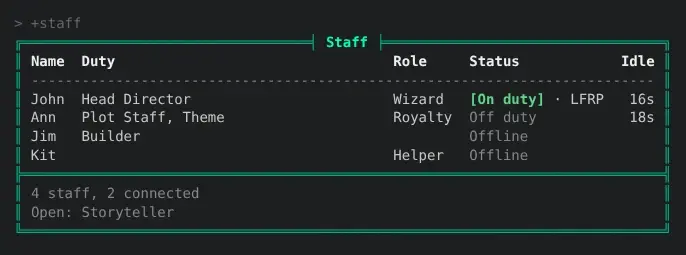
- Everyone holding a staff role is listed on their own. Nobody keeps a list by hand.
- Duties are set with
+config, and someone holding one is listed even without a staff role. - Staff say whether they are on duty with
+staff/onand+staff/off. - God (#1) is not listed unless it holds a duty.
| You are | You want to | Read |
|---|---|---|
| A player | see who the staff are | Reading the list |
| Staff | say whether you are on duty | On and off duty |
| Staff | give someone a duty | Setting duties |
| Staff | choose which roles count as staff | Staff roles |
| Staff | install it | Installing |
| A coder | change the Status column | Changing the Status column |
In the game, +help staff has the same in short form.
Reading the list
Section titled “Reading the list”+staff shows one row for each staff member:
| Column | Shows |
|---|---|
| Name | The character’s name |
| Duty | The duties they hold, such as Plot Staff, Theme when they hold two |
| Role | Their staff role, such as Wizard or Royalty. Empty for someone listed only for a duty |
| Status | On duty or Off duty while they are connected, and Offline when they are not |
| Idle | How long they have been idle, while they are connected |
Someone hidden from the who list is shown Offline, on duty or not, so a staff member who
is DARK is not given away.
Under the table, the footer counts who is listed and how many are connected, and names the
duties nobody holds yet, such as Open: Storyteller.
The list is in order of duty, then of role, then of name: someone holding a duty comes before everyone holding none, and the duty’s order says which comes first.
On and off duty
Section titled “On and off duty”Anyone on the list says whether they are on duty:
> +staff/on[STAFF] Done: You are on duty.> +staff/off[STAFF] Done: You are off duty.You stay on duty until you type +staff/off, through logging off and back on. While you
are not connected, +staff shows you Offline either way. Someone who is not on the list
is told so:
> +staff/on[STAFF] Error: Only someone on the staff list can go on or off duty.Where the status package is installed, +staff also shows each connected
staff member’s +status, such as On duty · LFRP, once an administrator installs the
staff-status package as well.
Setting duties
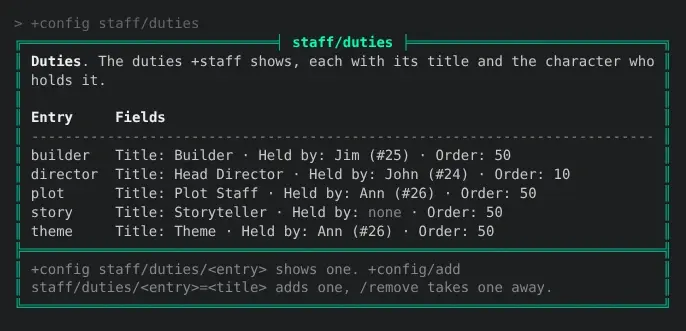
Section titled “Setting duties”Duties are a table in +config staff/duties. Changing it needs the config.admin
permission. Each duty has:
- a name, which is how you change it, such as
director; - a title, what
+staffshows, such asHead Director; - a holder, the player who holds it, or nobody while it is open;
- an order, from 0 to 999, lower first. A new duty has 50.
Add a duty with its title, then give it to a player:
> +config/add staff/duties/director=Head Director[CONFIG] Done: Added staff/duties/director. +config staff/duties/director shows it.> +config staff/duties/director/holder=*John[CONFIG] Done: staff/duties/director/holder is now John (#24), was none.> +config staff/duties/director/order=10[CONFIG] Done: staff/duties/director/order is now 10, was 50.+config staff/duties lists every duty with its fields:
- To open a duty again, set its holder to nothing:
+config staff/duties/builder/holder=. - To take a duty away,
+config/remove staff/duties/builder. - A player can hold several duties.
+staffshows them all, in order. - For two builders, add two duties with the same title, such as
builderandbuilder2.
The holder is kept as the character itself, not their name, so renaming them keeps the duty. A holder whose character is destroyed leaves the duty open.
Staff roles
Section titled “Staff roles”+staff lists everyone holding one of the roles in +config staff/roles. On a new game
that is SharpMUSH’s and RhostMUSH’s staff roles, highest first:
immortal wizard moderator councilor royalty architect guildmaster helperA role the game does not have lists nobody, so the same setting works whichever staff roles the game chose. The Role column shows the first role in the setting that each character holds. To list builders too, add their role:
> +config/add staff/roles=builder[CONFIG] Done: staff/roles is now immortal, wizard, moderator, councilor, royalty, architect, guildmaster, helper, builder, was immortal, wizard, moderator, councilor, royalty, architect, guildmaster, helper.+config/remove staff/roles=builder takes it off again. Setting the list with
+config staff/roles=... replaces all of it.
God (#1) and the Package Manager hold the wizard role to run the game, so they are left out. Either is listed once it holds a duty.
Give someone a role with @role/assign, such as @role/assign *Ann=royalty; help @role in the
game has the rest.
Installing
Section titled “Installing”The staff package ships with the server but is not installed on a new game. An administrator installs it from the portal:
- Open Packages in the admin area and choose Browse.
- Install
staff. Its+helptopics and+configsettings come with it, through thestaff-helpandstaff-configbridges, wherever+helpand+configare installed.
It adds +staff and +stafflist as $-commands on an object in the master room, Staff
List, which also holds the settings. The duties are kept on the Staff Store inside it.
A game that already has a +staff of its own should remove that first, or both answer.
See Softcode Packages for how installing, upgrading and rolling back work.
Changing the Status column
Section titled “Changing the Status column”Another package can change the Status column with a filter on the Staff List: an
attribute named FILTER`STAFF`STATUS`<name>. For each row, +staff runs every filter in
name order with chain(). Each is given the status so far as %0 (On duty, Off duty or
Offline to begin with), the character as %1, and 1 as %2 when they are connected,
and returns the status to show. staff-status is one such filter.
A filter a package attaches to the Staff List goes away when that package is uninstalled.