
Large Maps
A large grid of rooms, such as a forest, a desert or open sea, takes one object for every room. A world map keeps its places itself instead: each place has a terrain, may have walls and a name, and costs no object. When someone walks onto a place, the map lends it a room, and takes the room back once it is empty. A place that needs a real room, such as an inn, can have one of its own that stays.
This page covers:
- Setting it up
- Making a world map
- Walking a map
- Lent rooms
- Rooms that stay
- Locks
- Hex maps
- Graph maps
- Changing a world map in the portal
- Reading a map in softcode
Setting it up
Section titled “Setting it up”World maps come from the World plugin, which the server loads unless an administrator turns it off under
Plugins on the portal’s Packages page. It adds @world and the world functions. To walk a map, also install the
World grid package from the portal’s Packages page, after the World map
package it depends on. On a game with +help, World grid: +help topics adds +help map grid, shown to
builders and staff.
Making a world map
Section titled “Making a world map”A world map that people walk is a room that nobody enters: its exits work in every room it lends.
Make it with @dig, then @world/create, then paint its places with a terrain type. Each @world
switch needs control of the map.
> @dig WildsWilds created with room number 25.> @world/create #25Wilds is now a world map.> @world/paint #25/0,0:9,9=forestPainted 100 places as forest.> @world/paint #25/6,0:6,9=riverPainted 10 places as river.A place is x,y, or x,y,z with z the level. The map’s legend says how each terrain looks, as on
any map: MAP`LEGEND`<type>`LABEL, `TONE and `ICON. `CHAR is the one character
+map and worlddraw() show for it. `DESC describes the rooms the map lends, and a type whose
`CLOSED holds a reason cannot be entered.
> &MAP`LEGEND`FOREST`LABEL #25=Old forestWilds/MAP`LEGEND`FOREST`LABEL - Set.> &MAP`LEGEND`FOREST`DESC #25=Oaks crowd the path, and the light comes down green.Wilds/MAP`LEGEND`FOREST`DESC - Set.> &MAP`LEGEND`RIVER`LABEL #25=RiverWilds/MAP`LEGEND`RIVER`LABEL - Set.> &MAP`LEGEND`RIVER`CLOSED #25=The river runs too fast to wade.Wilds/MAP`LEGEND`RIVER`CLOSED - Set.A side of a place can be a wall, one-way or locked, with the reason a mover is told (locks are
below). A place can have a name of its own, and JSON data that the portal’s World map shows in its
panel. A place whose data sets "render":{"hidden":true} shows as bare terrain to anyone who may
not examine the map: no name, data, room or walls of its own.
> @world/wall #25/2,2/n=wall,A fallen oak blocks the path.The north side of 2,2,0 is now a wall.> @world/place #25/3,4=Old OakNamed 3,4,0 Old Oak.> @world/data #25/3,4={"info":{"Danger":"Low"}}Set the data of 3,4,0.help @world lists every switch. When @world refuses, it says what is missing, such as
control of the map. A map it cannot find by name is named by its dbref instead.
Walking a map
Section titled “Walking a map”+map/exits opens an exit on the map for each way out of its places, and gives them to the map’s
owner: ten, North;n to Down;d, on a square map and a hex map alike. Name the map
by its dbref unless you are standing near it.
> +map/exits #25[MAP] Done: Opened 10 direction exits on Wilds.Each exit leads to the room on the place beside the mover’s, lending one if the place has none. A wall, a one-way side seen from the wrong end, a closed terrain and a lock the mover does not pass refuse, with their reasons. The map’s exits are a zone’s exits, so a room’s own exits come first.
+map/exits also puts ZONE`EXITS on the map: given a room and a viewer, the map’s exits that
lead somewhere from it. look in a lent room lists those ways, and so do the Play page and a GMCP
client’s room data. A way that refuses, or leads off the map, is left out.
worldroom() gives the room on a place, lending one if it has none. A wizard puts Wren on 2,2:
> think worldroom(#25,2,2)#36> @tel *Wren=#36Wren, standing on 2,2:
> look=< Old forest (2,2,0) >=======================================================Oaks crowd the path, and the light comes down green.> northA fallen oak blocks the path.> east=< Old forest (3,2,0) >=======================================================Oaks crowd the path, and the light comes down green.> north=< Old forest (3,3,0) >=======================================================Oaks crowd the path, and the light comes down green.+map, from the World map package, draws the places within five of yours, north up, with @ where
you stand (three on a hex map, whose rows take two lines). Each place is its terrain’s `CHAR,
else its icon when that is a character or two, else the first letter of its label. A place with
nothing painted is blank. Under the map, a key line names each type drawn.
> +mapWilds  OOOOOOROO  OOOOOOROO  OOOOOOROO  OOOOOOROO  OOOOOOROO  OOO@OOROO  OOOOOOROO  OOOOOOROO  OOOOOOROO

Key: @ you · O Old forest · R River
Three steps east, the river refuses:
> e=< Old forest (4,3,0) >=======================================================Oaks crowd the path, and the light comes down green.> e=< Old forest (5,3,0) >=======================================================Oaks crowd the path, and the light comes down green.> eThe river runs too fast to wade.Lent rooms
Section titled “Lent rooms”A lent room is named after its place’s name, or its terrain’s label and where it is. It joins the
map’s zone and is set FLOATING, so nothing reports it as cut off from the rest of the game. It is
described by the World grid package’s cell parent. To describe the rooms of a map your own way, set
MAP`CELLPARENT on the map to a parent of your own.
@world on a place names the room on it, and whether the room is lent:
> @world #25/2,22,2,0 on Wilds: Old forest (forest).North: wall (A fallen oak blocks the path.)Room: #36, lentOnce a lent room has held nothing for five minutes, the game takes it back: it is renamed Spare room, leaves the map’s zone and parent, and waits to be lent again to another place on its owner’s maps. A room with anyone or anything in it stays lent, and one whose map is destroyed waits until it is empty. The game keeps at most 50 spare rooms, and destroys a spare that has waited a week. Lent rooms and spares belong to the map’s owner and count against that player’s building quota. A wizard can take back every empty lent room at once:
> @world/sweepTook back 4 empty rooms, and destroyed 0 spares.Rooms that stay
Section titled “Rooms that stay”A room of your own can stand on a place, and is then the room every way onto that place leads to. Placing it needs control of the map and of the room. It joins the map’s zone, and keeps its own name, description and exits.
> @dig Wayside InnWayside Inn created with room number 37.> @world/room #25/5,5=#37Wayside Inn now stands on 5,5,0 to stay.+map/keep keeps the lent room you stand in on its place, as it is, so it is never taken back. It
needs control of the map:
> +map/keep[MAP] Done: Old forest (2,2,0) stays on 2,2,0 now.@world/room #25/5,5= with nothing after the = takes the room off its place again.
A locked side works like a locked exit. @world/lock gives it a key, the same keys @lock takes,
and a mover who passes the key goes through. The map is the locked object. The reason set with
@world/wall is what everyone else is told.
> @world/wall #25/3,3/n=lock,The ranger's gate is barred.The north side of 3,3,0 is now locked.> @world/lock #25/3,3/n=RANGER:yesThe north side of 3,3,0 is now locked.Wren, on 3,3, is not a ranger:
> northThe ranger's gate is barred.@world/lock #25/3,3/n with no key opens the side again.
The legend can also lock moving from one terrain into another, which suits mountains, deep water and the like:
MAP`LEGEND`<type>`LOCK: the key for entering that type from any other type. Moving between two places of the same type needs no key.MAP`LEGEND`<type>`LOCK`<from>: the key for entering it from one type, used in place of`LOCK. Set it for the type itself to lock moving within it.MAP`LEGEND`<type>`FAILUREand`FAILURE`<from>: what a refused mover is told.
#FALSE lets nobody in. Here the mountains are closed except to climbers coming from the forest:
> @world/paint #25/0,9:9,9=mountainPainted 10 places as mountain.> &MAP`LEGEND`MOUNTAIN`LOCK #25=#FALSEWilds/MAP`LEGEND`MOUNTAIN`LOCK - Set.> &MAP`LEGEND`MOUNTAIN`LOCK`FOREST #25=CLIMBER:yesWilds/MAP`LEGEND`MOUNTAIN`LOCK`FOREST - Set.> &MAP`LEGEND`MOUNTAIN`FAILURE #25=The slope is too steep to climb without gear.Wilds/MAP`LEGEND`MOUNTAIN`FAILURE - Set.> think worldway(#25,3,8,0,n,reason,*Wren)The slope is too steep to climb without gear.Names in a legend key are looked up from the map, so use dbrefs, flags and attributes there.
Hex maps
Section titled “Hex maps”A hex map’s places are hexagons, so every place has six neighbours the same distance away. Make one
with =hex after the map:
> @dig MoorMoor created with room number 36.> @world/create #36=hexMoor is now a world map.> @world/paint #36/-2,-2:2,2=heathPainted 25 places as heath.A place is still x,y, with north at y + 1. The hexagons stand with a flat side to the north, and
each column is half a place higher than the one to its west, so a paint box draws as a slanted
block. A place’s sides are n, ne, se, s, sw and nw, with u and d as on a square map.
e and w face a corner of the hexagon, not a side. Going east leads round that corner to the place
two columns over, as a square map’s diagonal does: it is open when either way round is, through the
northeast place or the southeast one.
> think worldway(#36,0,0,0,e,to)/[worldway(#36,0,0,0,w,to)]2,-1,0/-2,1,0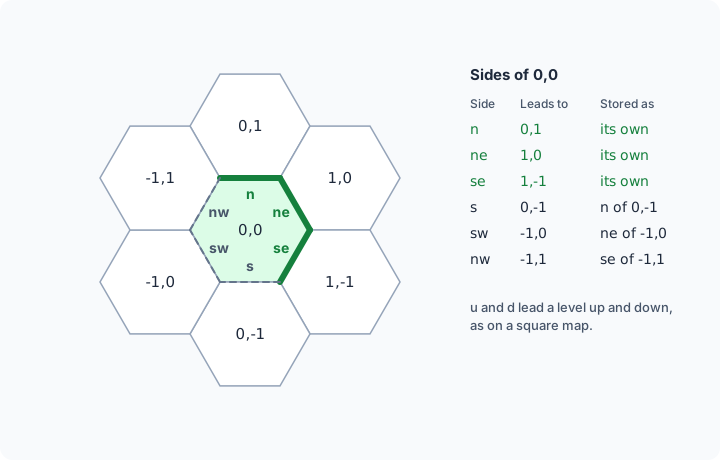
Walls, locks and one-way sides work as on a square map, and a side is the same side seen from either place:
> @world/wall #36/0,0/sw=wall,A drystone wall.The southwest side of 0,0,0 is now a wall.> think worldway(#36,-1,0,0,ne)/[worldway(#36,-1,0,0,ne,reason)]wall/A drystone wall.> @world/wall #36/0,0/e=wallWhich side? A hex place's sides are n, ne, se, s, sw, nw, u or d: give one as <map>/<x>,<y>[,<z>]/<side>.+map/exits opens the ten ways, and +map and worlddraw() draw two lines for each row of
places, each column two characters from the next:
> +map/exits #36[MAP] Done: Opened 10 direction exits on Moor.> think worlddraw(#36,0,0,0,2,@) H H HH H H H HH @ H H HH H H H H HPointy hexagons
Section titled “Pointy hexagons”A pointy-hex map stands its hexagons on a corner instead, so their sides face ne, e, se,
sw, w and nw. East is x + 1 and northeast y + 1, and each row is half a place east of the one
below it. Here n and s face a corner, and lead round it to the place two rows over:
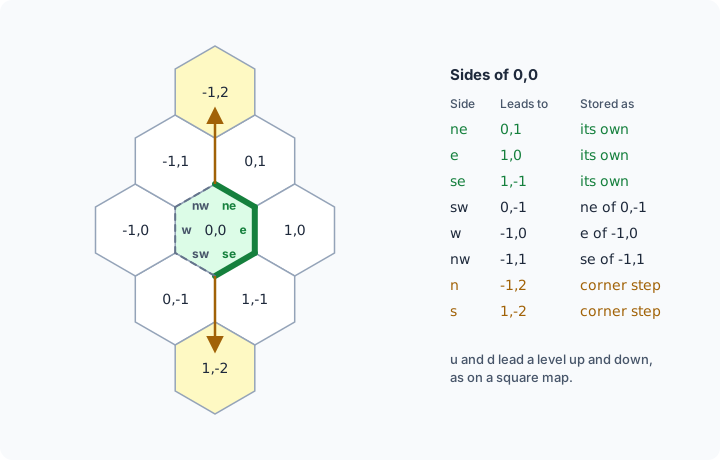
> @dig CarrCarr created with room number 57.> @world/create #57=pointy-hexCarr is now a world map.> @world/paint #57/-2,-2:2,2=reedsPainted 25 places as reeds.> @world/wall #57/0,0/w=wall,A dyke.The west side of 0,0,0 is now a wall.> think worldway(#57,-1,0,0,e)/[worldway(#57,-1,0,0,e,reason)]wall/A dyke.> think worldway(#57,0,0,0,n,to)/[worldway(#57,0,0,0,s,to)]-1,2,0/1,-2,0> +map/exits #57[MAP] Done: Opened 10 direction exits on Carr.> think worlddraw(#57,0,0,0,2,@) R R R R R R RR R @ R R R R R R R R R+map and worlddraw() draw a pointy map a row a line, each row a character east of the one below.
The portal’s World map draws both kinds as hexagons, with each wall on its side and each room a smaller hexagon inside the place it stands on.
Graph maps
Section titled “Graph maps”A graph map’s places have no sides and no neighbours. They are joined only by the ways you make
between them, each with names, as an exit has. Use one for a road map, a set of islands or a
dungeon where only some places lead to others. A place is still x,y or x,y,z, and that is where
the World map draws it, but places side by side are not joined unless a way joins them.
@world/link makes a way. Give the place it leads to and its names, ; between them: the first is
shown, and any of them walks it. Give names back as well and the way back is made too.
> @dig DownsDowns created with room number 75.> @world/create #75=graphDowns is now a world map.> @world/paint #75/0,0=grassPainted 1 place as grass.> @world/paint #75/3,0=grassPainted 1 place as grass.> @world/paint #75/1,3=woodPainted 1 place as wood.> @world/link #75/0,0=3,0,Old Road;road,Back Road;backOld Road leads from 0,0,0 to 3,0,0, and Back Road from 3,0,0 back.> @world/link #75/3,0=1,3,Shrine Path;shrineShrine Path leads from 3,0,0 to 1,3,0.> @world/link #75/1,3=0,0,Long Track;trackLong Track leads from 1,3,0 to 0,0,0.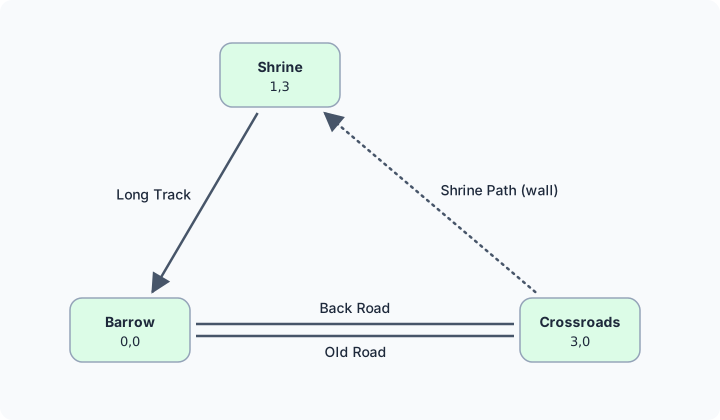
A way leads to any place on the map, on any level. A place has at most 64 ways out. Linking a way
with the same first name out of the same place replaces it. To remove a way, name it with no =;
the way back stays:
> @world/link #75/1,3/trackRemoved the way Long Track out of 1,3,0.@world/wall and @world/lock take a way’s name where a side goes. A way is open, wall or
lock. A walled way stays on the map and refuses with its reason. A way already leads one way, so
it is never oneway: link a way back for a road that goes both ways.
> @world/wall #75/3,0/shrine=wall,Brambles block the path.The way Shrine Path out of 3,0,0 is now a wall.> think worldway(#75,0,0,0,road,to)/[worldway(#75,3,0,0,back,to)]3,0,0/0,0,0> think worldway(#75,3,0,0,shrine)/[worldway(#75,3,0,0,shrine,reason)]wall/Brambles block the path.> think worldway(#75,0,0,0,n)none+map/exits opens one exit for each way name on the map, rather than the ten directions. Ways out
of different places with the same first name share one exit, which goes by every name those ways
were linked with and takes the way out of the mover’s place:
> +map/exits #75[MAP] Done: Opened 3 way exits on Downs.A name that ways with different first names share, such as old on both Old Road;old and
Ford;old, gets an exit of its own. That exit takes whichever way by that name leaves the mover’s
place, so old works from both places. look lists ways by their first names, so it does not show
this exit.
The portal’s World map draws each place as a box and each way as a line between two places on the level shown. A way with a way back is two lines side by side. A way with no way back ends in an arrow. A wall is dotted and a lock dashed, and each line has the way’s first name beside it. A way to a place on another level is a short arrow out of its place, named with the level it leads to.
Changing a world map in the portal
Section titled “Changing a world map in the portal”On the portal’s World map, Edit map on a grid map you control shows a World map section. On a
map that is not a world map yet, Make this a world map plans @world/create, Make this a
flat-topped hex world map plans it with =hex, Make this a pointy-topped hex world map
with =pointy-hex, and Make this a graph world map, its places joined by named ways with
=graph. On a world map:
- Click the map to choose a place. The paint box starts on it: give the far corner and a terrain type, or pick one of the legend’s types, and Paint. An empty type erases.
- The chosen place takes a name, a side (on a hex map one of its six, or up or down) set open, wall, one way or locked with the reason a
refused player is told, Hide from players or Show to players, and a room you control
placed on it by its dbref. A locked side keeps its key; give it one in the game with
@world/lock. - On a graph map, the chosen place lists its ways, each with Remove. Give the x, y and z of the place a new way leads to, its names and, if you like, the names of the way back, and Add way. The way’s passage is set open, wall or locked with Set way.
- Open the direction exits runs
+map/exits. It needs the World grid package, and the map must be a room.
Each change is the @world command you would type. Nothing runs until you review and apply them,
as for any map. See Changing a map in the portal.
Rooms standing on a place are reached by the map’s own exits, so the review does not warn that
they have no way in.
Reading a map in softcode
Section titled “Reading a map in softcode”| Function | Gives |
|---|---|
worldmap(<map>[, <field>]) | the map’s space (square, hex, pointy-hex or graph), its sides, the directions worldway() takes there (on a graph map, its ways and their names), its levels and its painted box |
worldcell(<map>, <x>, <y>[, <z>[, <field>]]) | a place’s terrain, label, name, data, room, its ways on a graph map, and more |
worldway(<map>, <x>, <y>, <z>, <direction>[, <field>[, <mover>]]) | where a way out of a place leads, and whether it is open, for a mover if one is named; on a graph map, the way is named instead of a direction |
worlddraw(<map>, <x>, <y>[, <z>[, <radius>[, <mark>]]]) | the places around one, drawn as text, as +map does |
worldroom(<map>, <x>, <y>[, <z>]) | the room on a place, lending one if it has none |
worldplace(<room>[, <field>]) | the place a room stands on |
With the Wayside Inn still standing on 5,5:
> think worldroom(#25,5,5)#37> think worldplace(#37)5,5,0worldroom() needs control of the map, and lends a room, so it is a side-effect function. See
help world functions for every field.