
Remote Backups in the Portal
The Compose stack’s backup container can take its jobs from the portal instead of running on its
own nightly schedule. You then set the repository, password and interval on the Remote backups page, start a
backup with a button, and see which backups reached your storage and which failed.
This page is for operators of the single-machine Compose stack in the
Deployment Reference. Run the commands from the deploy/ folder.
How it works
Section titled “How it works”Each backup is a job. When one is due, or when you press Back up now, the server makes a fresh
copy of the world with LMDB’s own copy routine, the same safe copy @backup makes. A small worker in
the backup container picks up the job, sends that copy to your restic repository with the game’s
key ring, wiki files and installed plugins, and reports the result back to the page. The worker reads
the files read-only and never touches the live world.
A job counts as a success only when restic finished and named the snapshot it made. Copying the world on the server is not enough.
This replaces the container’s nightly 03:30 run. Never run both against one repository.
Turning it on
Section titled “Turning it on”-
Turn on backups and create the repository as the Backups section describes: fill in the restic settings in
.env, setCOMPOSE_PROFILES=backup, and runrestic initonce. The portal never creates a repository. -
Make a token for the worker and add it to
.env:Terminal window echo "SHARPMUSH_BACKUP_AGENT_TOKEN=$(openssl rand -hex 32)" >> .envThe worker uses the token to pick up backup jobs and report on them. A job carries the repository password and storage keys, so anyone with the token can read them. Keep it as private as they are.
-
Add the remote backups file to your stack, build the worker, and restart the game server so it reads the token. Players get a restart notice and stay connected.
Terminal window # Start with docker-compose.cloudflare.yml instead if that is your stack.export COMPOSE_FILE=docker-compose.prod.yml:docker-compose.remote-backups.ymldocker compose up -d --build backupdocker compose up -d sharpmush-serverName the services: a plain
docker compose up -d --buildon the Caddy stack also rebuilds the socket server, and replacing it disconnects every player.Keep
docker-compose.remote-backups.ymlinCOMPOSE_FILEfrom now on. Without it, thebackupcontainer goes back to its own nightly schedule. -
Open Build & manage, Remote backups (
/admin/backups). It needs theserver.adminpermission. Enter the same repository, password and storage keys as in.env, so the restic commands on this page reach the repository the worker writes to. Save, as below.
The Remote backups page
Section titled “The Remote backups page”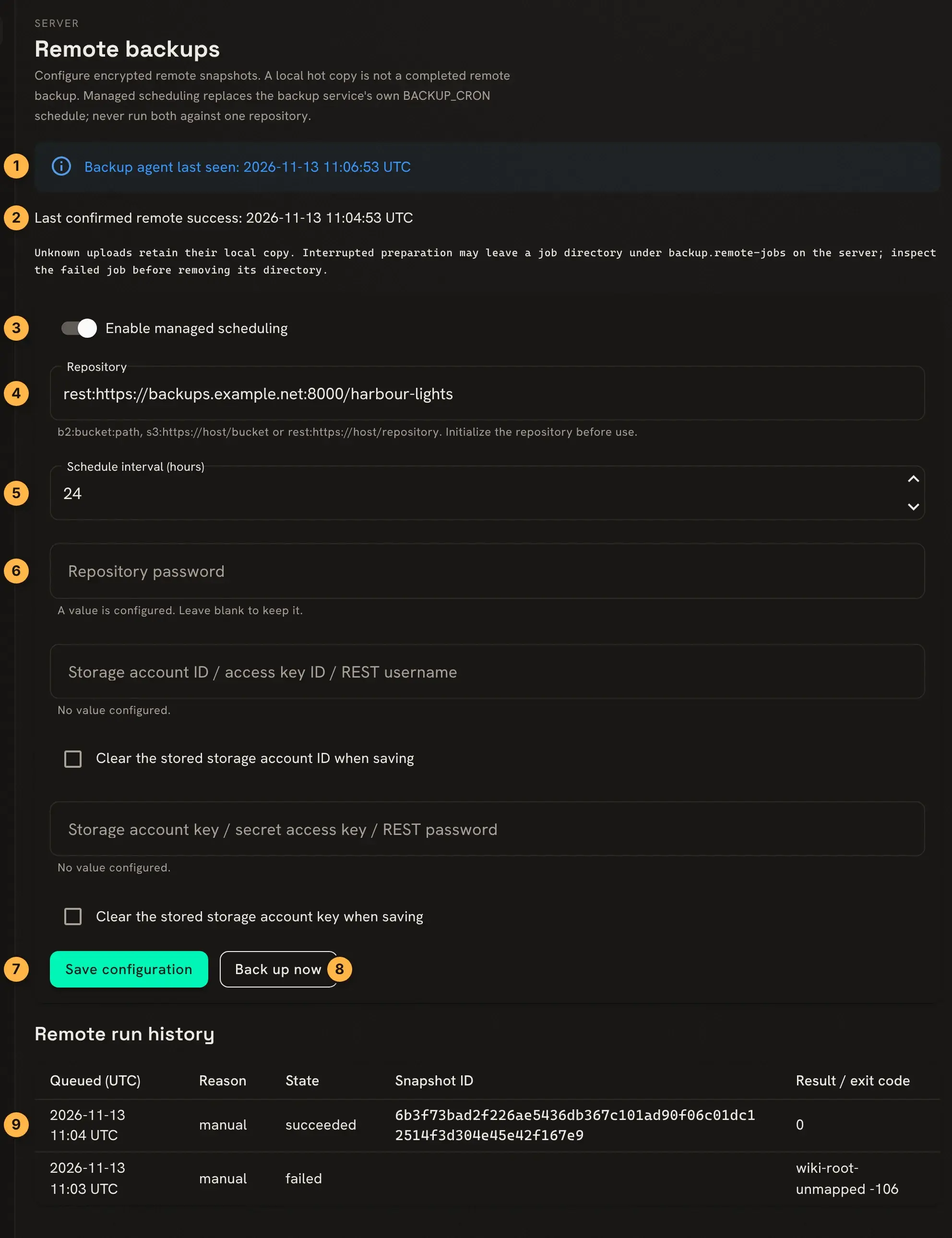
- When the worker last checked in. If it has not checked in for two minutes, this turns into a warning, and no job can finish until it is back.
- The last backup restic confirmed. A failed run never changes it.
- Enable managed scheduling turns on backups from the portal. While the saved setting is off, nothing is scheduled and Back up now is greyed out.
- The repository, in one of three forms:
b2:bucket:path,s3:https://host/bucketorrest:https://host/repository. Plain HTTP, local folders and SFTP are refused, and so is a user name or password inside the address: those go in the account fields. - Hours between backups, from 1 to 8760, counted from the last backup of either kind, so Back up now starts the count again. A game with no backups yet gets its first one within seconds of saving.
- The repository password, then the storage account’s ID and key: the B2 account ID and key, the S3 access key ID and secret, or the REST server’s user name and password. Once saved, they are kept encrypted and never shown again. Leave a field blank to keep what is stored. To remove a stored ID or key, tick its Clear box and save. A value set by an environment variable or a secrets file wins over the stored one and cannot be cleared here.
- Save configuration. A backup that is already queued keeps the settings it was queued with.
- Back up now queues a backup straight away. Only one runs at a time, so the button is greyed out while one is queued, running or unknown.
- The latest runs, newest first: when each was queued, whether by hand (
manual) or by the schedule (scheduled), its state, the snapshot ID, and the result with its exit code. Negative codes come from the worker, others from restic. The page refreshes every ten seconds.
Check that a run reached the repository by listing its snapshots. With the remote backups file in the stack, restic is run by naming it as the entry point:
docker compose run --rm --entrypoint restic backup snapshotsEach snapshot is tagged sharpmush and sharpmush-job:<job>, with the job’s ID.
The commands in the Backups section of the Deployment Reference need the
same --entrypoint restic once this file is in the stack. Don’t use docker compose run --rm backup backup: the worker makes the uploads now.
When a run fails
Section titled “When a run fails”The last column names what went wrong, followed by the exit code:
| Result | What it means | What to do |
|---|---|---|
repository-not-found 10 | There is no repository at that address. | Check the address, and run restic init if it was never created. |
repository-locked 11 | Another restic process has the repository locked. | Wait for it to finish. A lock left by a crashed process is removed with restic unlock. |
repository-password-rejected 12 | The repository refused the password. | Enter the password it was created with. |
partial-backup 3 | restic could not read some files, so the snapshot is incomplete. It counts as a failure. | Look at the files the run should have read, then back up again. |
restic-failed | restic stopped with another code, often because it could not reach the storage or was refused by it. | Check the address and the storage account’s ID and key. |
cancelled 130 | restic was stopped. | Back up again. |
worker-failed-or-timed-out -1 | The worker could not run restic, or stopped it because the run was about to pass two hours. | Check the worker’s log with docker compose logs backup. |
local-copy-failed, local-copy-interrupted | The server could not finish its copy of the world, so nothing was sent. | Check free disk with @storage, then back up again. |
required-key-ring-missing -3 | The worker cannot see the key ring folder. A world without its keys cannot be restored, so restic was never started. | Check the key ring folder setting below, and that the folder exists. |
local-copy-missing -105 | The worker cannot see the world copy the server made. | Check the folder settings below. |
copy-root-unmapped, key-ring-root-unmapped, plugin-root-unmapped, wiki-root-unmapped | The server keeps these files in a folder the worker was not told about. | Set the folder settings below. |
configured-plugin-directory-missing, configured-wiki-directory-missing | A plugin or wiki folder that the server uses is missing in the worker. | Fix the mount, or restore the folder. The worker never skips it. |
backup-source-path-escape -104 | A path in the job goes through a link or leads outside the folder it should be in. | Correct the folder setting. |
Unknown and unconfirmed runs
Section titled “Unknown and unconfirmed runs”unknown, withagent-lease-expired: a run passed two hours without reporting back. Its copy of the world is kept, and no other backup starts until the worker reports on it.unconfirmed: the worker restarted while restic was running and cannot prove how restic ended. It does not try that upload again, and backups carry on. restic writes a snapshot only at the end, so look for one tagged with the job’s ID withsnapshots. If there is none, or you are unsure it is complete, back up again.
If the worker’s state is lost and an unknown run will never report back, first make sure no restic
process is still running and look at the repository. Then press Abandon unknown job and retain its
copy, which appears above the history with a warning for each unknown run. Backups start again, the
run shows operator-abandoned-copy-retained, and the action is written to the audit log. If the old
worker does report later, its real result is still recorded.
Leftover copies
Section titled “Leftover copies”Each job’s copy of the world is in backup.remote-jobs, in a folder named after the job’s ID without
its hyphens: job 077869f0-4871-4ff0-8ab7-237ed2fc4016 is folder 077869f048714ff08ab7237ed2fc4016.
A finished run removes its folder. Two kinds can stay behind, each holding a whole world:
- a run that failed while the world was being copied.
- an abandoned run, unless the old worker reports later.
Remove such a folder only once you are sure no copy or restic process is still using it, and remove only that job’s folder.
Keeping the repository small
Section titled “Keeping the repository small”The worker never removes old snapshots. Prune them yourself, for example every week. Each snapshot holds a different folder, so restic would keep every one of them unless told to group them by machine:
docker compose run --rm --entrypoint restic backup \ forget --tag sharpmush --group-by host --keep-daily 7 --keep-weekly 4 --pruneAdd --dry-run first to see what it would remove.
Restoring
Section titled “Restoring”A snapshot made from the portal holds the world copy in backup.remote-jobs/<job>/<copy>, not in
backup/<copy>. Restore it as Restoring for real describes,
with two changes:
-
In step 1, name restic as the entry point:
Terminal window docker compose run --rm --entrypoint restic -v "$RESTORE_VOLUME:/restore" backup \restore latest --target /restore -
Before step 2, move the copy to where the rest of the steps look for it. A snapshot holds exactly one copy:
Terminal window docker compose run --rm --no-deps -v "$RESTORE_VOLUME:/restore" --entrypoint sh sharpmush-server \-c 'mkdir -p /restore/data/backup && mv /restore/data/backup.remote-jobs/*/* /restore/data/backup/'
Then carry on from step 2. A portal snapshot has no wiki-assets or lightning.plugins folder if the
game had none when the backup was queued. If step 3 stops for that reason, create the missing empty
folder in the scratch volume, as that section shows for plugins, and repeat step 3.
Folders in other places
Section titled “Folders in other places”The worker is told where each kind of file lives on the server and where it sees the same folder. The
defaults match the stack, so most games set nothing. If you move the backups (SHARPMUSH_BACKUP_PATH),
plugins, wiki files or key ring, set the matching pair in .env:
| Files | Server folder | Folder the worker reads | Default folder name |
|---|---|---|---|
| World copies | BACKUP_AGENT_COPY_SOURCE_ROOT | BACKUP_AGENT_COPY_MOUNT_ROOT | backup.remote-jobs |
| Installed plugins | BACKUP_AGENT_PLUGIN_SOURCE_ROOT | BACKUP_AGENT_PLUGIN_MOUNT_ROOT | lightning.plugins |
| Key ring | BACKUP_AGENT_KEYS_SOURCE_ROOT | BACKUP_AGENT_KEYS_MOUNT_ROOT | lightning.dataprotection-keys |
| Wiki files | BACKUP_AGENT_WIKI_SOURCE_ROOT | BACKUP_AGENT_WIKI_MOUNT_ROOT | wiki-assets |
By default each server folder is that name under /app/data, and the worker reads it under /data.
For example, with SHARPMUSH_BACKUP_PATH=/app/data/snapshots, set the copy folders to
/app/data/snapshots.remote-jobs and /data/snapshots.remote-jobs. Each folder the worker reads
must be inside one of its read-only mounts. The portal cannot change these settings.
If a folder is on a volume of its own, mount that volume read-only in the backup container as well.
docker-compose.remote-backups.paths.example.yml in the deploy/ folder shows this for all four;
list it after the remote backups file in COMPOSE_FILE. A snapshot then holds the files at those
mount paths, not under /data, so adjust the restore commands to match.
A queued job keeps the folders it was queued with, so let queued jobs finish before you move a folder.